
60-minute Quickstart
From "I just got my super-admin credentials" to "I can enroll my first student", in 8 verifiable steps. No choices, no detours.
This linear path takes you from a brand-new tenant to a system ready to enroll students. One hour, 8 steps, a checkpoint at every milestone. By the end you'll know exactly where your setup stands.
For vocabulary and concepts, keep Core concepts open in another tab and check it whenever a term blocks you.
Before you start
You'll need:
- your tenant URL (
https://your-school.klassci.com) - your super-administrator credentials (received by email)
- the list of your filières and study levels
- the tuition-fee grid (or at least the enrollment fees)
- the email addresses of your administrative and teaching staff
- 60 uninterrupted minutes
Everything is editable later. You can perfectly start with one filière and one fee, then enrich week by week. The goal here is reaching first enrollment, not perfection.
Step 1 — Create the academic year (5 min)
Sidebar → Filières & Classes → Années universitaires → + Nouvelle année universitaire button.
- Fill in Nom (
2025-2026), Date de rentrée, and Date de fin. - Leave Année universitaire active on. Click Enregistrer.
- Back on the list, click the yellow circle with a check on the year's row to mark it as current.

Checkpoint — a green ANNÉE EN COURS badge shows up on the row. Every future enrollment is tied to this year by default.
Full walkthrough, screenshots and edge cases →
Step 2 — Create the filières (10 min)
Sidebar → Filières & Classes → Filières → + Nouvelle Filière button.
For each filière in your offer:
- Nom (
BATIMENT,INFORMATIQUE,Communication & Marketing…) and short Code (BTP,INFO,BH123). - Leave Filière active on.
- Click Créer la filière.
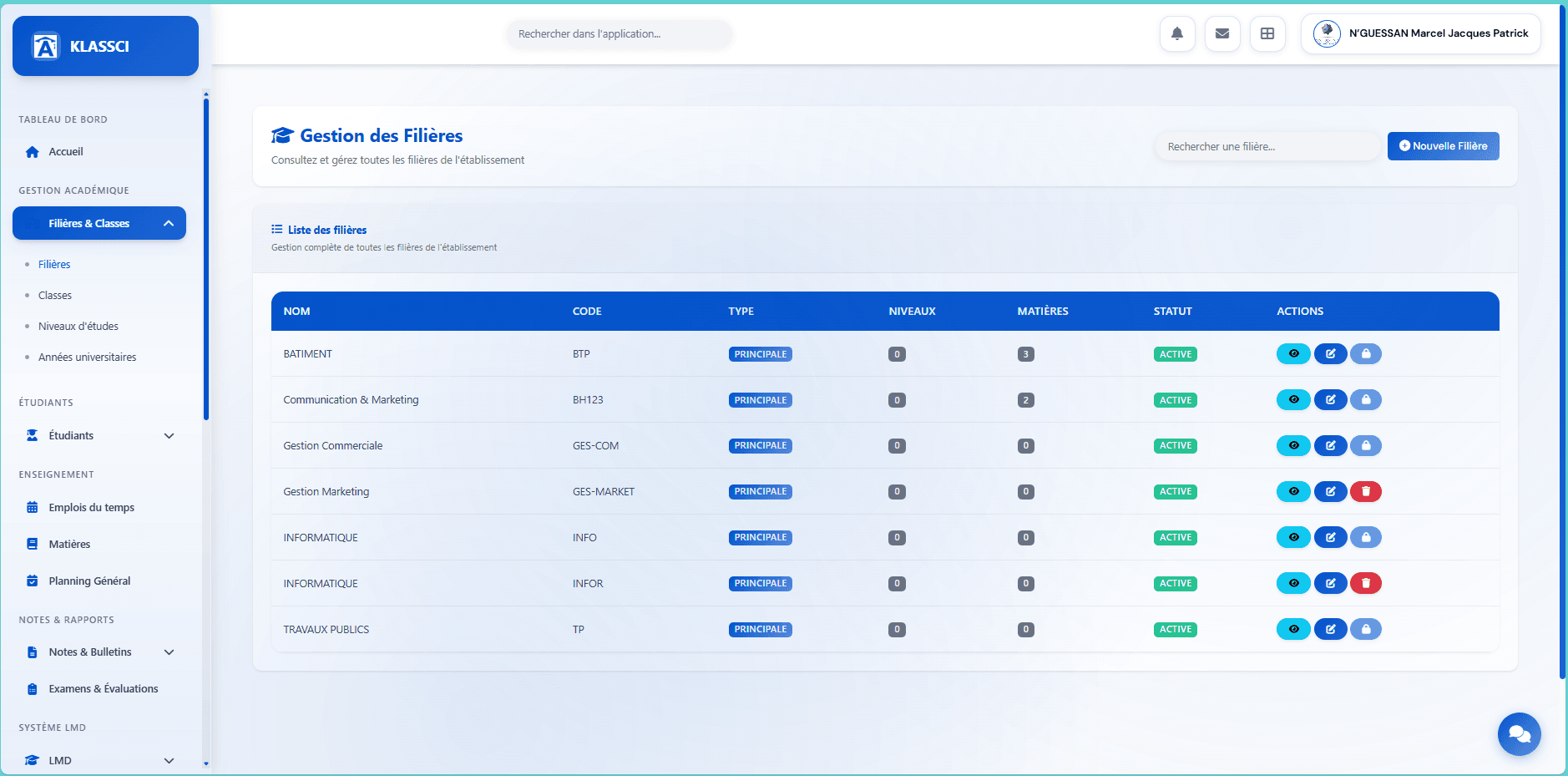
Checkpoint — every filière shows up with a green ACTIVE badge and the levels/courses counter at 0.
If a filière starts with a tronc commun before specialisation, see the dedicated subsection in the full guide.
Step 3 — Create the study levels (5 min)
Sidebar → Filières & Classes → Niveaux d'études → + Nouveau Niveau button.
For each level (BTS1, BTS2, L1, L2, M1…):
- Nom (
BTS Première Année), Code (BTS1). - Type de formation (
BTS,Licence,Master,Doctorat) — this is what determines whether the level follows the BTS system or LMD. - Année d'étude (1st, 2nd, etc.) → Créer le niveau.
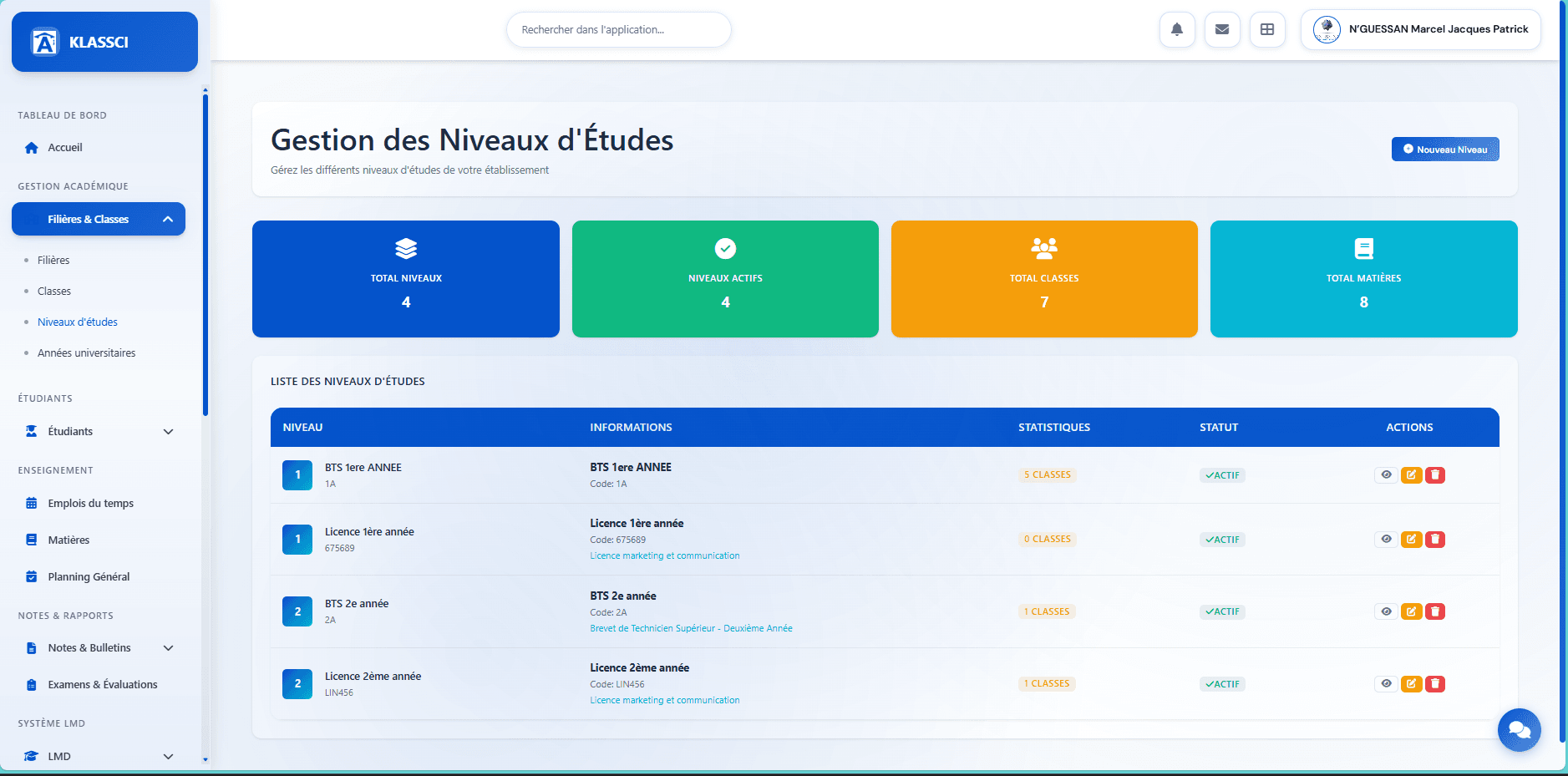
Checkpoint — the levels appear in the table with their codes and the ACTIF badge.
Step 4 — Create the classes (10 min)
Sidebar → Filières & Classes → Classes → + Nouvelle classe button.
For every filière × niveau combination that will host students at the start of the year:
- Nom de la classe (
1ère année BTS Génie Civil), Code (1BTS-GC-BAT). - Pick Filière, Niveau d'études, and Année universitaire.
- Set the Capacité maximale (default 30) → Enregistrer la classe.
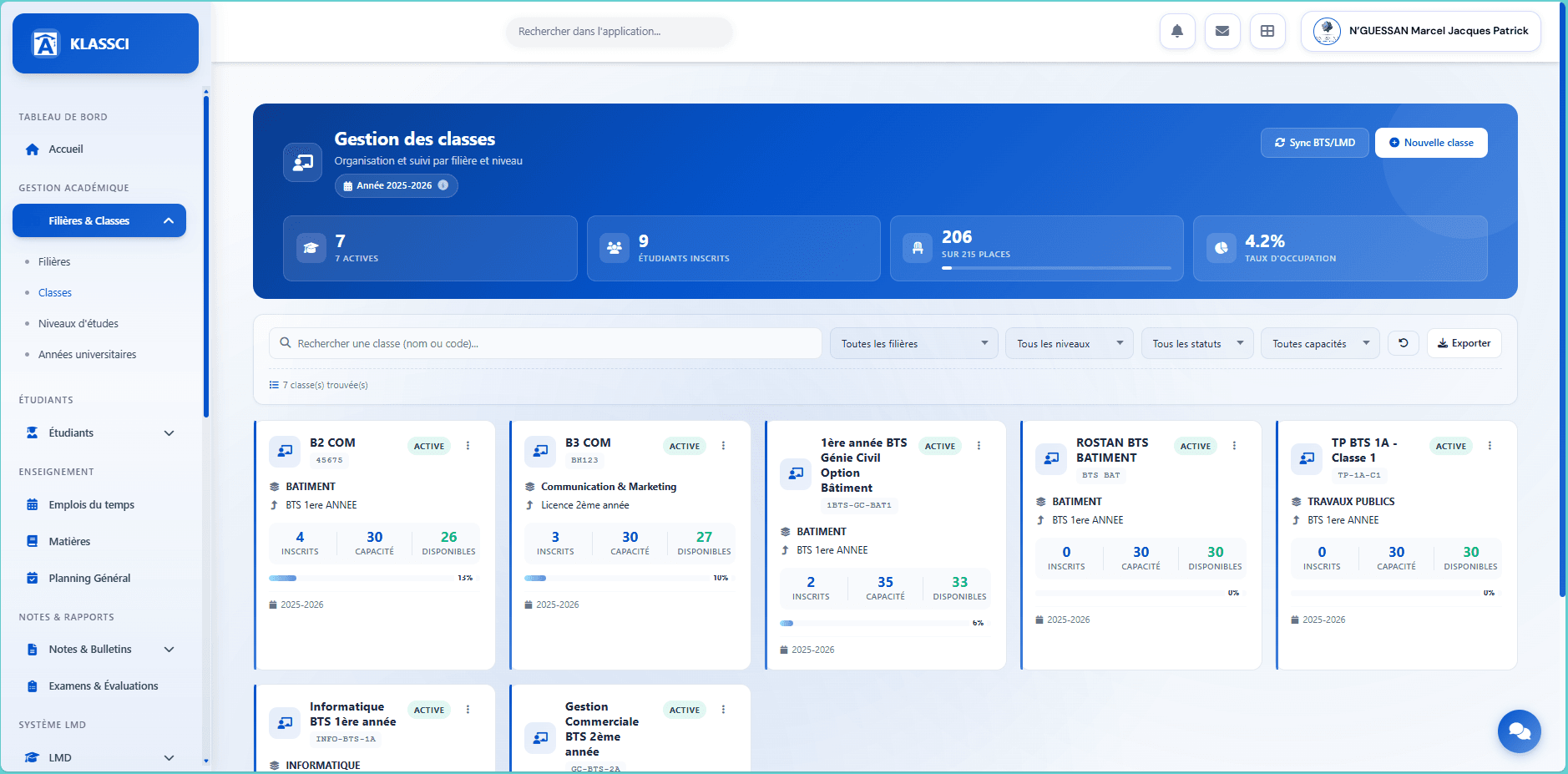
Checkpoint — every class shows up as a card with its 0 inscrits counter and the ACTIVE badge.
The BTS/LMD academic system is auto-derived from the level (Licence/Master/Doctorat → LMD; otherwise BTS).
Step 5 — Configure the courses (10 min)
For BTS levels
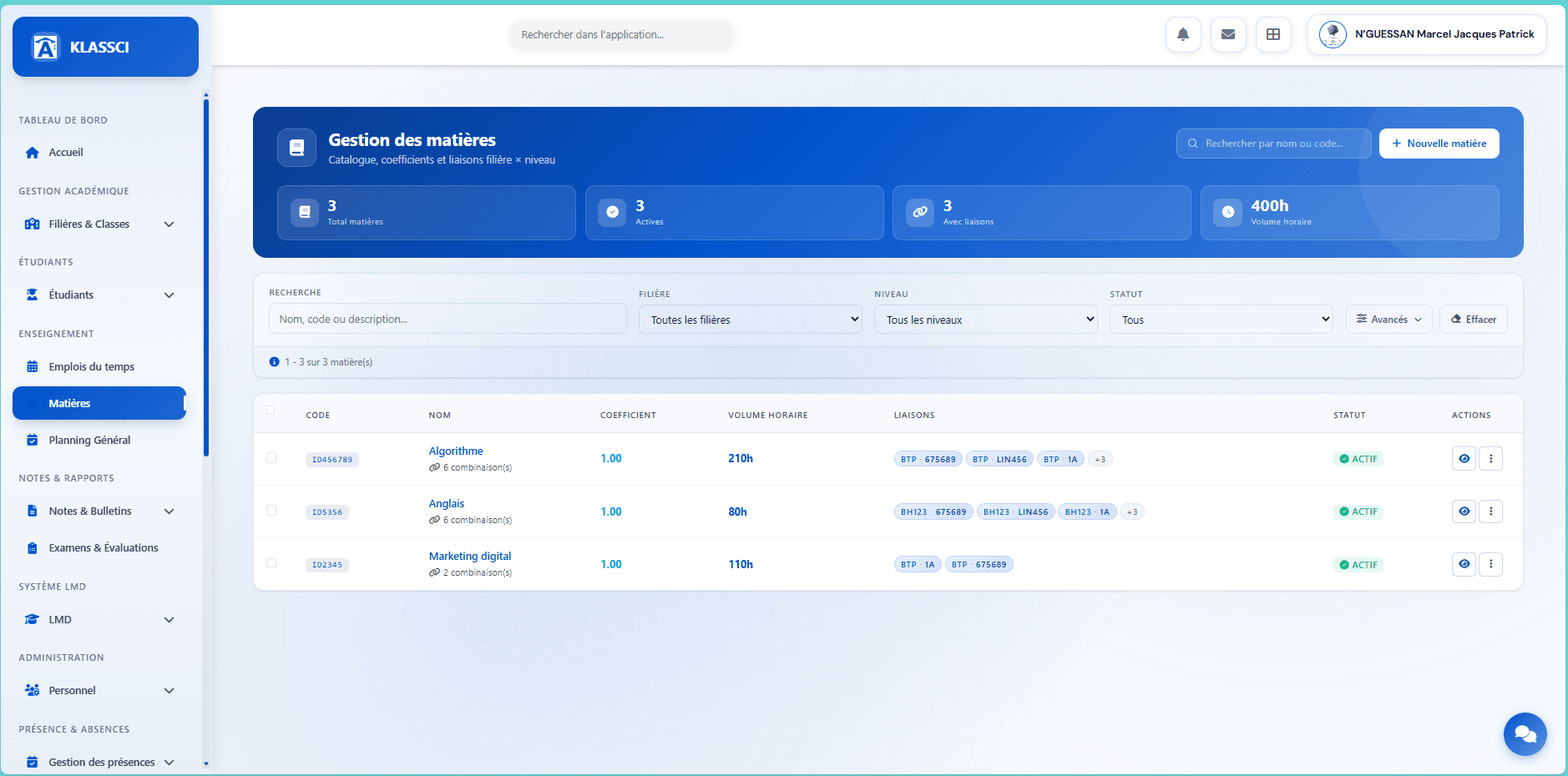
Sidebar → ENSEIGNEMENT → Matières → + Nouvelle matière button.
- Nom complet (
Mathématiques appliquées), Type de formation (Formation généraleby default). - In the Liaisons Filières & Niveaux column on the right, tick each level where the course is taught. The Tout sélectionner button on a card ticks every level of that filière at once.
- Click Enregistrer la matière.
For LMD levels
Sidebar → SYSTÈME LMD → Unités d'Enseignement → + Nouvelle UE (fill name, code, ECTS credits, type) → on the UE row, click to add each ECUE → then click to attach the UE to a parcours.
Checkpoint — courses (BTS) or UE+ECUE (LMD) appear with their attached-combinations counter.
BTS walkthrough → · LMD UE/ECUE →
Step 6 — Configure fees (10 min)
Sidebar → GESTION FINANCIÈRE → Comptabilité → Gestion des Frais → + Nouvelle catégorie button.
Create at least two mandatory categories:
- Frais d'inscription (code
INSCRIPTION, default amount, Frais obligatoire ticked). - Frais de scolarité (code
SCOLARITE, default amount, mandatory).
Then Configuration par Classe in the header → click Configurer les Frais on each unconfigured class → enter the 3 MESRS amounts (AFFECTÉS / RÉAFFECTÉS / NON AFFECTÉS).
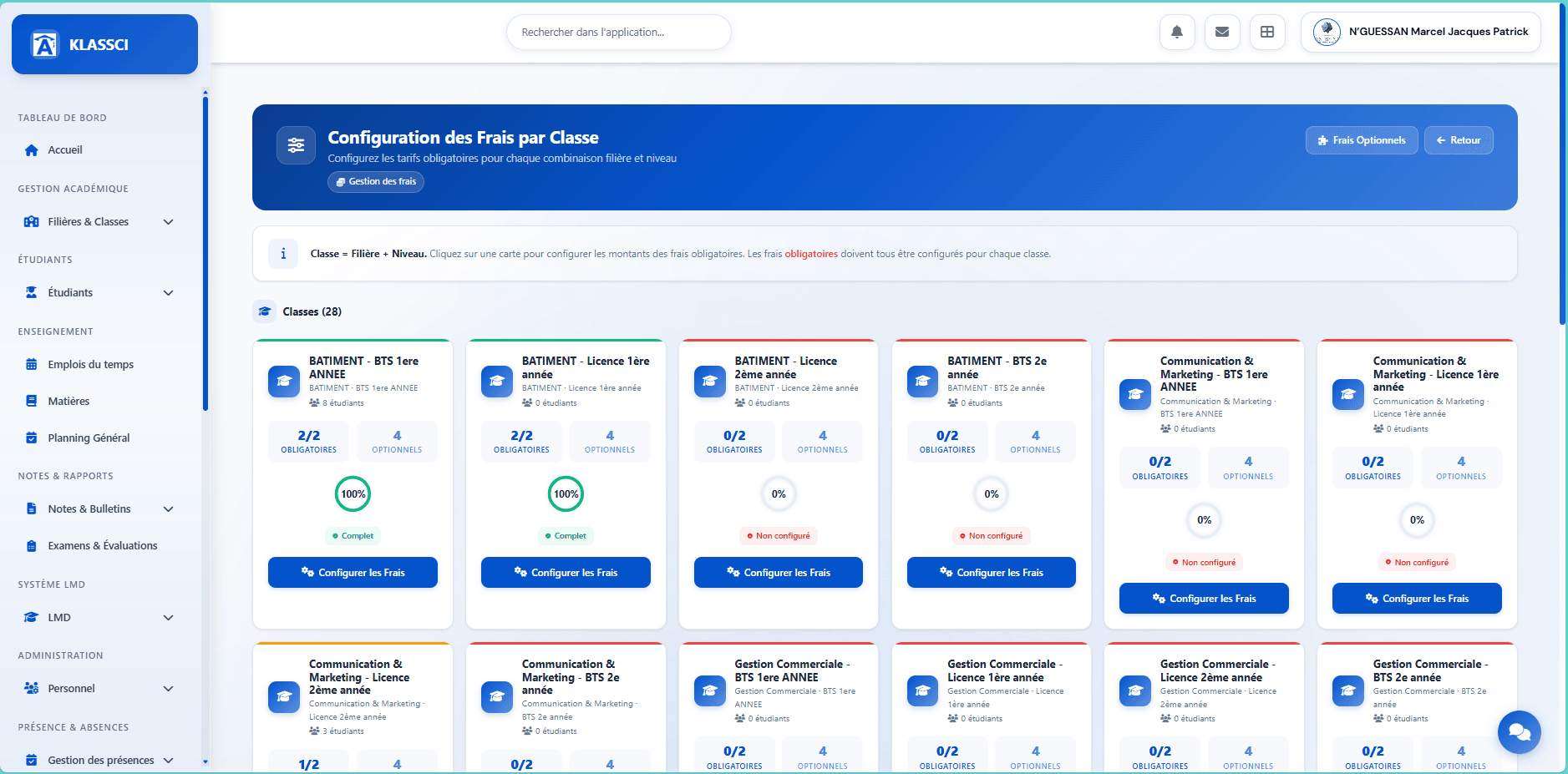
Checkpoint — every class card shows its green Complet badge once the 3 amounts are filled in for every mandatory fee. If a class isn't configured, the category's default amount is used as a fallback.
Fees & Accounting module — full reference →
Step 7 — Create staff accounts (5 min)
Sidebar → Personnel → Vue unifiée → + Nouveau personnel button.
For each staff member:
- Fill in last name, first name, email.
- Pick the role (
secretaire,enseignant,comptable,caissier,coordinateur,service_technique). - Submit. KLASSCI generates a username in
firstname.lastnameformat and a secure initial password, then sends an activation email.
Checkpoint — the staff member shows up in the list with their role. On first sign-in they're forced to change their password.
Watch faculty permissions. If you turn on the notes_evaluations, presences, and emploi_temps modules, also grant them to the enseignant role. The module toggle isn't enough — the business permission must be granted too.
Step 8 — Validate and launch (5 min)
Before sharing the URL with students, run an end-to-end test:
- Étudiants → Nouvel étudiant → create a test student, enroll them in a class.
- Open their financial standing: the class's mandatory fees should be ready to charge.
- Sign in with a test faculty account and verify grade entry works in their class.
- Check the sidebar shows every expected module for each role.
Final checkpoint — student created, fees visible, grades editable. You're ready to share the URL and credentials with your administrative team.
You're ready
At this point your tenant is operational. What you can attack next:
- Day-to-day registrar work — Registrar — managing enrollments (full pre-enrollment to validation workflow).
- Day-to-day bursar work — Bursar — operations (record a payment, validate, view financial standing, track enrollments awaiting payment).
- Fees reference — Fees & Accounting module if you want to dig into MESRS, optional services, and assignments.
For an urgent question, email klassci@africandigitconsulting.com — reply within 24 working hours.