
Bursar — day-to-day operations
Record payments, validate them, view and print a student's financial statement.
This guide covers the routine operations the bursar runs once the initial fee setup is in place. For the first-time setup of fee categories and per-class amounts, see Fees & Accounting module.
Payment workflows are tightly coupled to the enrollment cycle. If you're new to the platform, read Registrar — creating a new enrollment first to get the context (Prospect → In review → Active).
Bursar dashboard
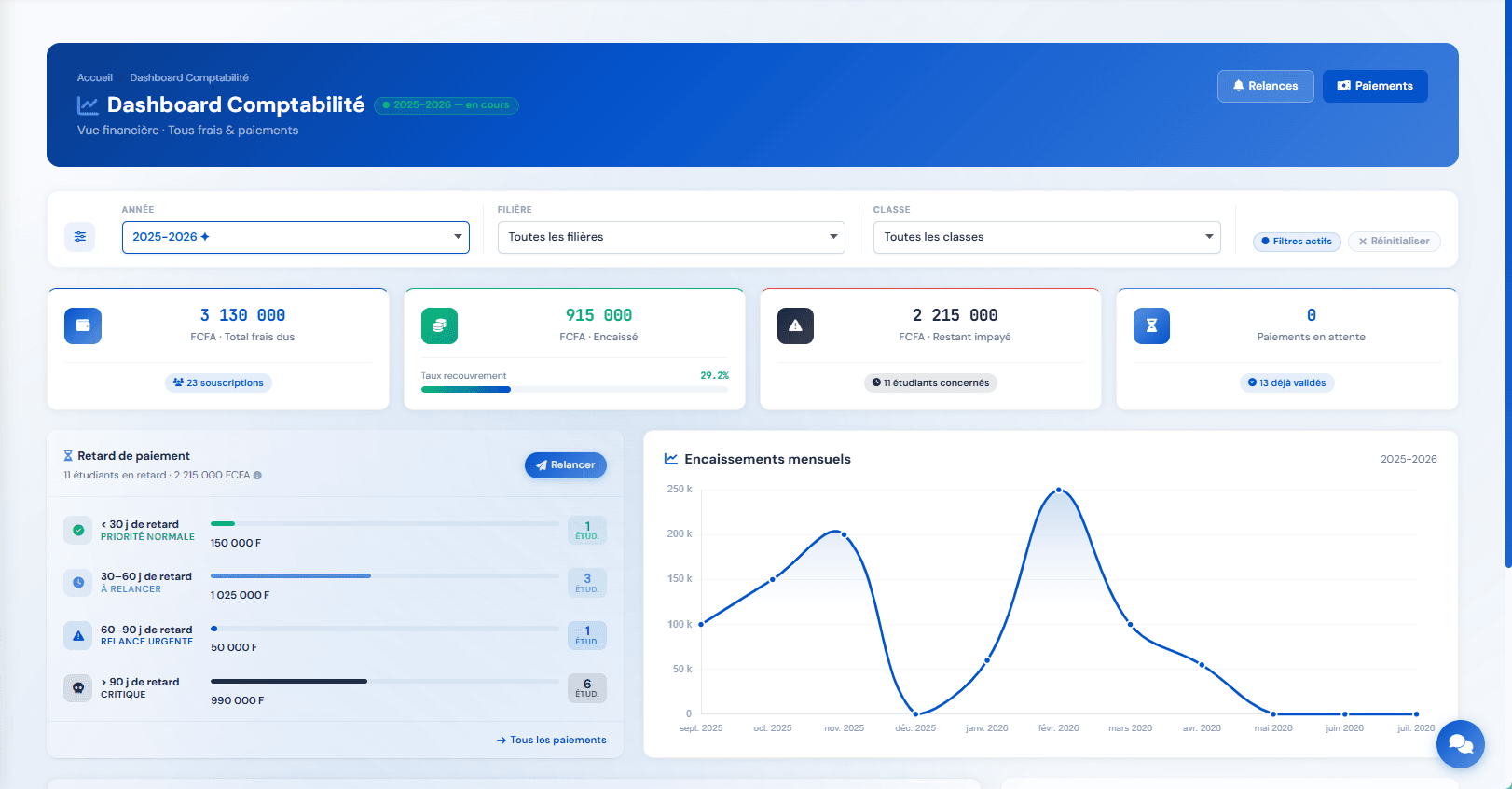
When you sign in with a bursar account, the app opens straight onto the Bursar Dashboard — the homepage dedicated to the finance team. Everything starts there.
Filters and shortcuts
The top header exposes two shortcuts: Reminders and Payments. Three filters then scope every view on the dashboard: Year (defaults to the current academic year, "in progress" badge), Track, Class. The Reset button returns to defaults.
The four headline KPIs
| KPI | Reading |
|---|---|
| Total fees due | Sum of fees subscribed by all students in the filtered scope; the subtitle shows the number of subscriptions. |
| Collected | Sum of validated payments. A bar shows the collection rate (collected / due). |
| Outstanding | Unsettled balance; the subtitle shows the number of students concerned. |
| Pending payments | Counter of pending payments to process; the subtitle shows how many have already been validated. |
Payment delays by bucket
Late students are split into four buckets by delay age, each with an urgency label and a cumulative amount:
| Bucket | Label |
|---|---|
| < 30 days | Normal priority |
| 30 – 60 days | To follow up |
| 60 – 90 days | Urgent reminder |
| > 90 days | Critical |
The Send reminder button in the panel header opens the reminder flow. The All payments link routes to the matching filtered list.
Monthly collections
A line chart covering the current academic year month by month. Useful to visualise peaks (start of year, second semester) and troughs for cashflow planning.
Pending payments and quick links
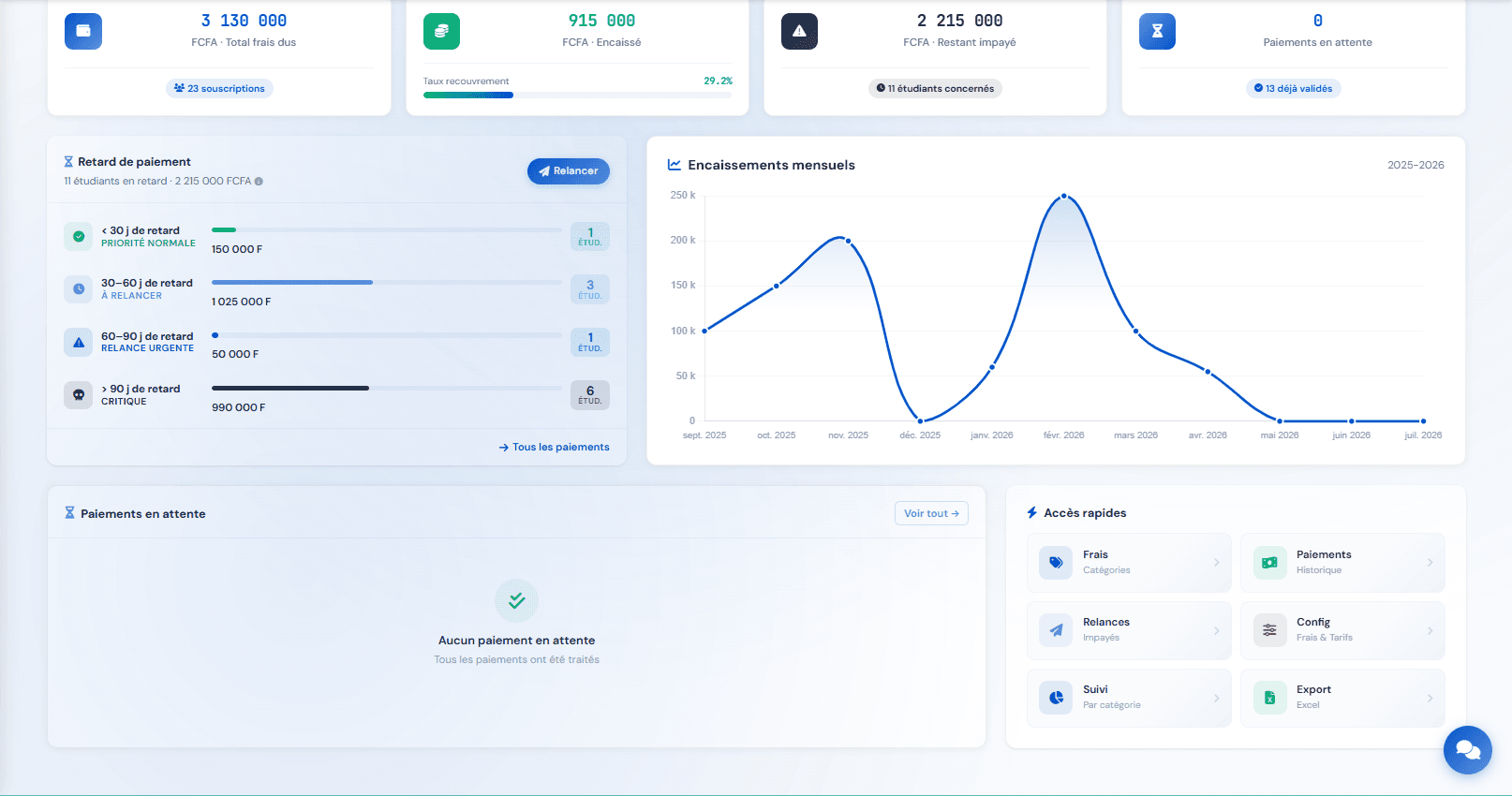
The Pending payments zone lists pending payments to process directly from the dashboard. When everything is validated, KLASSCI shows « No pending payment — All payments have been processed ». The See all button opens the filtered list.
Six quick-link cards take you to the most-used pages:
- Fees → Categories — fee category configuration
- Payments → History — global payments list
- Reminders → Overdue — overdue reminder module
- Config → Fees & Rates — advanced amount setup
- Tracking → By category — collection per fee category
- Export → Excel — Excel accounting exports
Recording a payment
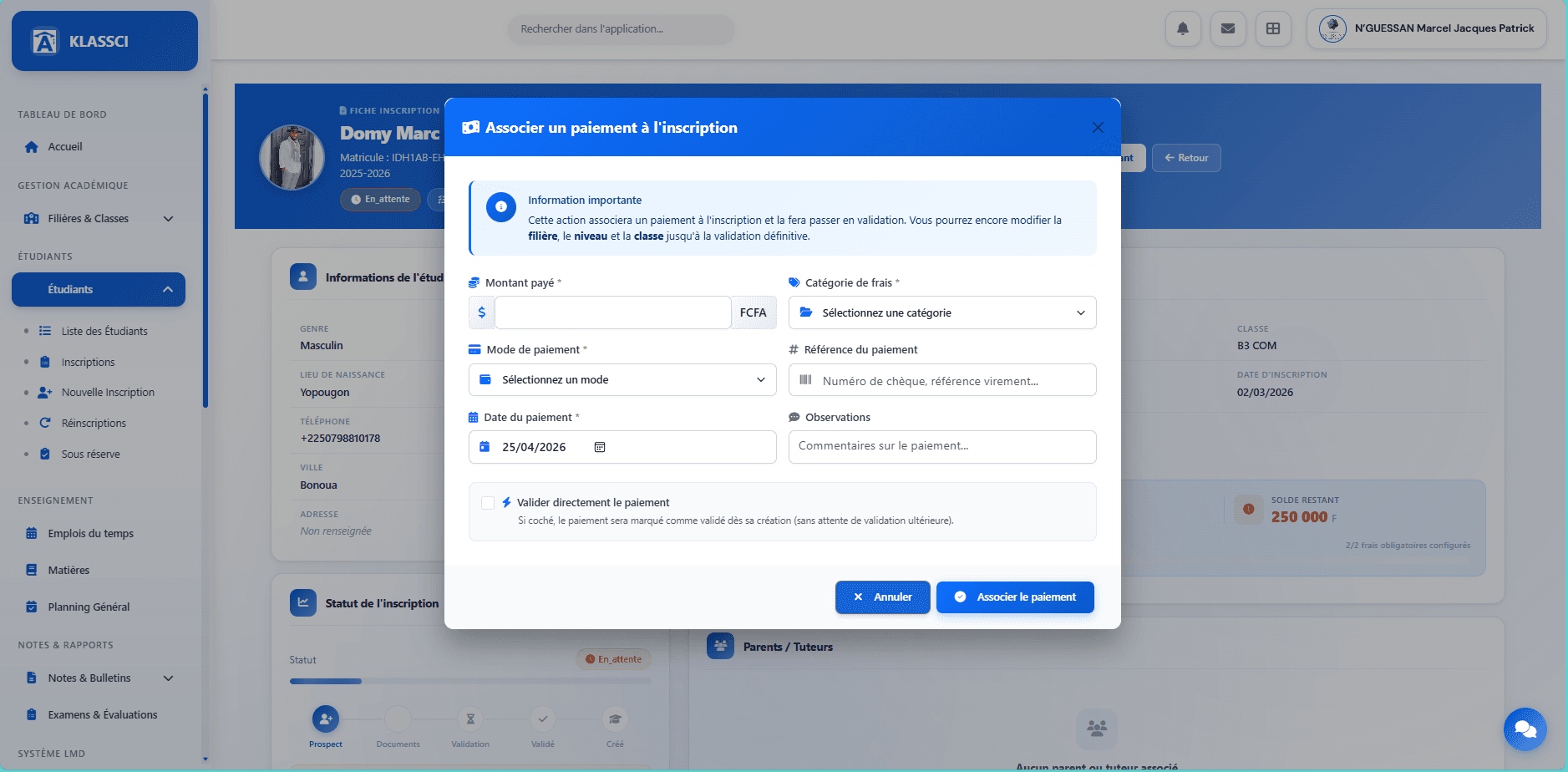
A payment can be entered from three places. Each one opens its own modal; the fields are identical across modals, but the design and the default value of the « Validate immediately » checkbox differ.
- From the enrollment record: Pay button on a row of Detail by fee, or Validate with payment in the action bar if the enrollment has no payment associated yet. « Validate immediately » unchecked by default.
- From the student record Finances tab: blue Record a payment button (visible only when a balance is still due). « Validate immediately » checked by default — convenient for the bursar's everyday gesture.
- From the Enrollment Administration page: on a pending enrollment row, action Associate a payment (when no payment is linked yet) or Validate the payment (when a pending payment is already linked — opens a quick-validation modal, not the full record modal).
Required fields
- Amount paid (FCFA) — partial payments are fine.
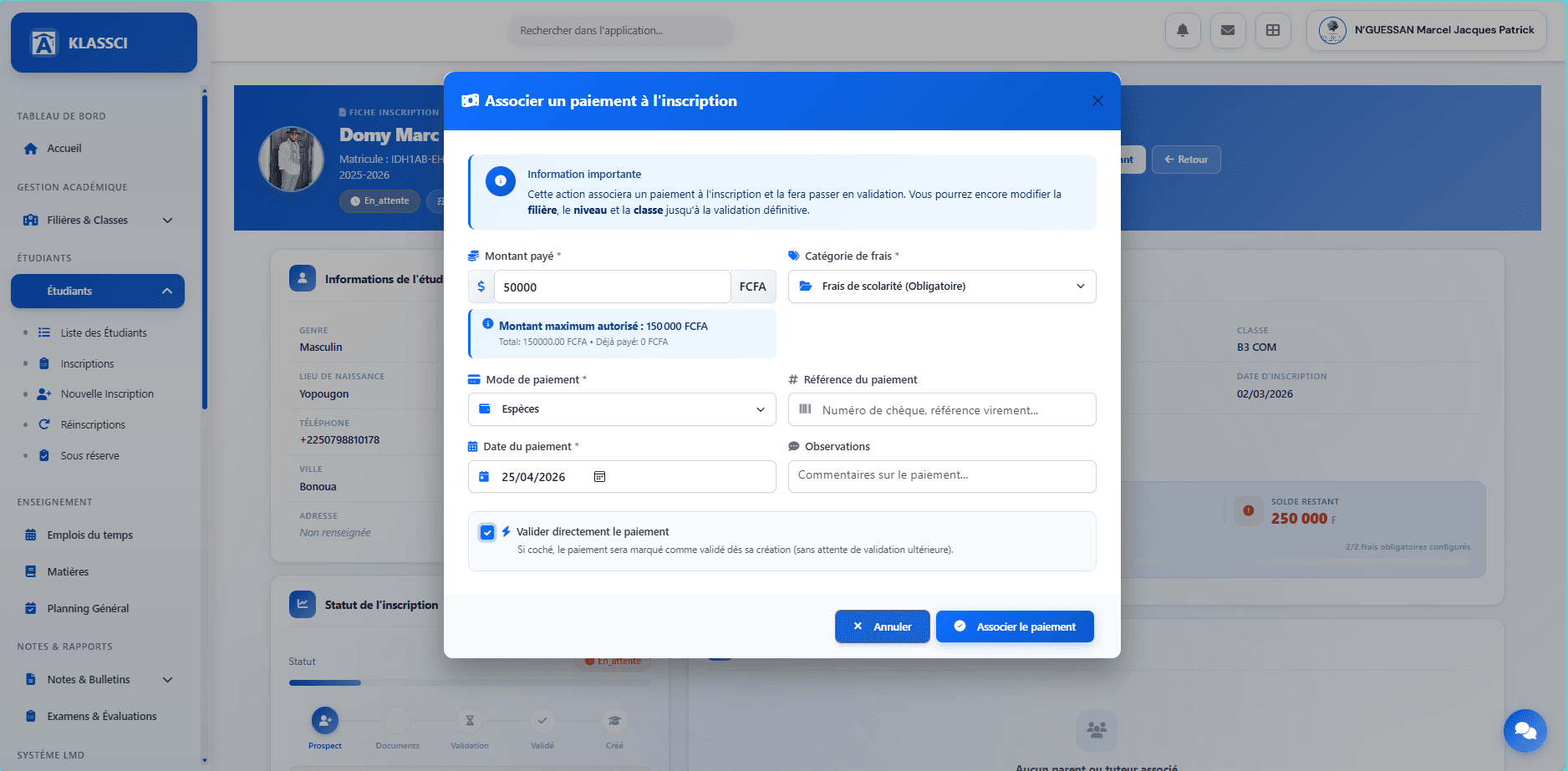
- Fee category — combo showing the mandatory fees on this enrollment. Once a category is picked, KLASSCI shows the Maximum allowed amount so you do not over-collect by accident.
- Payment method — four options: Cash, Cheque, Bank transfer, or Mobile Money (Wave / Orange Money / MTN MoMo grouped under Mobile Money — record the operator in the Reference field).
- Payment date — pre-filled with today; adjustable to log a payment received earlier.
- Payment reference (optional) — cheque number, Wave / OM / MoMo transaction ID, transfer reference.
- Notes (optional) — free comment kept on the payment history.
Validate immediately or leave pending
The Validate the payment immediately checkbox:
- Checked — the payment is recorded as validated right away. Total paid and Remaining balance KPIs are updated, and the payment counts towards the final enrollment validation. That's what you want 99 % of the time when collecting yourself.
- Unchecked — the payment is created as pending validation (
status='en_attente'). It shows up in the balance but is not counted as received yet. Useful when a cashier or front desk records a collection that you want to reconcile against the bank statement before you confirm it.
Where to validate a payment left pending. A bursar can validate a pending payment in two places:
- Enrollment Administration page — on the row of the enrollment carrying the pending payment, the Validate payment button shows up and opens a quick-validation modal.
- Global payments list (
Accounting → Payments) — Validate action on the payment row (reserved for profiles with theaccess_adminpermission).
The enrollment record itself displays linked payments (in the Payments linked to this enrollment zone) without a validation action — you have to use one of the two paths above.
As long as the payment stays pending, the enrollment cannot be definitively validated (the Validate button will return « No validated payment found »).
Click Associate the payment. A confirmation toast shows up, the detail-by-fee table is updated, and the payment lands in the Payments linked to this enrollment zone.
Viewing a student's financial standing
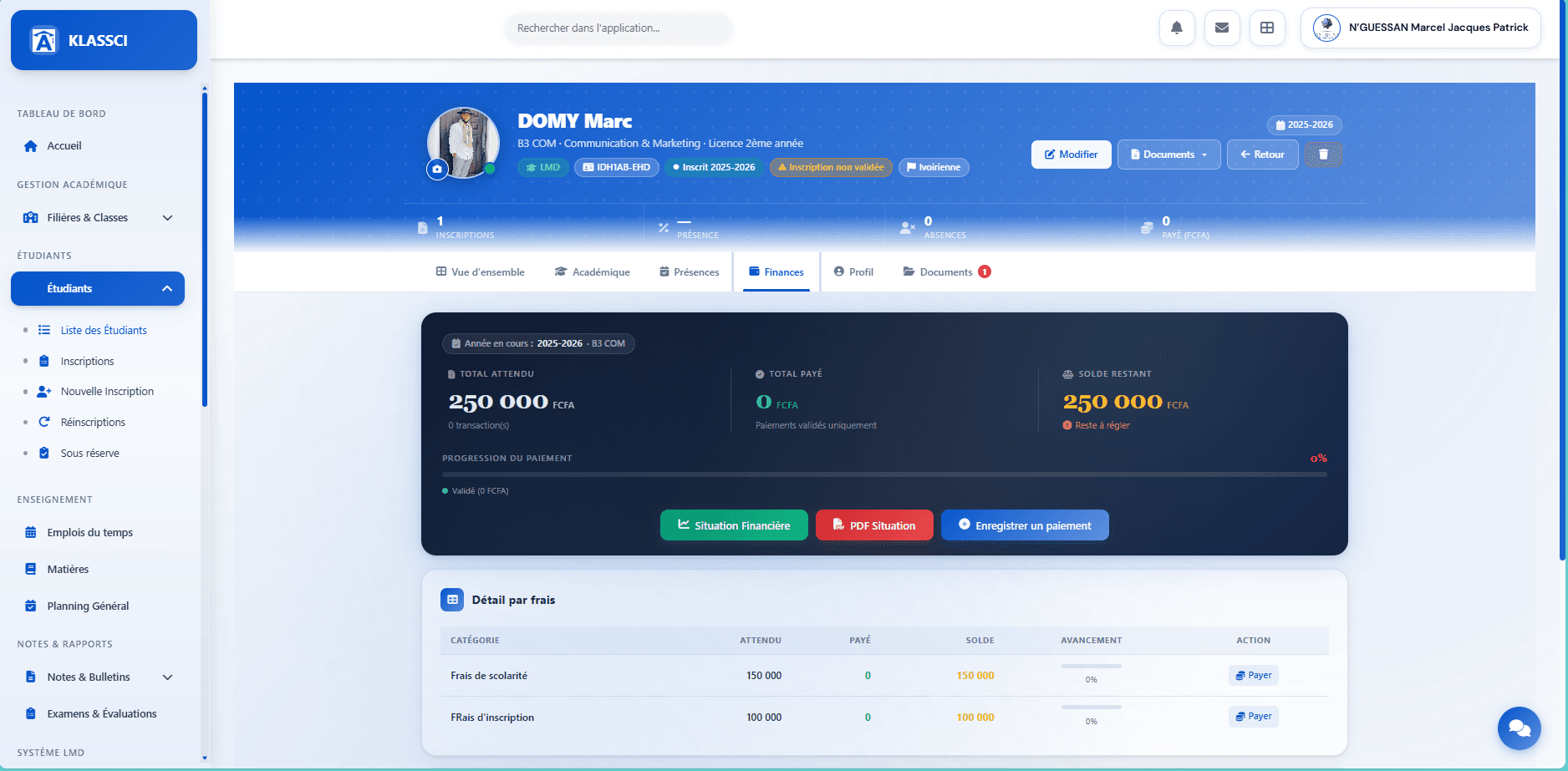
From the student record Finances tab, KLASSCI exposes the Total expected / Total paid / Remaining KPIs with a progress bar, the detail by fee row by row, and three action buttons:
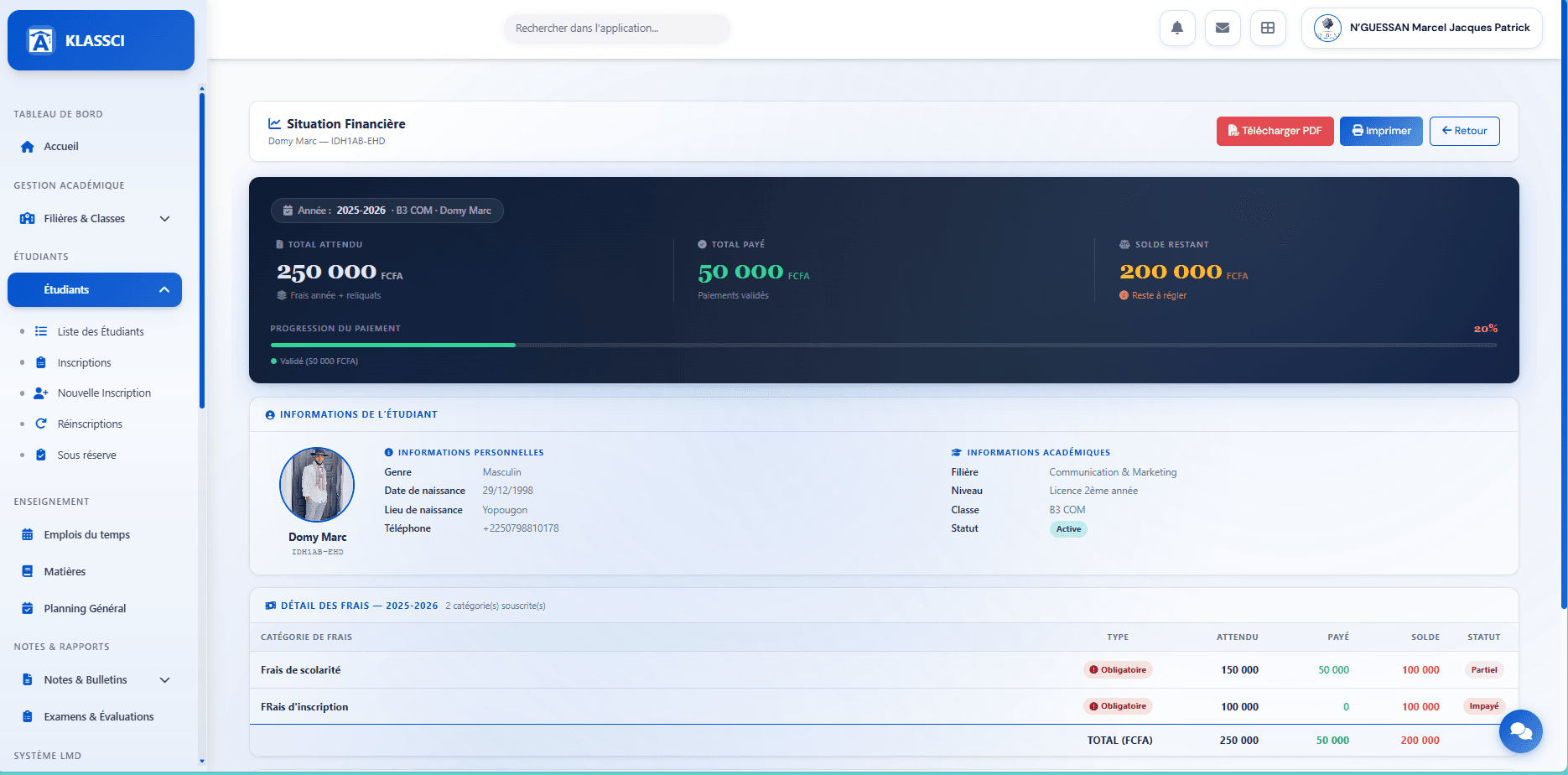
Web preview — Financial Situation
The green Financial Situation button opens a full web page (not a toast) that lays out the statement: hero KPIs, student information, subscribed fees breakdown, validated payments, carried-over balances, remaining due. On-screen view, ready to print or share via the Print button.
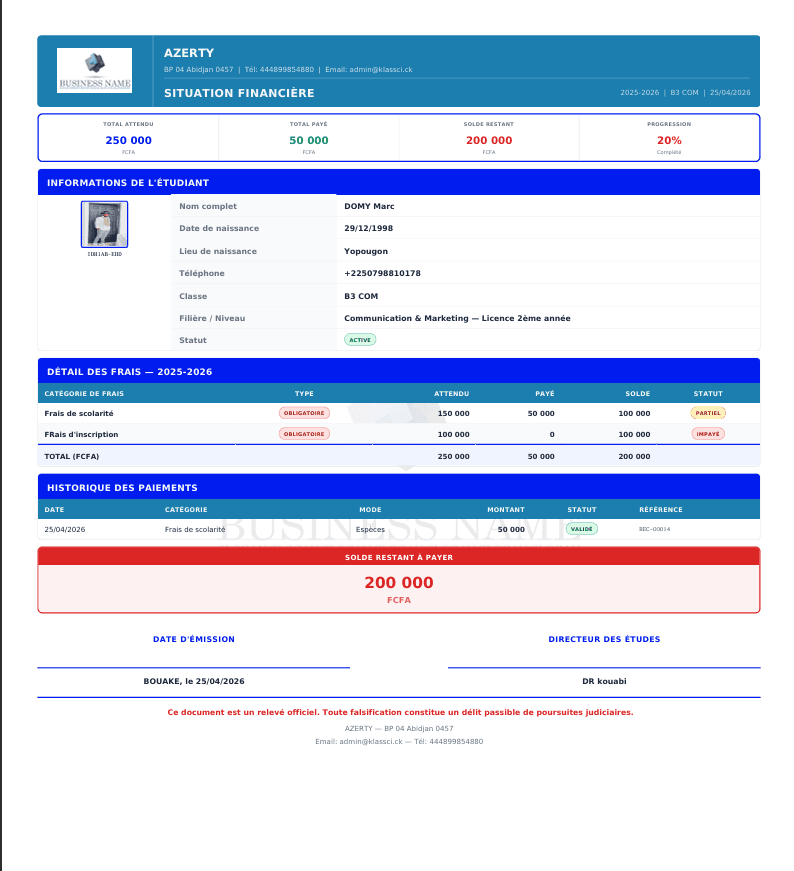
PDF output — PDF Statement
The red PDF Statement button downloads the same statement as a portrait A4 PDF with a formal layout: school header, issue date, director signature, watermark. That's what you hand over to the family or send by email.
None of these buttons changes anything on the student side. Financial Situation and PDF Statement are read-only restitutions — useful to answer a statement request without recording a new line. To modify or void an existing payment, see Adjust or void a payment below.
Tracking enrollments awaiting payment
The Enrollment Administration page (reached from the Administration button on any enrollment record) is the bursar's central tool at the start of the year.
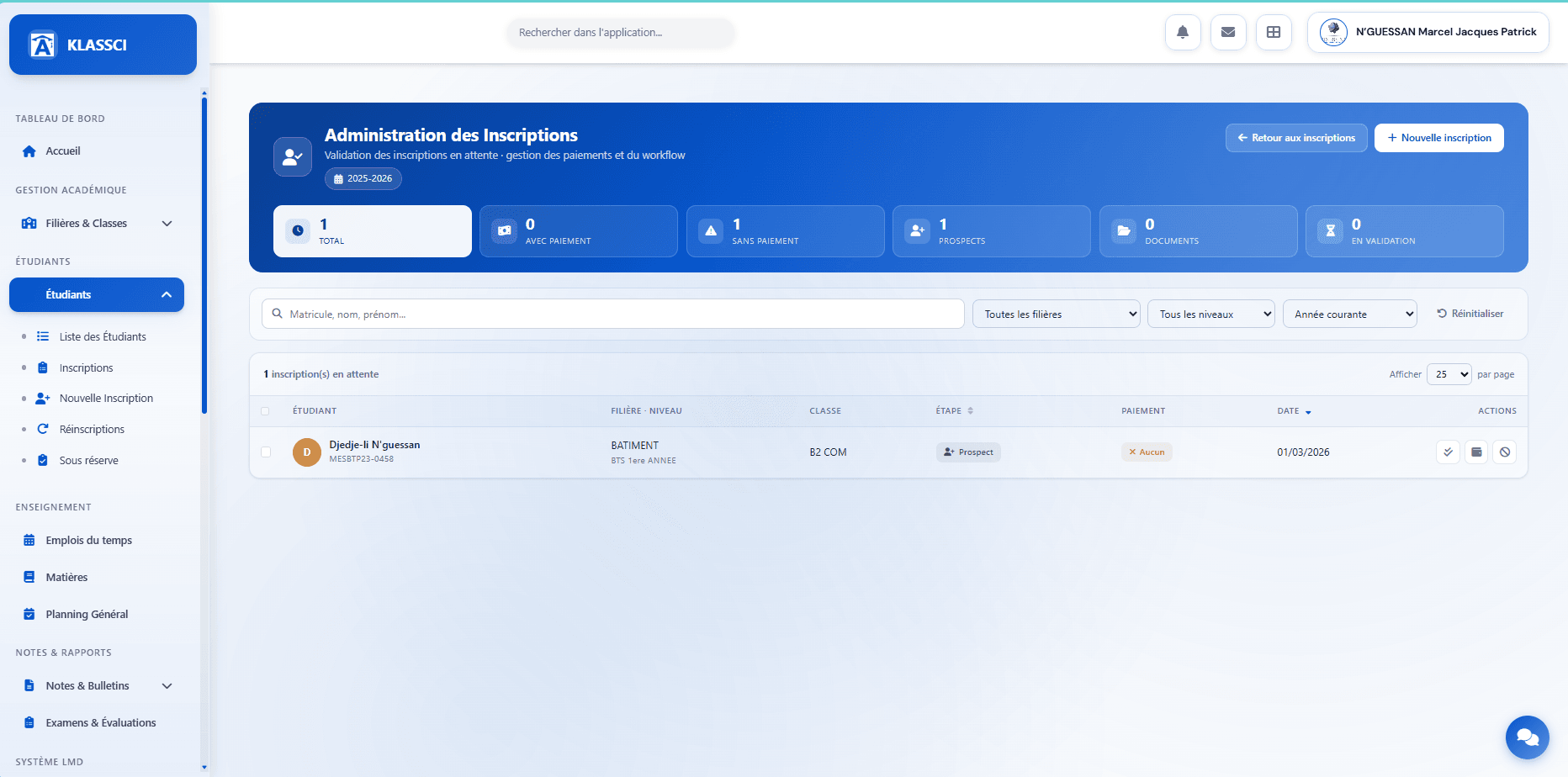
Six KPIs scoped to the active academic year:
- Total — every pending enrollment
- With payment — already linked to a payment
- No payment — no payment associated yet
- Prospects — Prospect step
- Documents — Documents-complete step
- In review — In-validation step
Filters: matricule / surname / given name, track, level, current year.
Per-row actions:
- View the enrollment
- Validate the enrollment (shortcut without going back to the record)
- Associate a payment (when none is linked yet) or Validate the payment (when a pending payment is already linked)
- Cancel the enrollment
Bulk actions (tick several rows): Validate, Cancel, Export. The bulk validate attempts each enrollment; the ones without a payment and the ones whose payment is still pending validation are skipped — both cases show up in the recap with their reason.
That is where you process pending enrollments in series: sort by With payment to flip them to active, then loop back on No payment for follow-ups.
Subscribing an optional fee after validation
If a family decides mid-year to subscribe to an optional service (canteen, transport, equipment), go through the student's enrollment record, Available Optional Fees zone, and click Subscribe student on the fee card. The amount is added to the remaining balance.
Not from the student record. The Finances tab on the student record does not expose subscription — you have to go through the enrollment record.
Issuing a payment receipt
KLASSCI generates an official receipt as a portrait A4 PDF for every validated payment (filename Recu_{numero_recu}.pdf).
Access: Accounting → Payments (global payments list). On the row of a payment whose status is validated, click the PDF dropdown → choose Preview (printable HTML view) or Download PDF.
Receipt only generated for validated payments. As long as a payment is pending, the PDF/Receipt option does not show up in the dropdown — validate it first. The receipt is also not accessible from the enrollment record nor the student record: you have to go through the global payments list.
Modify, validate, reject or delete a payment
Every life-cycle action on an existing payment goes through the global payments list: Accounting → Payments.
| Action | When | Permission |
|---|---|---|
| Modify | While the status is not validated | paiements.manage |
| Validate | Pending payment | access_admin |
| Reject | Pending payment — opens a reason modal | access_admin |
| Delete (soft-delete) | From the Finances tab on the student record | paiements.manage |
| Print receipt | Validated payment only | Read-only (any profile with viewing rights) |
Bulk validate / reject. Dedicated routes paiements.bulk-valider and paiements.bulk-rejeter allow processing several pending payments at once (rate-limited to prevent abuse).
Overpayment on a fee category
When the amount paid on a category exceeds the expected amount (negative balance), a Transfer to another fee button appears on the enrollment record on that category's row. The surplus can be reallocated to another fee on the same enrollment. Permission: paiements.edit.
Unsubscribing an optional fee
On the enrollment record, in the Detail by fee, an Unsubscribe button removes an optional fee subscribed by mistake (the fee must be non-mandatory and already subscribed). Permission: inscriptions.edit.
Coming soon
The following bursar workflows will be documented with screenshots and verified flows:
- Configure automatic reminders — overdue thresholds, message templates (SMS / email), sending frequency.
- Tracking by category — aggregate view of collection per fee category and overdue rate.
- Accounting exports — available formats and time scopes (to be confirmed against the code before publication).
- Internal scholarships — workflow for capturing a partial or full scholarship (beyond the workaround already documented in Enrollment — scholarship student).
- End-of-year closing — carry remaining balances over to the next year, archive accounts of students who have left.
For urgent questions: klassci@africandigitconsulting.com.