
Changelog
Notable changes to the KLASSCI platform, grouped by month.
The format loosely follows Keep a Changelog.
This file is curated by hand from the release log. Minor fixes, internal refactors, and infrastructure changes aren't always listed. For the full technical history, check the repo's git log.
October 2026
Added
-
Make-up entries that were really exam marks — in a class's LMD marks window, a banner points out evaluations entered as "Régularisation". If they were the exam marks of a semester, the school picks that semester, sees what will change, then requalifies them as exams: they are now named "Examen …", no mark moves, and continuous assessment stays separate. Nanan can do it too, after your "Validate" click.
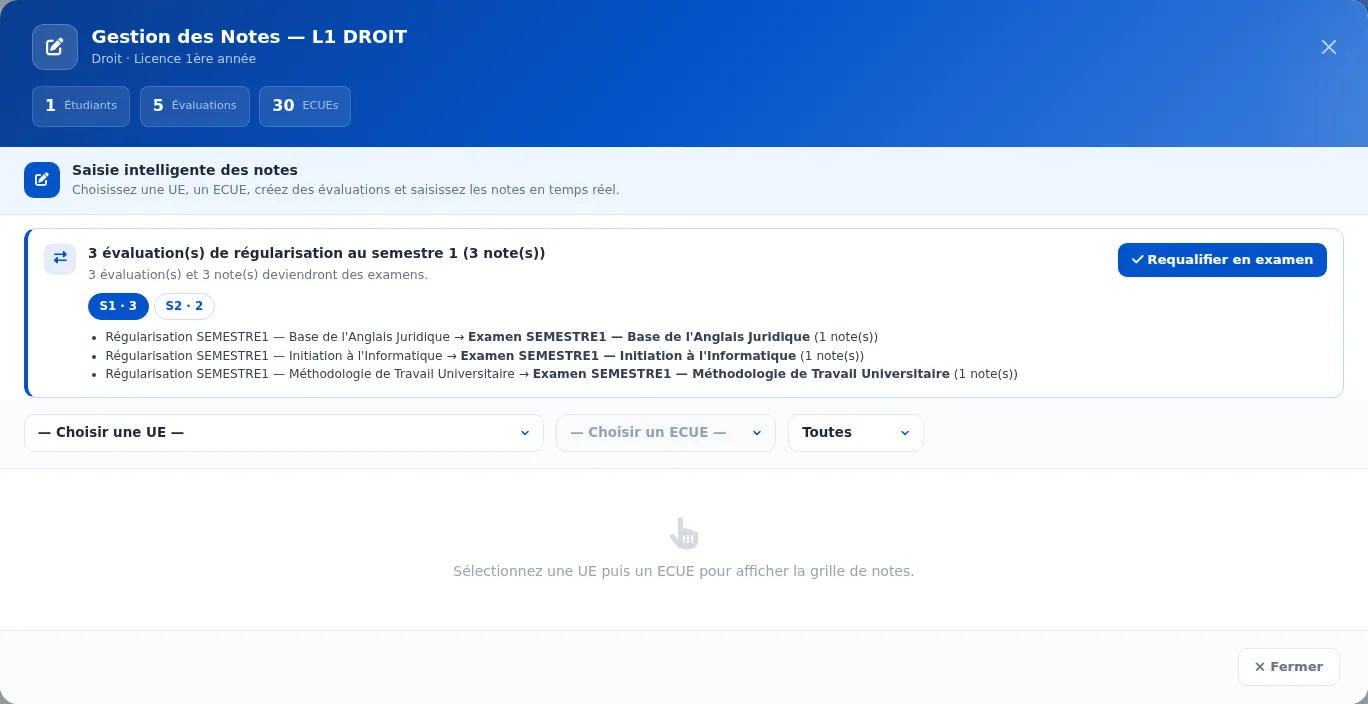
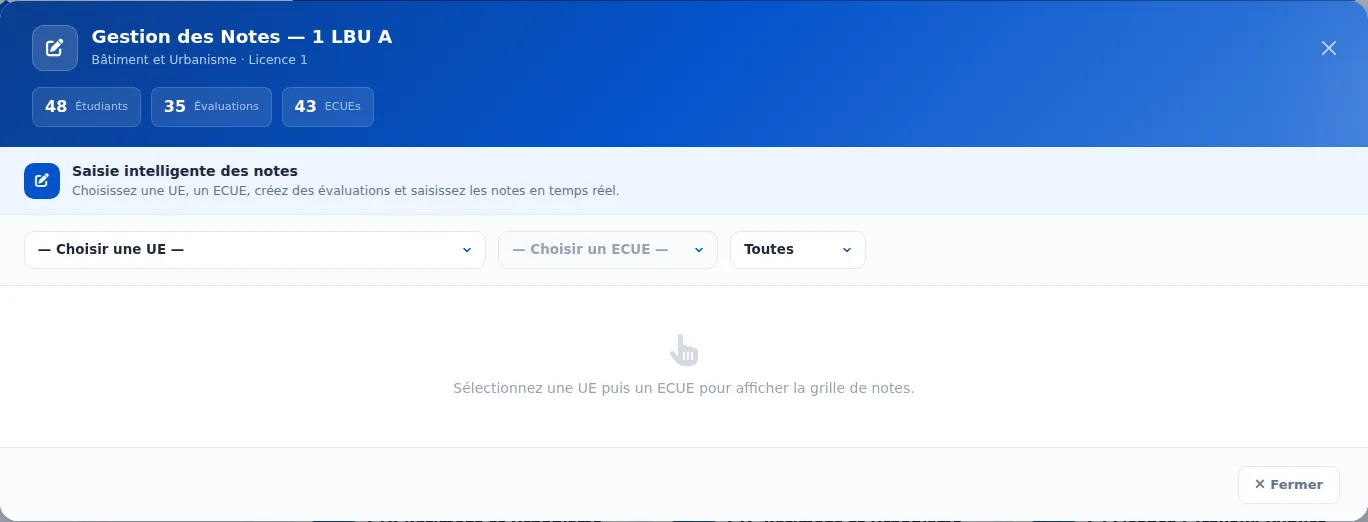 AvantAprès
The banner shows how many evaluations each semester has, and every title before and after. -
A teaching unit's rank on the report card, per programme — in "Link to programmes", each ticked programme has its own "Rank on report card" field. The same unit can be ranked differently in two programmes, as on the official report cards.
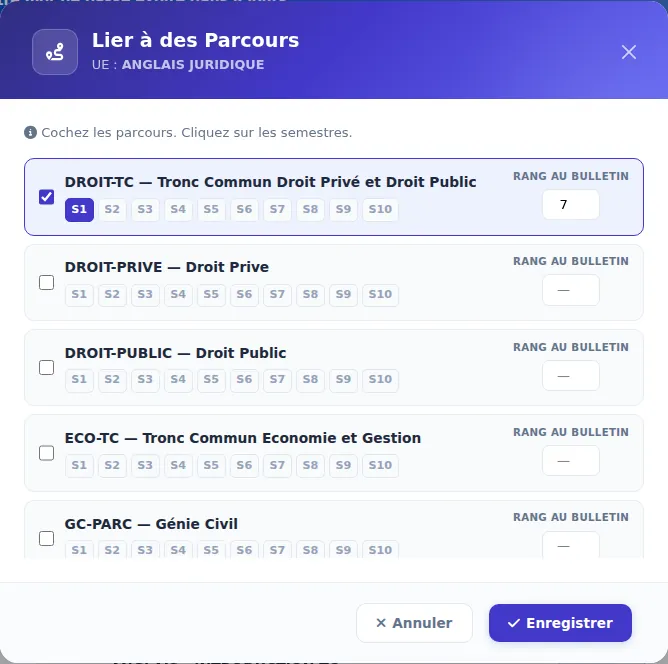
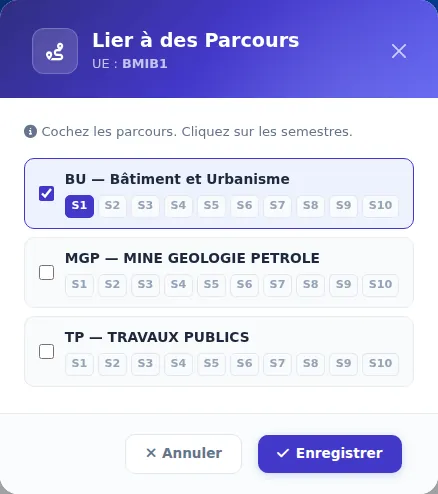 AvantAprès
The rank is set next to each programme's semesters. -
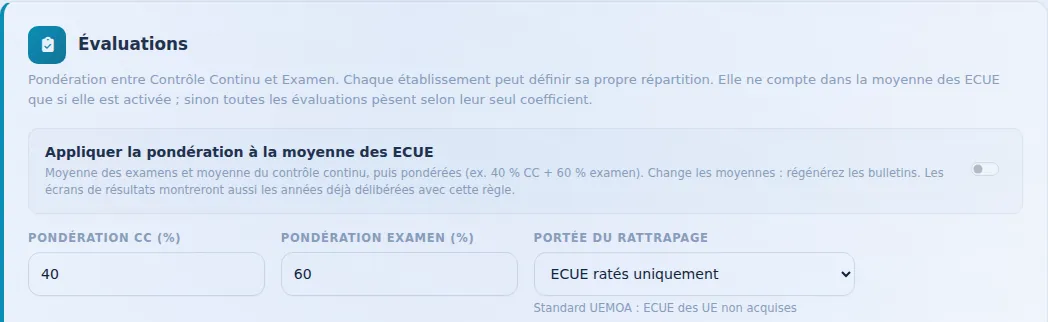
Continuous assessment / exam weighting, if the school chooses it — in the LMD settings, a checkbox brings the split (for example 40% continuous assessment and 60% exam) into each element's average. Missing the exam counts as 0; when only one part exists it counts alone. Unticked, nothing changes. The jury report and the transcript state the rule applied.
-
Nanan edits and removes LMD curriculum elements — change a unit's code, title, credits or rank, add or edit an element, or remove one while choosing what becomes of it: Nanan shows the before/after table, flags a unit shared with other programmes or a semester above 30 credits, and writes nothing before your "Validate" click.
-
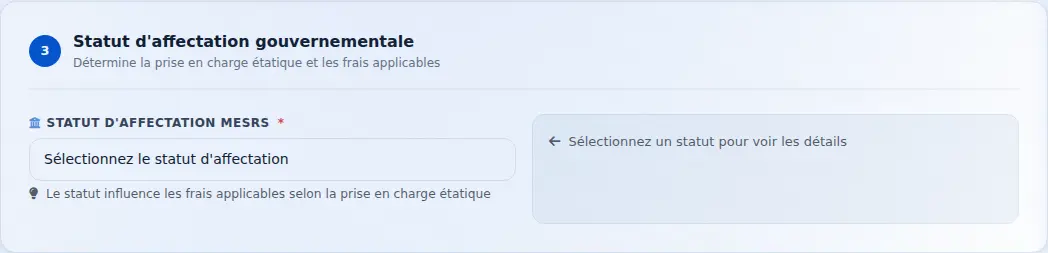
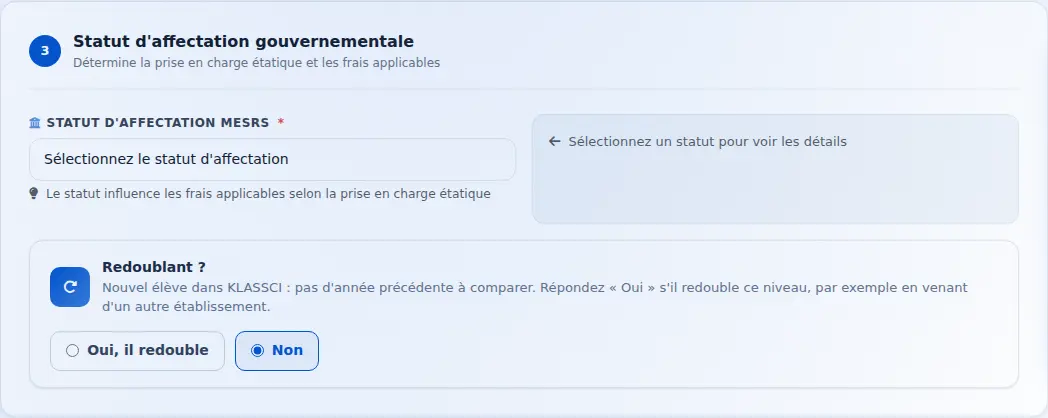
"Repeating?" at every enrolment — the question is now also asked on the "New enrolment" form, in "Accept and enrol" for an application, and in "Re-enrol" for an online request. For a new student KLASSCI suggests "No": the school answers "Yes" if the student is repeating after coming from another institution, and says why.
-
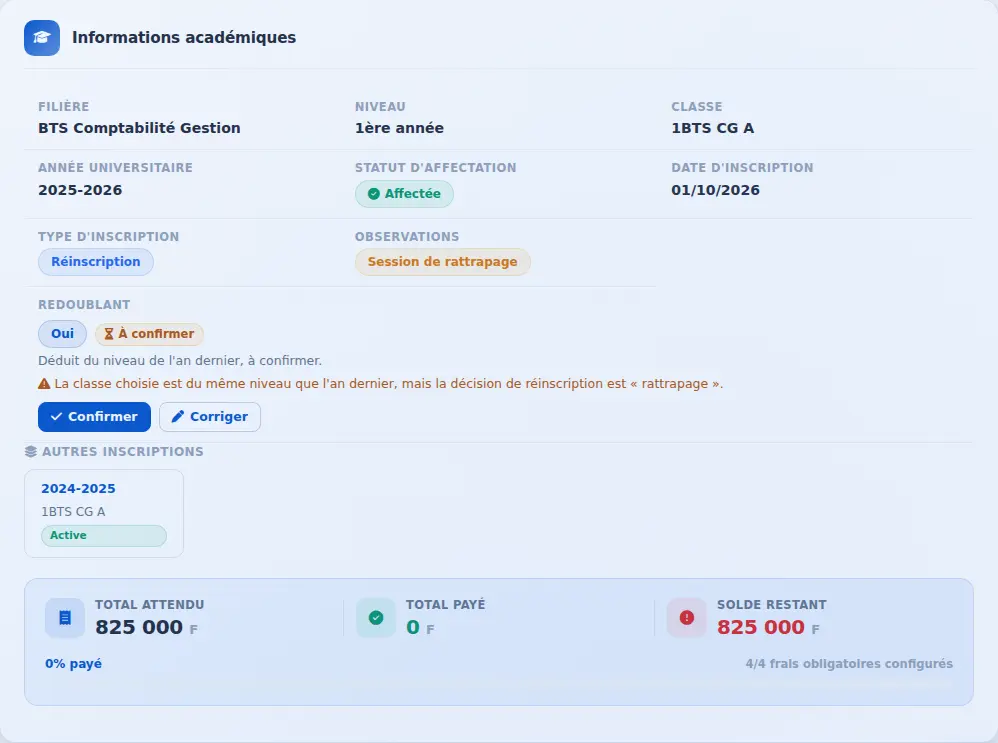
Repeating status, confirmed by a person — KLASSCI still infers whether a student is repeating a year from their level the year before, but an authorised person now confirms it: at re-enrolment, on the enrolment record, or in bulk from the list filtered on “repeating status to confirm”. Changing the proposed value requires a reason, a contradiction with the re-enrolment decision is flagged, and the pre-check before generating report cards warns while a status is still unconfirmed. By default the registry, student records office, coordinator and director of studies can confirm.
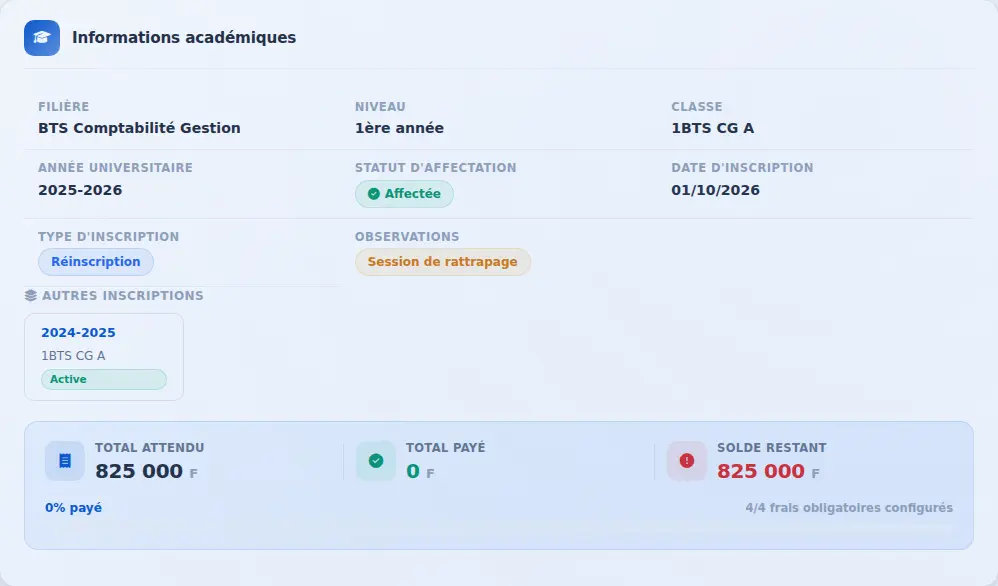 AvantAprès
The record shows where the status comes from, flags the contradiction, and is confirmed or corrected in one click. -
Nanan creates and edits classes — “add a 60-seat class to every programme and level”, “set first-year classes to 50 seats”: Nanan first shows a before/after table (names, capacities, pairs with no students), copies the subjects of the sibling class, refuses a capacity below the number of enrolled students, and writes nothing until you click “Validate”.
-
Phone confirmation over WhatsApp, the other way round — on the enrolment portal, families can confirm their number by tapping a button that opens WhatsApp with the code already typed: they send it to the school's number, and the page confirms itself a few seconds later. No message is sent to a stranger, which protects the school's number. Enabled school by school.
-
“I have already applied” on each school's portal — a third entry, next to “New student” and “Already a student here”, to find the date, time and place of your appointment with your date of birth and phone number or student ID, then download or resend your PDF notice.
-
Appointment location on the notice — the school states where to go (for example “Registrar, building A”): it appears on the PDF notice, the email, the WhatsApp message and the appointment page.
-
Nanan unblocks a re-enrolment held by an unpaid balance — ask “why is this student’s re-enrolment blocked?”: Nanan shows what is owed and paid fee by fee, flags a pass/repeat decision computed without any grade, and, when the debt does not match reality (student imported from another tool, waiver), prepares an adjustment of the amount owed. Nothing changes until you click “Validate”, a reason is required, and the amount never goes below what has already been paid.
-
Grade claims — a student challenges a grade from “My grades”, with a reason and a photo of the paper. The teacher gives an opinion, the school decides: the grade is corrected or kept, with a reason, and the student follows the answer in the same place.
-
Help guided by Nanan — the “Help” button opens a conversation with Nanan: a problem, a “how do I” question, an idea, or following up one's requests. If Nanan cannot solve it, she prepares the support request, page capture included, and the school is notified when support replies.
-
Nanan prepares, the school confirms — confirming enrolments, cancelling a payment with a credit note, correcting a grade, creating an assessment, generating report cards, opening an academic year: on request, Nanan prepares the operation and nothing changes until someone clicks “Confirm”.
Improved
-
Edit classes one after another, without waiting — the class edit window opens instantly, reads more clearly, and "Save and edit the next one" moves straight to the following class. Ctrl+Enter saves.
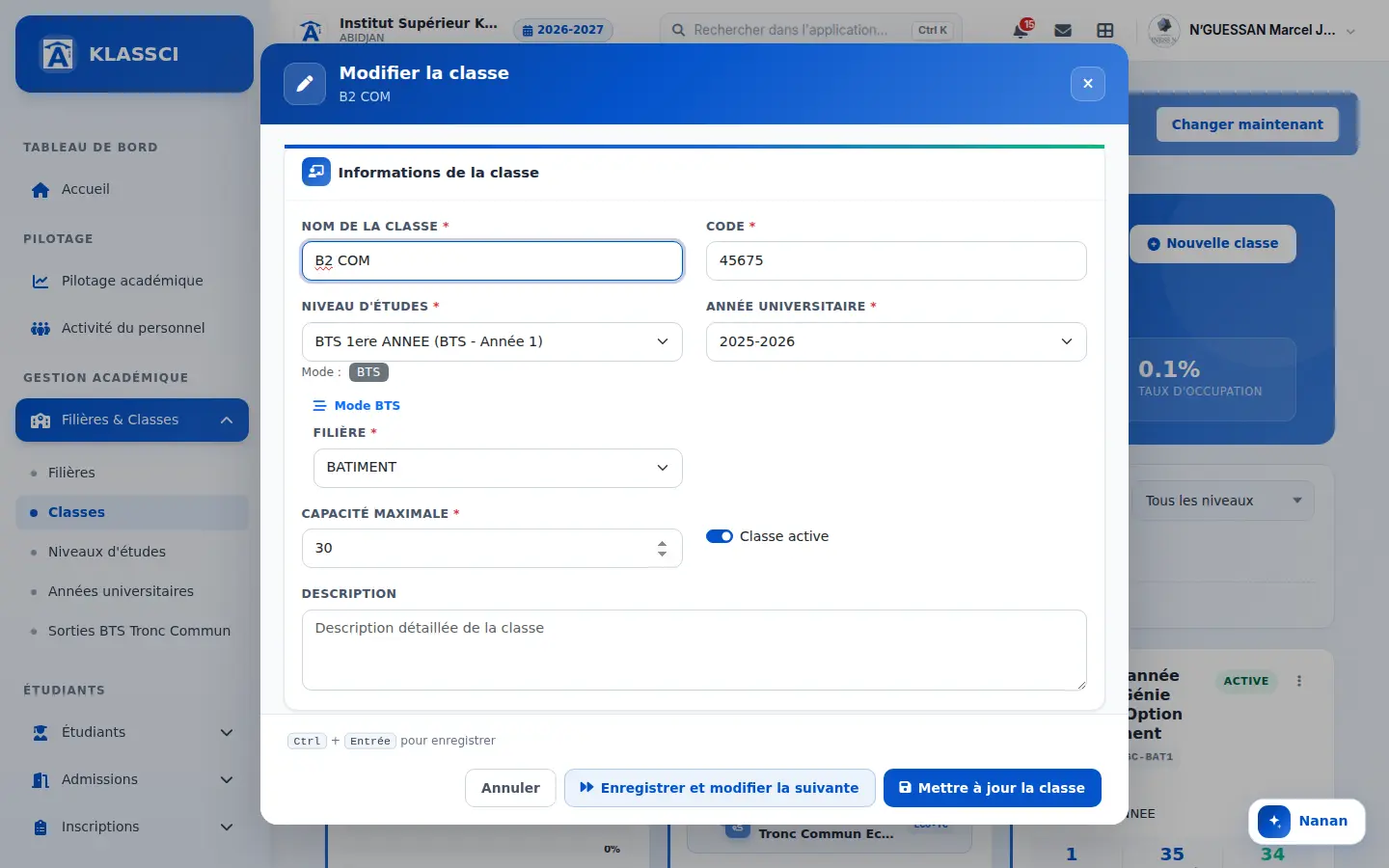
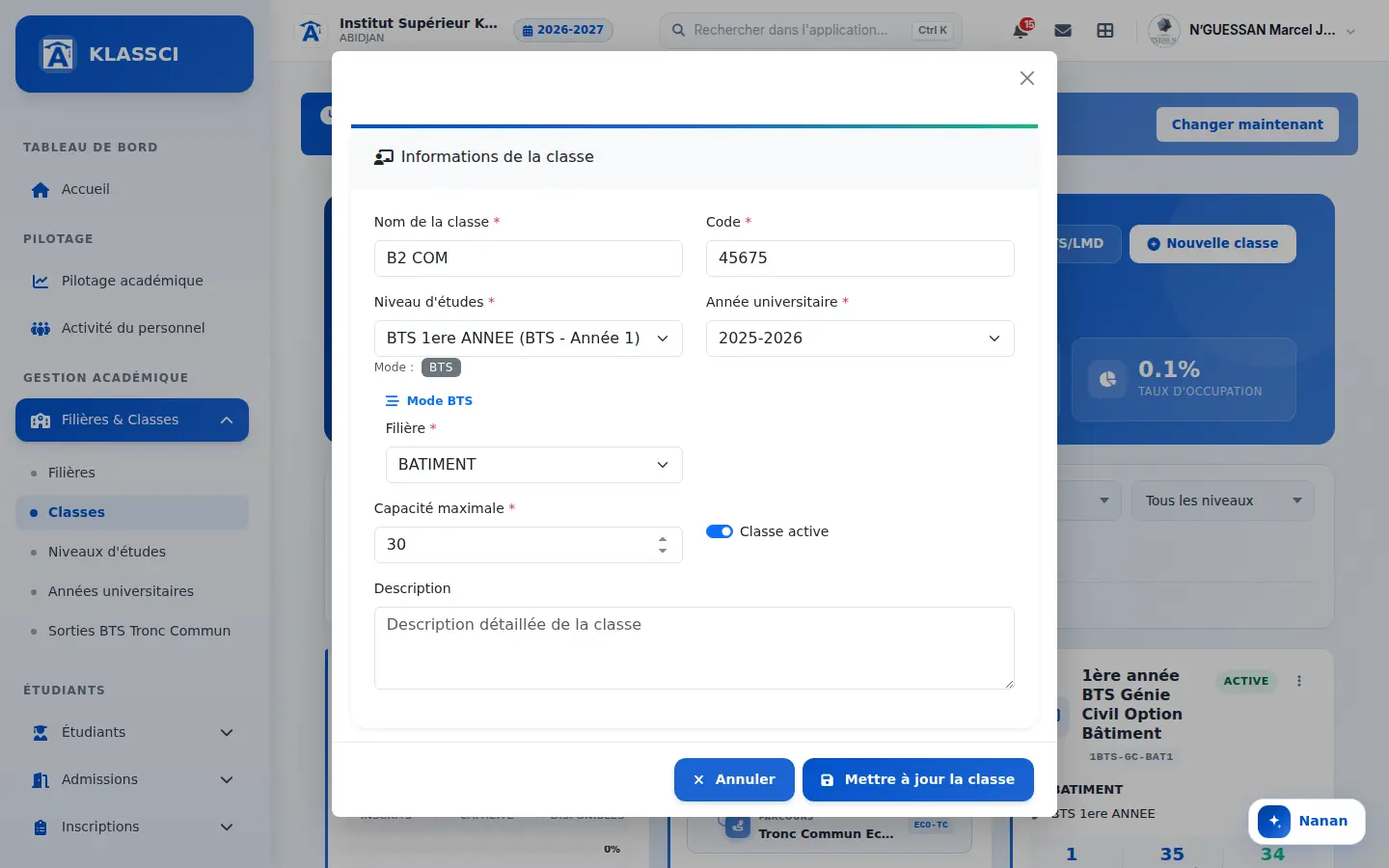 AvantAprès
A clearer window, and a button to move on to the next class. -
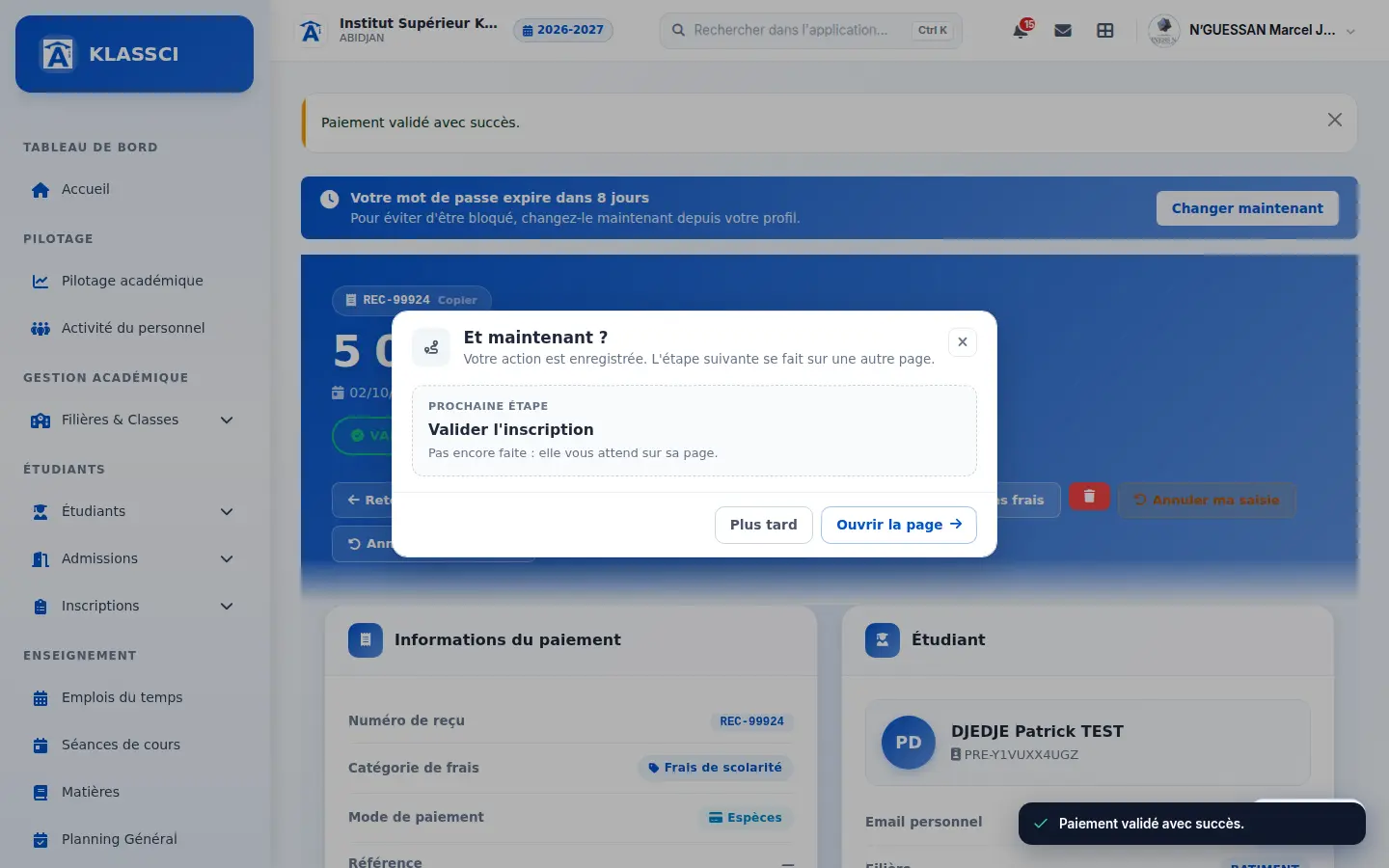
The next step no longer looks like a confirmation — after an action, KLASSCI shows the next step without suggesting it is done: a discreet banner when it happens on the open page, otherwise a "What now?" window offering to open the page. Messages no longer keep steps a colleague has already done, even after a bulk validation.
-
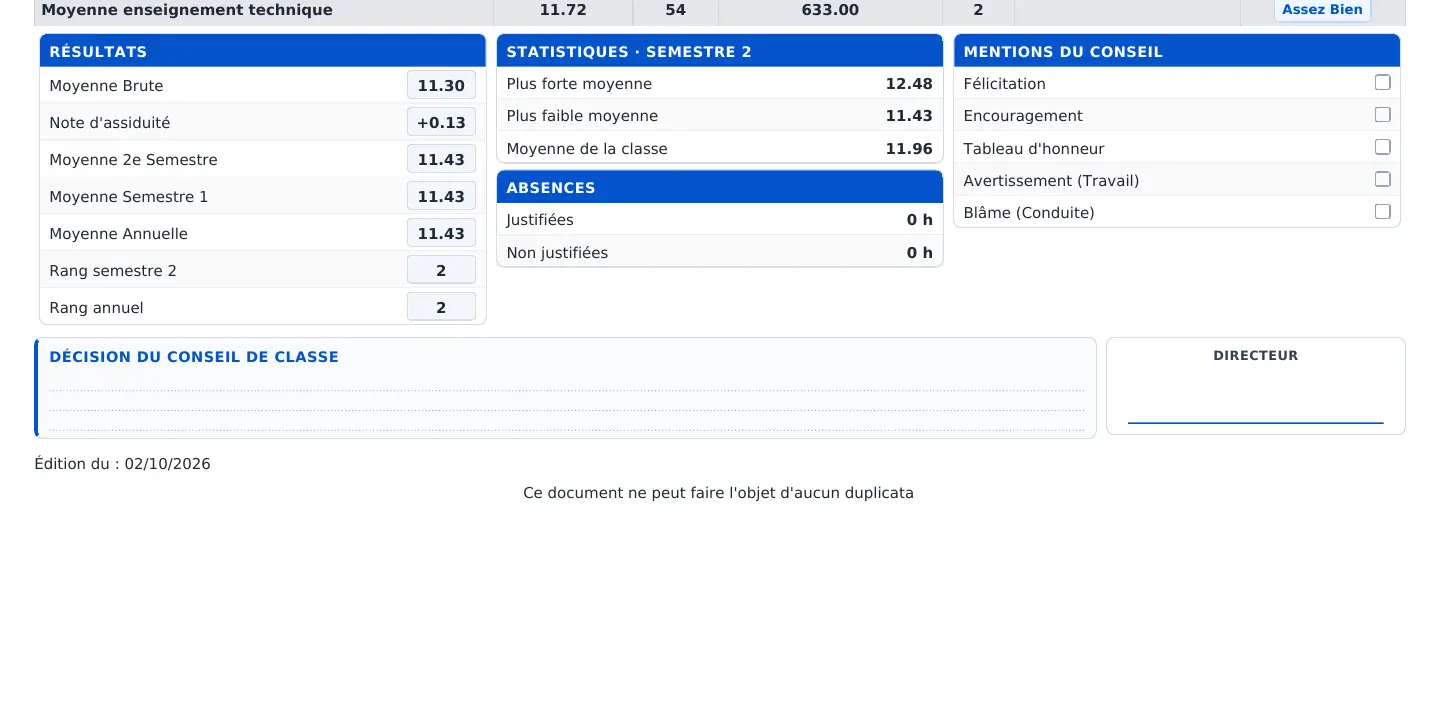
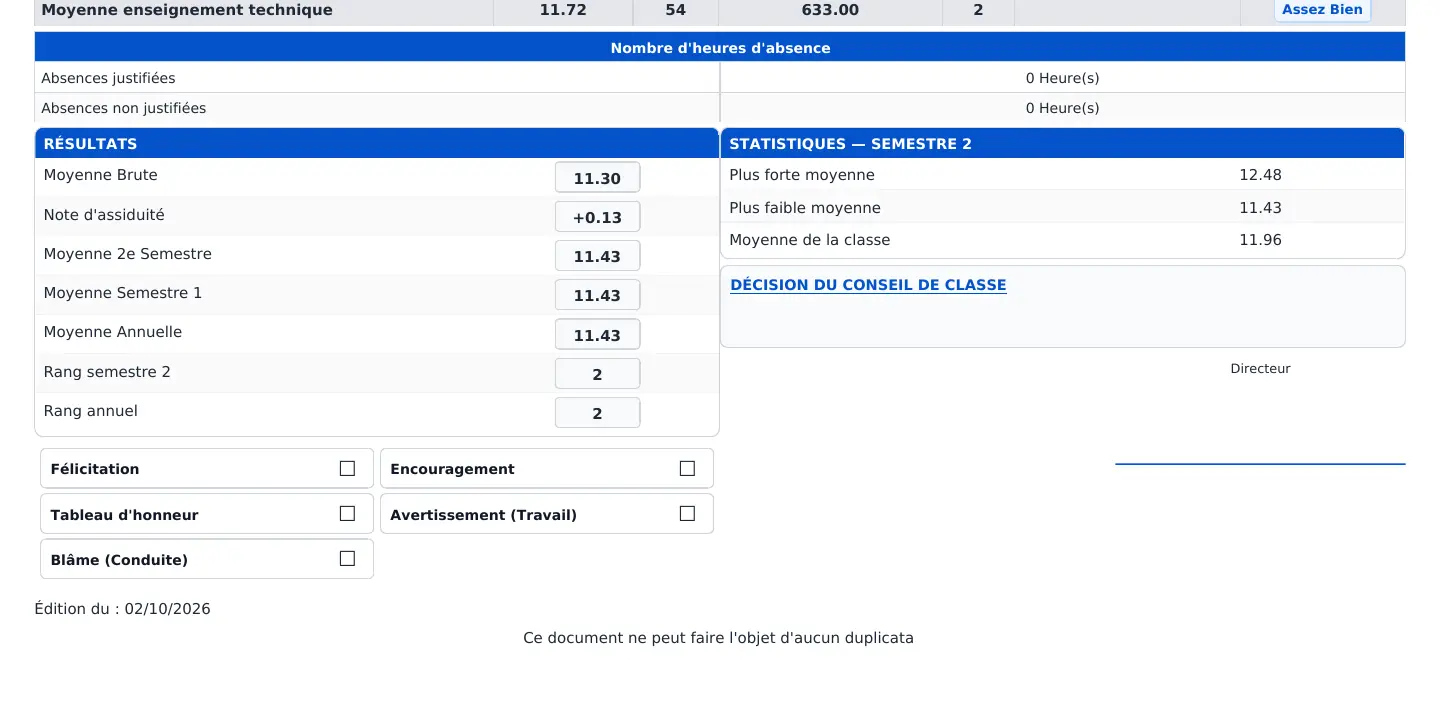
Better use of space at the bottom of the BTS report card — results, statistics with absences and council mentions in three equal columns, then the council decision and the director's signature side by side at the same height. An empty decision shows writing lines, and the signature width set by the school is respected. The report card still fits on one page.
 AvantAprès
The empty space on the right is gone: three equal columns, then decision and signature aligned. -
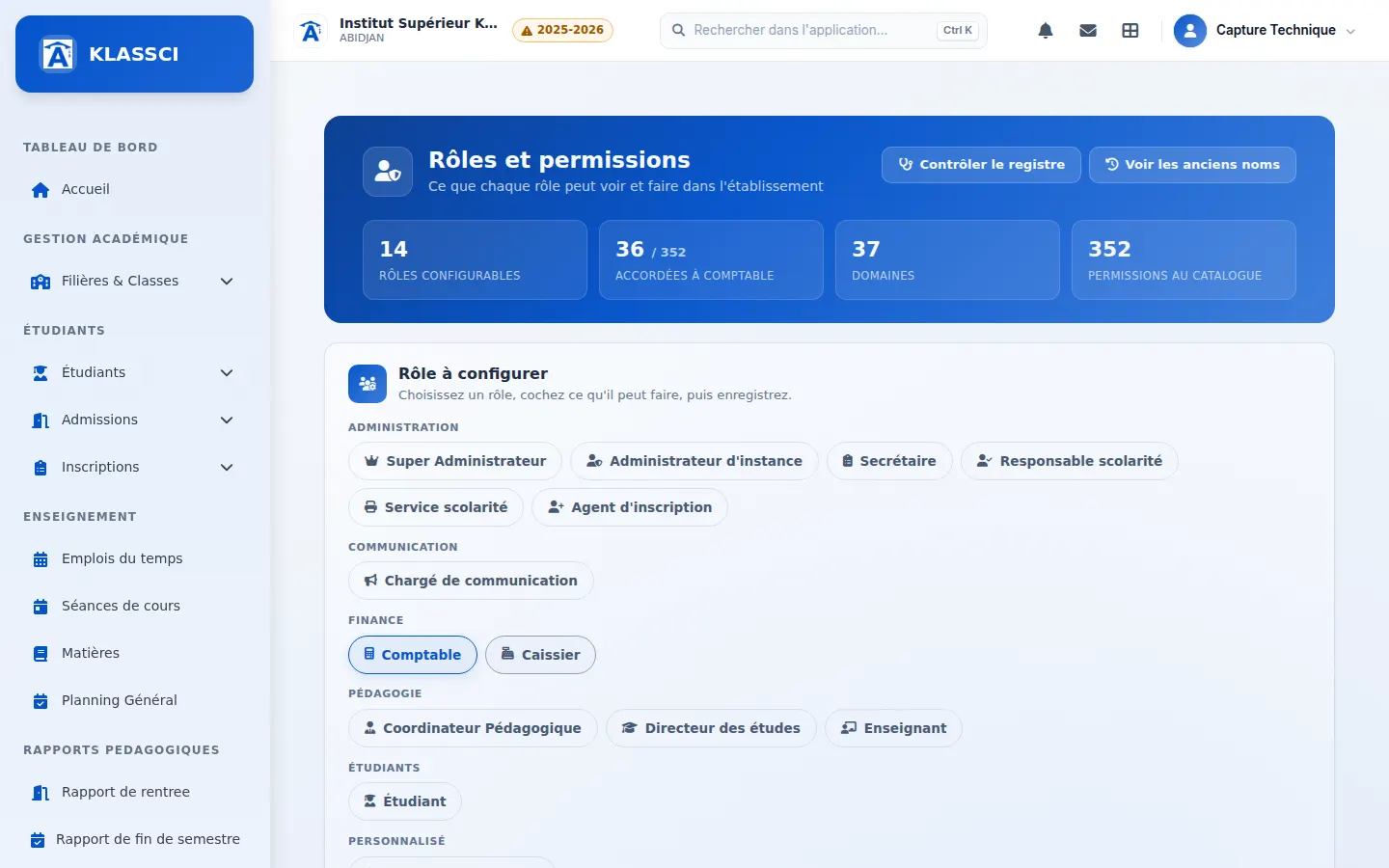
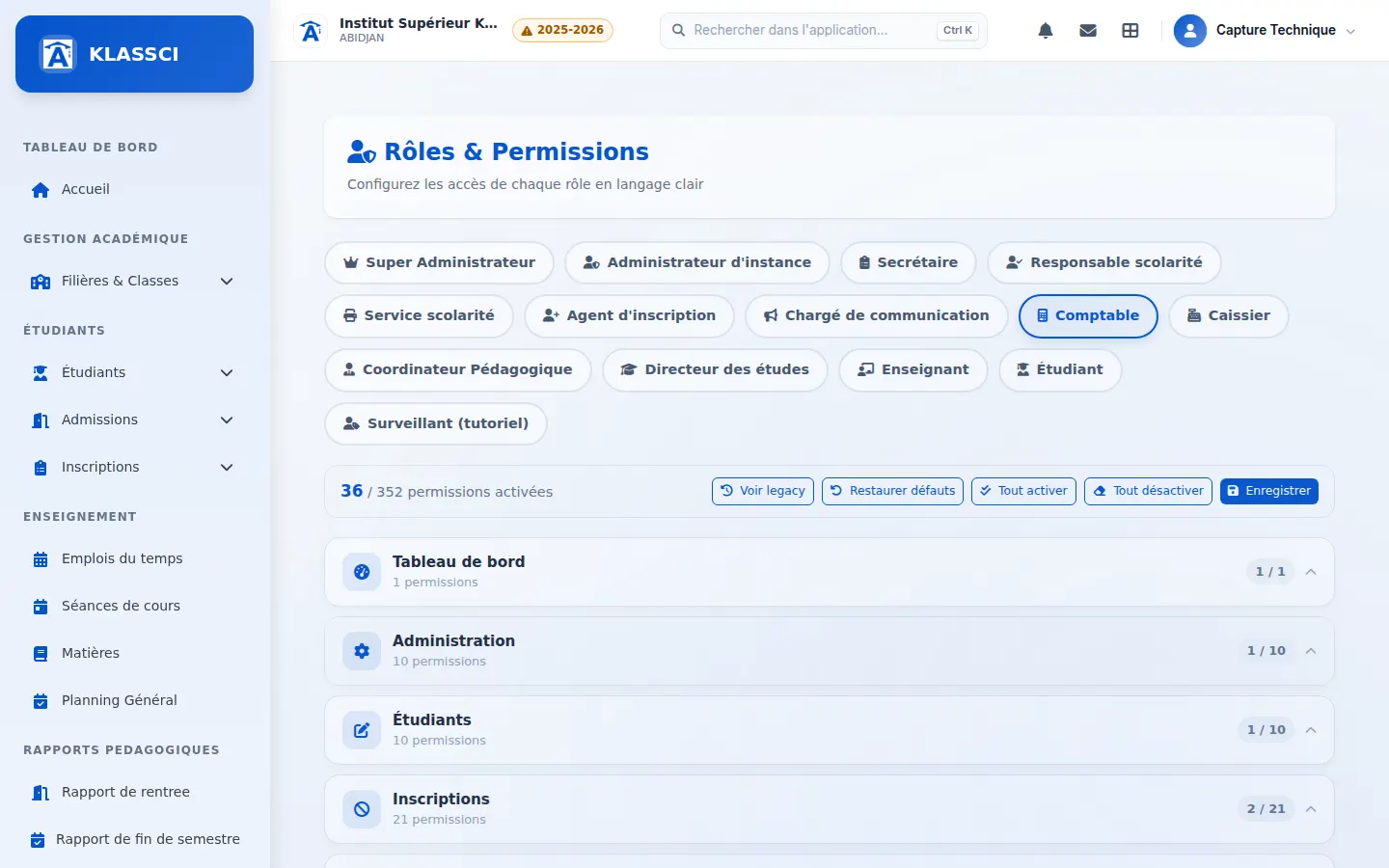
Roles and permissions, redesigned — roles grouped by family with what they do and which accounts they manage, a search across permissions, an "Unsaved" marker before switching roles, and saving without reloading the page. A button checks that every permission the application uses actually exists.
 AvantAprès
The selected role's figures up top, roles grouped by family, a search, and saving without a reload. -
Report card style, redesigned — both report card templates are shown side by side, with the active one and the date and author of the last change. The choice saves without reloading the page, and a failure is reported instead of a false success.
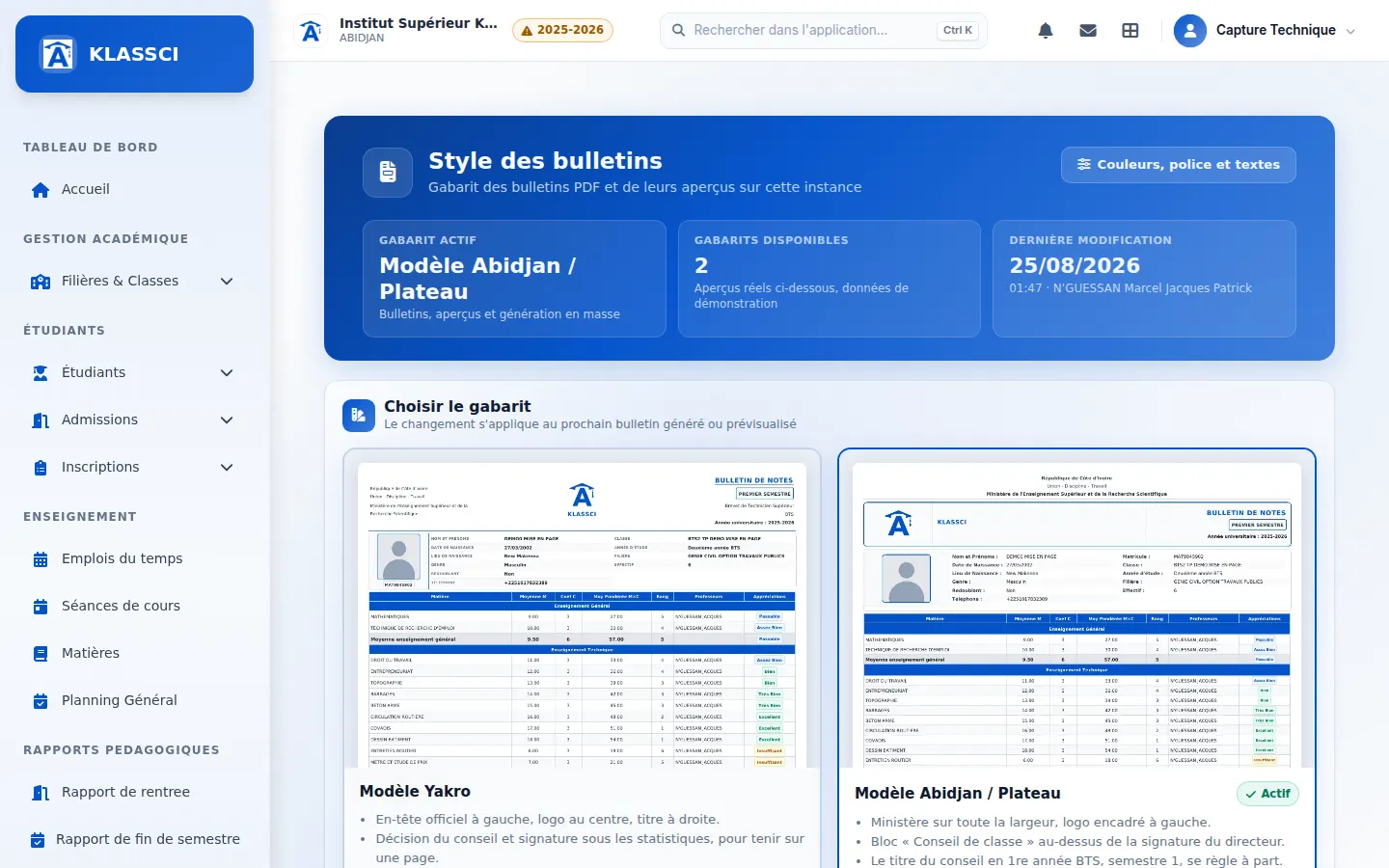
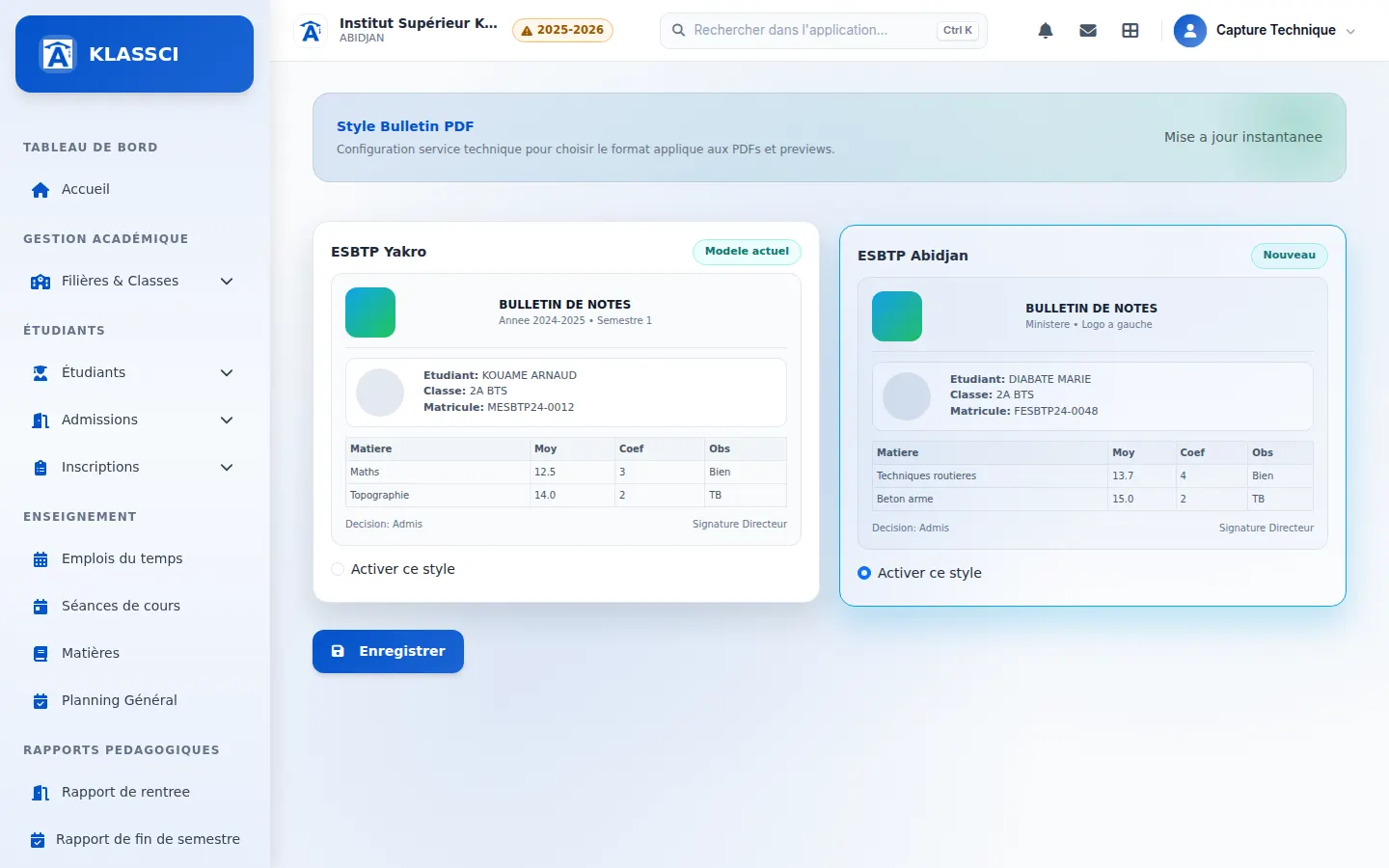 AvantAprès
Two radio buttons with no preview become two templates shown as they print. -
Today's reception: every invited family can be found — search ignores accents, apostrophes, hyphens and word order (“diabate” finds “Diabaté”, “nguettia” finds “N'Guettia”, “naomie dje” finds “DJE … Naomie”), also searches the student's name and ID when a parent made the booking, and accepts a phone number with or without the country code. One typo per word is forgiven: close spellings appear under a banner, and the Enter key never ticks them for you.
-
Faster “Accept and enrol” — choose the enrolment year (the previous one, the current one and the next ones), available seats recounted at once for the chosen year, confirmation required when the year has ended, an “All caps” button for the student and the parent, the parent's name split at the first word (undoable), and linking a parent already on file: those with the same phone or name are suggested before a duplicate is created.
-
Available seats counted on the enrolment year — a class full this year no longer looks full for next year, and enrolling into a year already full is refused, in the dialog as in the full form.
-
"Re-enrol" from the requests: year, decision and status already filled in — choose the year of the re-enrolment (the previous one, the current one or the next ones), places are recounted for that year, and an ended year asks for confirmation. The decision suggested by the results of the year being left is preselected, with the average that supports it, and the assignment status (assigned, reassigned, not assigned) is carried over from the previous enrolment. Staff can change either. The re-enrolment form also carries over the assignment status, and a re-enrolment into a year earlier than the one the student is leaving is refused.
-
The current academic year in the top bar — a badge on desktop, after the school name on phones, orange once the year has ended as a cue to open the next one.
-
New re-enrolment record — what was owed, paid and left on the year being left, the average and proposed decision, and a clear verdict: allowed, blocked, possible by override, or already done. Each case offers its action (collect a payment, view fees, re-enrol with carried balance, prepare the next year, correct the re-enrolment), plus an “Ask Nanan” button. Staff who cannot see finances read the verdict without the amounts.
-
The tolerated remaining balance for re-enrolment applies everywhere — the school's threshold applied when saving but not on the record, which blocked as soon as one franc was owed. The record, the list, bulk re-enrolment and Nanan now apply the same threshold.
-
Contact form reserved for schools — it first asks “You are writing to us as…”. A student or parent is directed to their school's portal (enrolment, re-enrolment, appointment), and a message about “my enrolment” or “my notice” asks for confirmation before it is sent.
-
Re-enrolment already submitted: the appointment in one click — a student who finds a request already on file goes straight to their appointment and notice instead of a plain message.
-
Student results redesigned, faster and colour-coded — the list loads 50 students at a time as you scroll, opening a class goes from 2–5 seconds to about one second, and the overall average and pass rate turn green, orange or red against thresholds each school sets.
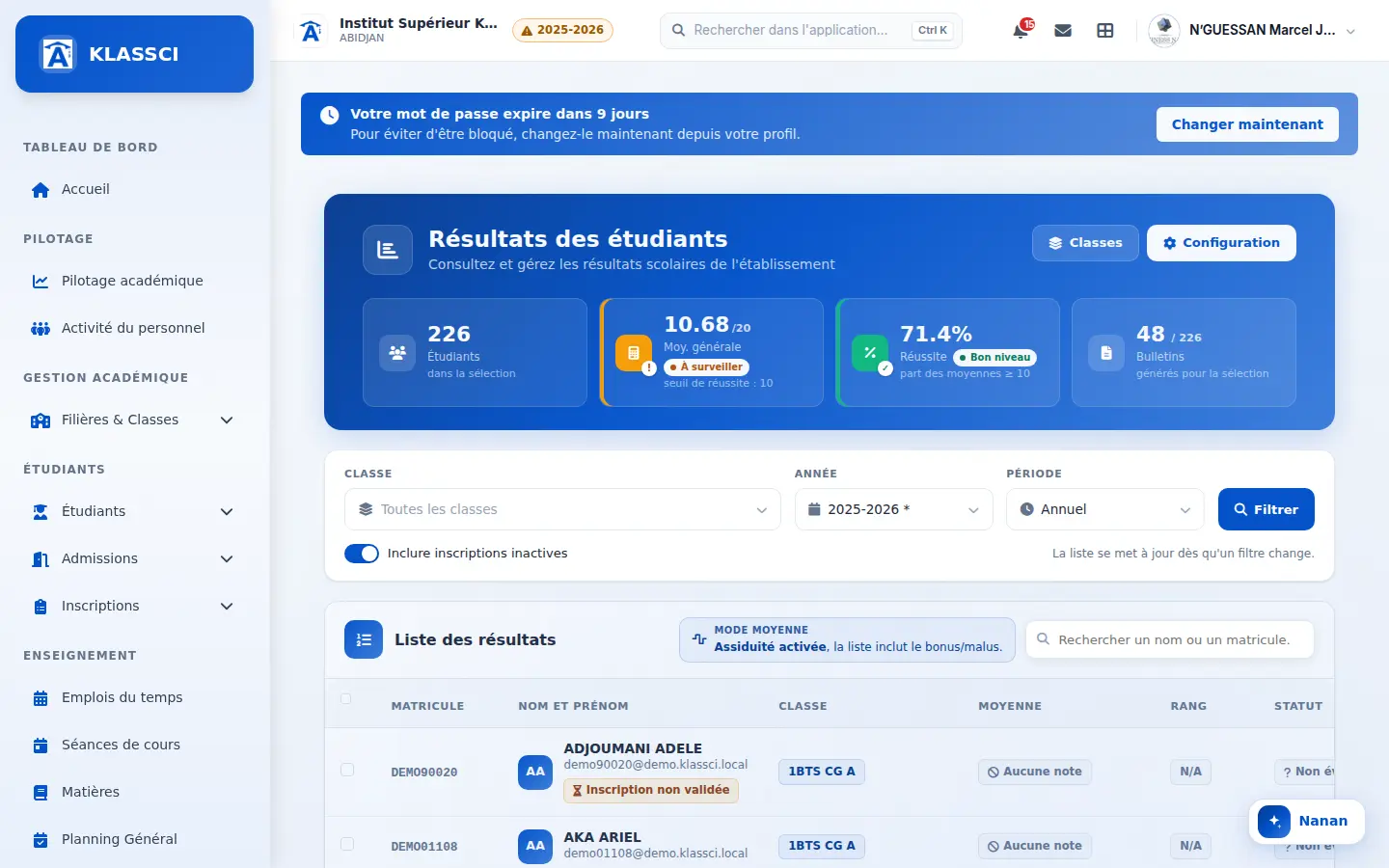
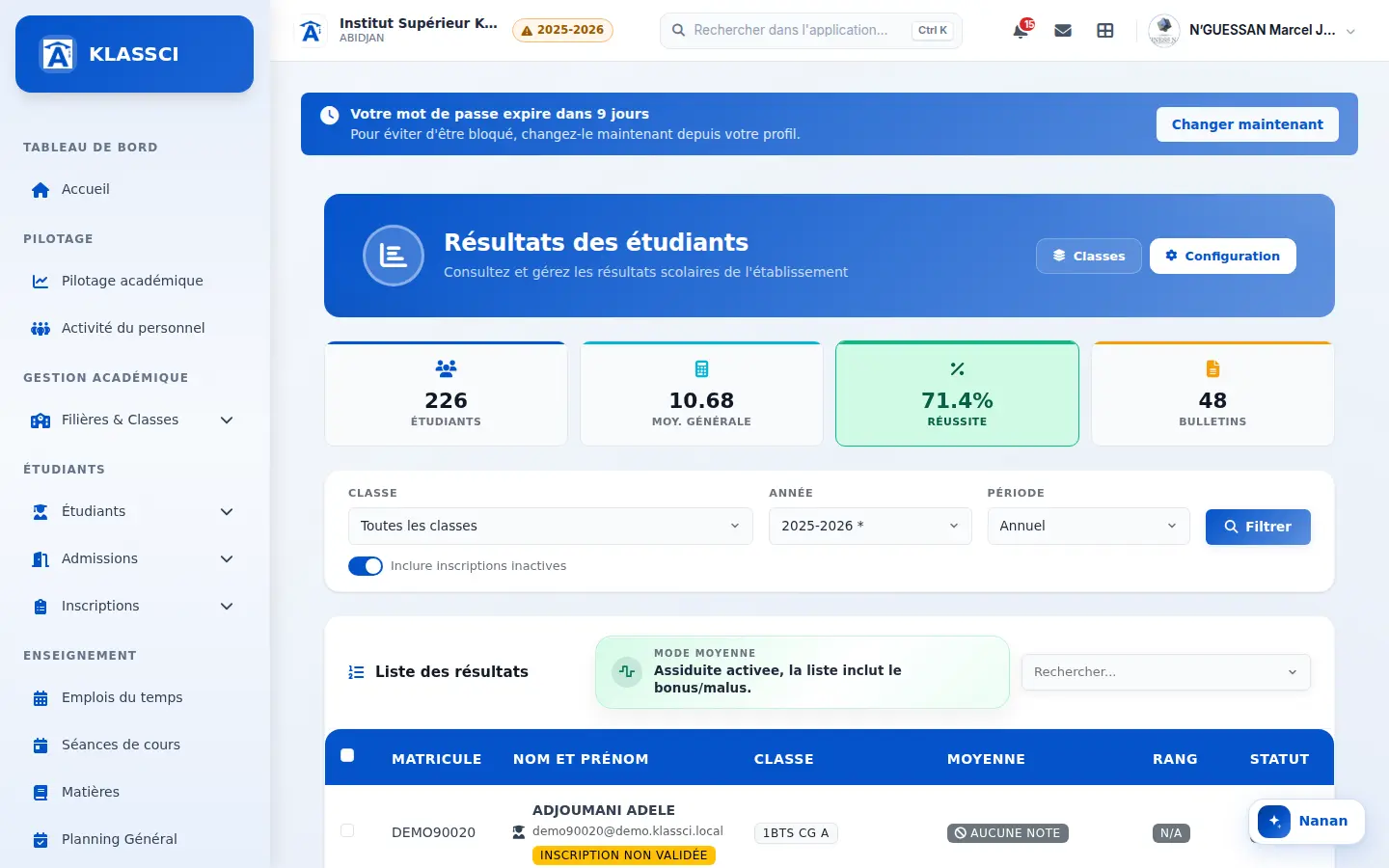 BeforeAfter
Key figures move into the header, each with its reference, and the average and pass rate show at a glance whether all is well. -
Faster pages everywhere — stylesheets and scripts kept by the browser instead of being rechecked on every page; student, class and reminder lists, student record and accounting pages made lighter. The reminders list opens about twice as fast, with every figure unchanged.
-
Clearer notifications and messages — the notifications page first shows what is waiting, then notifications grouped by day, with one-click filters and no reload. In messages, an unread conversation stands out at a glance and the writing options are simpler.
-
Report cards keep generating when you leave the page — a class's generation and the combined PDF continue in the background, with the number of students left and the estimated time.
-
Emails in the school's colours — parent notices, activation link, appointment notice and confirmation code share one template, with the school's logo and colours.
-
Reminders: only active enrolments are chased — a cancelled, finished or pending enrolment leaves the list; the school can switch back in its settings.
Fixed
-
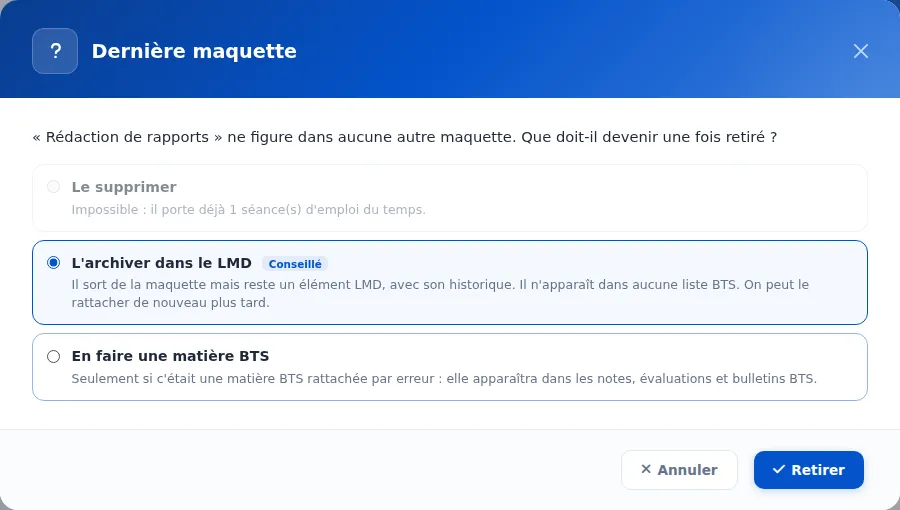
Removing an ECUE no longer turns it into a BTS subject — when a course element is removed from the last curriculum that holds it (LMD teaching units), KLASSCI asks what becomes of it: delete it if it was never used, archive it in the LMD with its history if it already has grades or sessions, or, only if chosen, make it a BTS subject. Before, it fell back by default into the BTS grade and report-card lists. The question now appears in a KLASSCI window rather than a browser dialog that the browser could block.
-
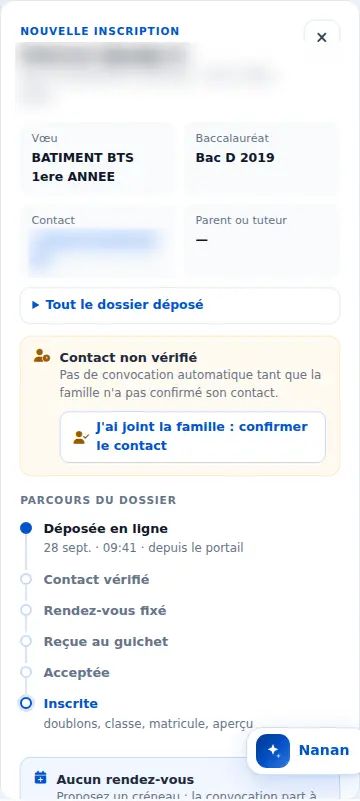
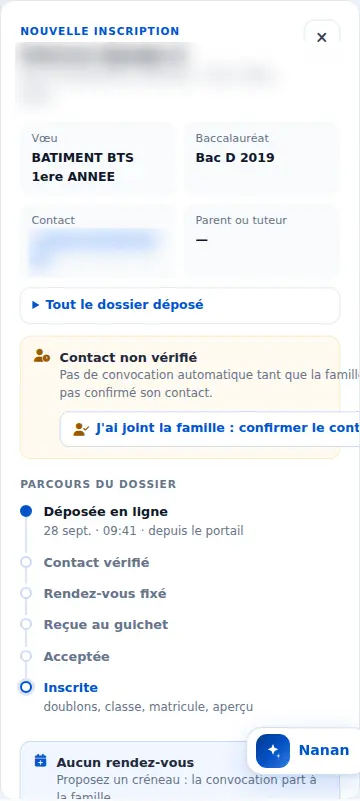
Online requests: the "I reached the family" button reads in full — in the panel of a request whose contact is not yet verified, the "I reached the family: confirm the contact" button wraps instead of being cut off, on computer and phone alike.
 AvantAprès
The contact confirmation button reads in full. -
Readable enrolment type — the enrolment page shows "First enrolment" instead of a raw "Première_inscription", and the printed form says "Re-enrolment" for every re-enrolment.
-
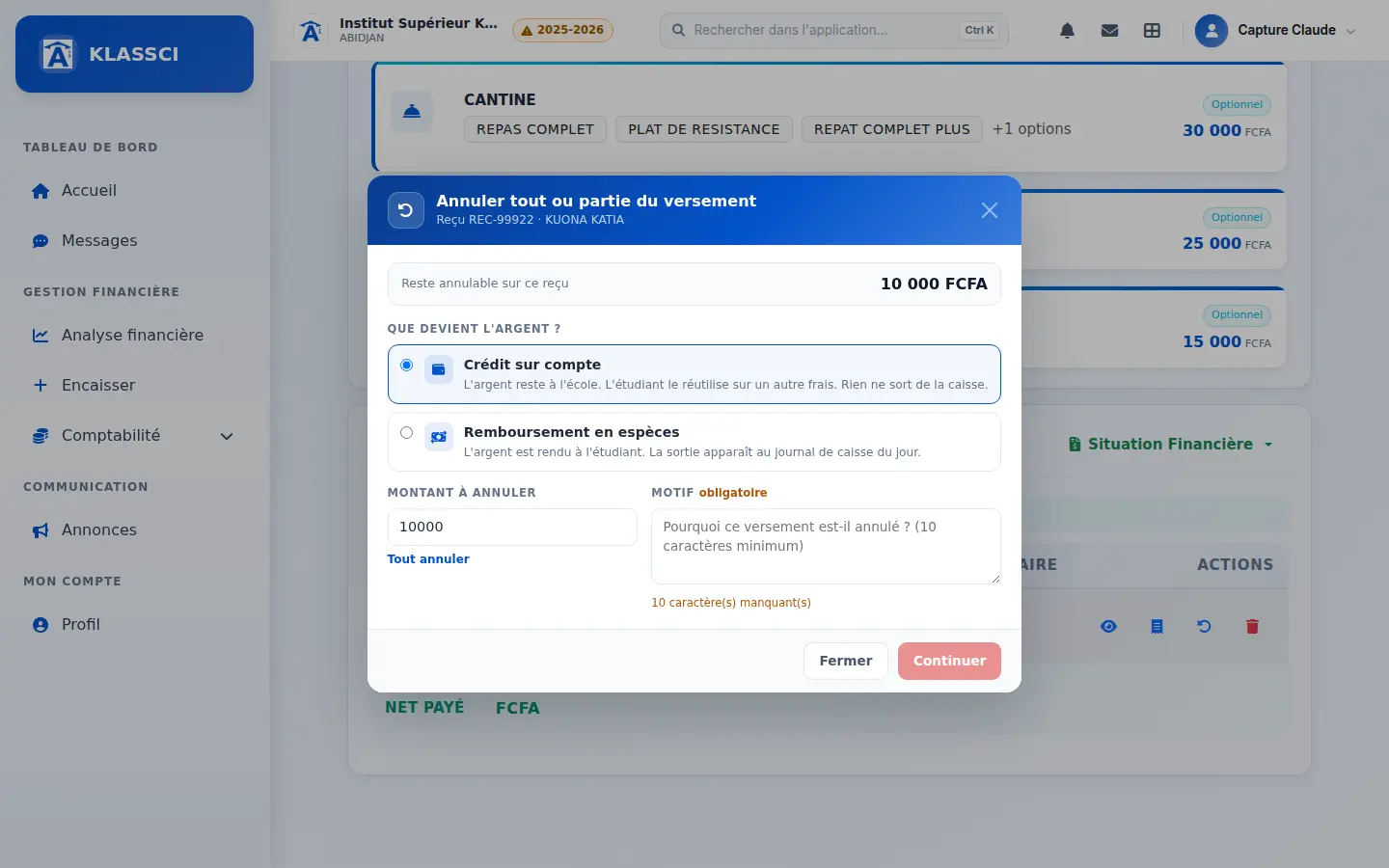
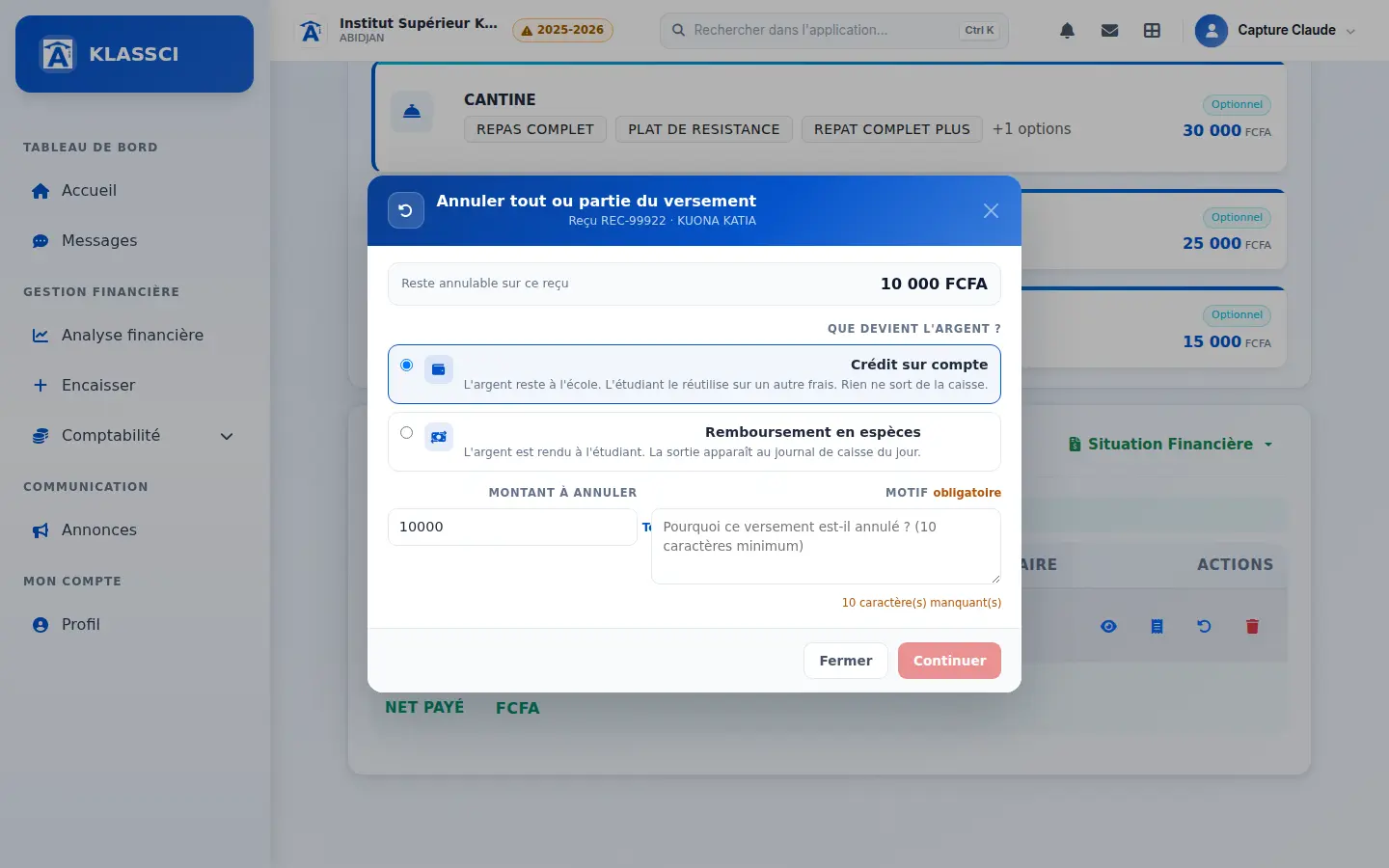
Enrollment page: the cancel and delete payment windows display in full — text aligned left, readable "Cancel all" link and complete warning, instead of content pushed right and cut off.
 AvantAprès
Labels are back on the left and the “Cancel all” link reappears under the amount. -
Phone and tablet: technical support no longer gets the cash desk menu — the account was taken for a cashier; its bar now offers home, subscription, student ID numbers and roles.
-
Roles: restoring default permissions now lasts — withdrawn permissions no longer come back at the next update, and saving a role no longer cuts access to screens that still use an older permission name.
-
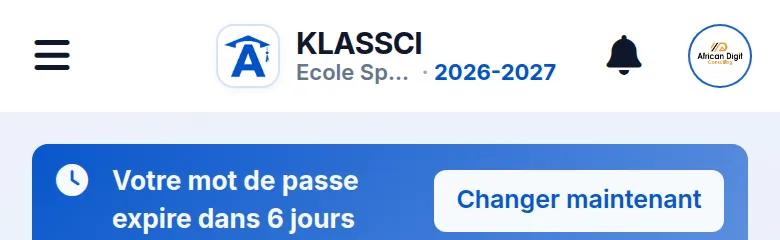
The school name no longer slips under the bell — on the student list on phones, a long school name overflowed onto the top-bar icons; it is now neatly truncated.
 BeforeAfter
The school name overflowed under the bell; it is truncated, and the current year follows it. -
The re-enrolment class picker is readable again — “Select a class…” showed as a grey bar, on the finalisation page and in the student list filters.
-
A student who joined this year is no longer shown as “already re-enrolled” — their re-enrolment targets the next year, and correcting a re-enrolment into the same class explains the refusal instead of showing a technical error.
-
Linking a teaching unit to its programmes saves again — removing or adding a programme no longer saved, and creating or editing a unit or an element showed “Network error” although it had been saved.
-
Finding your reference opens the appointment directly — no second click on “See my appointment”, and a phone number typed “07 07 …” is recognised.
-
A school whose subscription limits are not enforced is no longer shown as “blocked” — an overrun shows as a simple warning, and a school that really is blocked now sees the page explaining why, instead of “access denied”.
-
Re-enrolment decides on the report card's annual average — promotion, resit or repeat is judged on the average printed on the report card, not on a different calculation.
-
School certificate: a past year's average is no longer empty when its grades exist.
-
Student area: an enrolment for next year is recognised — a student enrolled during the campaign sees “Enrolled for 2026-2027” and their class, instead of “No active enrolment”.
September 2026
Added
-
Teacher sign-in rules set by each school — how early a teacher may sign in, the "present" and "late" limits and the end-of-class window are now settings. Past the late limit, the school chooses between recording an absence and accepting the lateness with a reason the coordination can see. Shipped values match the current behaviour.
-
Extend a class without creating a conflict — from the class session screen, the teacher asks for a few more minutes with a reason. The coordination decides after an automatic check of the added time: the class's next session, the room, the teacher's other classes. An occupied slot cannot be granted and the reason is shown. Once granted, only that class's end time moves, end-of-class sign-in included, and everyone is notified.
-
A teacher without the code can ask for it — a link under each of today's classes notifies everyone who generates codes, with the subject, class and time. The code is typed directly on the class line, in upper or lower case.
-
Exams: from the exam to grade entry, with real anonymity — "Open the grade sheet" creates the exam's assessment and opens grade entry. An anonymous exam gives each script a number in a shuffled order, and grade entry shows numbers instead of names; lifting anonymity is a separate, dated and named permission. Once grades are locked, they can no longer be changed.
-
Juries: reuse the last jury's members — on creation, the chair, assessors and secretary of the last jury for the same programme or class are carried over, each still editable.
-
Availability: open the whole week in one click — a newly created teacher no longer needs every slot ticked one by one: one button makes every hour Monday to Friday available, then you adjust the exceptions. When adding a class session, staff can also make the teacher available on the chosen slot, or schedule anyway knowingly.
-
Payroll: pay the hours actually worked — each school chooses between the planned length of sessions held and the time from start-of-class sign-in to the planned end, granted extensions included. A teacher with no hourly rate appears in the payroll with "Hourly rate missing — Fill in".
-
Lists load as you scroll, everywhere — enrolments, online applications, re-enrolment requests, payment reminders, cash journal, report cards, recycle bin, audit log, teachers, exams, class sessions, announcements, attendance, LMD juries and report cards, and some twenty other screens. No more page numbers: the next rows arrive when you reach the bottom, with the current filters and sort, and a counter shows how many rows are displayed out of how many. A "Load more" button remains for keyboard use or after a network drop. A row entered while you scroll neither repeats nor skips another.
-
Find a family's appointment, whatever the day — a family calling without knowing the date is found by name, phone number (with or without spaces), application reference or the student's ID number. Each result gives the day, time, status and any missed appointments, with a direct link to the file. The search opens from the planning and from today's reception desk; when the desk finds no one that day, it offers to search every day.
-
Act on a whole filter at once — when all displayed enrolments are ticked, the bar offers to select every enrolment in the filter. Validating, cancelling, exporting or recalculating fees then applies to all of them, without scrolling through the list.
-
The LMD transcript can now use the ministry's official layout — two-column header with emblems, semesters set in the margin, grade and decision carried unit by unit, and credits totalled across the year. A school setting picks between this layout and the application's own; schools already printing the latter see no change. The choice is fixed at the moment a transcript is issued, so a school that switches later does not alter transcripts it has already signed and handed over. The decision agrees with the student's gender, and a missing decision is never replaced by an invented one.
-
The enrolment sheet now carries the whole file — full civil status, contact details, programme down to the domain, parents and guardians with their relationship and occupation, and the list of documents with what is still missing. One full page per copy, and a signature line for the parent or guardian. Deliberately absent: account credentials, internal reasons for rejecting a document, and cashier comments — those are staff notes, not information for the family carrying the paper home.
-
A blank form to fill in the waiting room — staff print it, the student completes it by hand, brings it back, and the office types it in. The field order matches the data-entry screen so nothing is skipped, the lines are tall enough to write on, and sex and State-assignment status are ticked rather than written. It asks for the level and programme the student wants — that is what lets the school pick a class — but never the class itself, which is the school's decision. Levels and programmes are offered as tick boxes, since a ticked box is typed back without hesitation. Available from the enrolments list.
-
KLASSCI installs on a phone, and actually works there — the app sits on a phone or tablet home screen, opens without an address bar, and behaves like a phone app rather than a shrunken website. Bottom tab bar with a pill that glides between tabs, sheets that rise from the bottom and follow your finger, pull-to-refresh, and a banner when the network drops. Each profile gets its own tabs: a student sees Home, Grades, Timetable, Absences; a teacher, roll call and grades; the cashier, payment collection.
The first screens have shipped: the student home, grades grouped by teaching unit with credits under LMD, absences with a justification that goes out from a single sheet (reason, attachment, no page reload), the cashier's four-step full-screen collection flow, the receipt with its actions, and the teacher's full-width roll call. Every action still obeys its permission: what an account may not do is not shown.
On a tablet, a side rail replaces the bottom bar and lists move to two columns. On a desktop, nothing changes.
-
Our schools' logos now scroll across the home page — every client school appears with the logo it uploaded in its own KLASSCI settings, the one that heads its report cards. Change the logo there and it changes here within the hour, with nobody in the loop. The demo instance is left out: this wall shows real schools.
-
Online applications now carry your school's colours — the "Choose your school" list shows each school's logo and city. Once a school is picked, the form takes on the visual identity it configured for its PDF documents: its logo, its header line and its primary colour, which drives buttons, links and active fields. Applicants can see who they are handing their file to, and recognise them. You configure your identity once, in your settings: it applies to your report cards and to your application page alike. If your colour would not carry readable text on a button, it stays on the identity banner and the controls keep KLASSCI blue.
-
Document tracking, student by student — the enrolment record now carries a "Documents" panel where you tick off what the student has just handed in. A checkbox is enough: no mandatory upload, no form. The counter at the top says whether anything is missing, and what.
A document belongs to the student first, not to the year: six photos handed in during first year cover three enrolments, and the screen shows what is left. The school decides, document by document, what carries over and what is asked for again every year. A document that does not concern a student this year is set aside with a reason.
Three school settings: what to do with an incomplete file (block, flag, stay silent), whether a cancelled enrolment gives back what it consumed, and whether ticking at the desk already counts as approval. Where the person receiving the document is the one who judges it, one gesture is enough — that is the default.
-
A page to know who to chase — "Document tracking" lists, for a given year and class, the students whose file is incomplete, with the names of the missing documents. Five counters at the top: enrolments examined, complete files, incomplete files, documents to claim, documents to review. Each row leads straight to the student's file, exactly where you tick.
-
Student photos can be taken with a phone — a dialog opens right after an enrolment is created, while the student is still at the desk. Three routes: upload a file, use the workstation camera, or display a QR code to scan with a phone. The photo taken on the phone appears on screen; the desk approves it or asks for another — it only replaces the student's photo once accepted.
The page opened by the QR code requires no account and shows only a name: the link expires within minutes, is good for a single upload, and says nothing about the file. On re-enrolment, if the student already has a photo, the dialog first asks whether to replace it.
-
Required-documents catalogue — the school declares what it asks for at enrolment: label, original or copy, number of copies, validity period, and which programmes and levels the document applies to. A set of common documents can be installed in one click.
-
The Curriculum screen can finally add and remove a subject — until now it could only adjust what was already there: position on the report card, semester, core/specialty status. Completing a curriculum meant leaving the screen and going through each subject's own record, one at a time; removing one was possible nowhere without wiping the settings of its other programmes and levels in the process. An "Add a subject" button opens the catalogue, flagging what is already attached; a cross at the end of a row removes it, and warns first when the subject carries assessments at that level.
-
Every subject now knows which semester it is scheduled for — the same page lets you state, subject by subject, whether it runs in the first semester, the second, or both. A "Confirm semesters" button records the answer for that programme and level: "all subjects in both semesters" is an answer in itself, and is recognised as such. Until semesters are confirmed for a pair, nothing changes in your report cards. Once confirmed, they are read: a semester's report card no longer lists subjects scheduled for the other one, and grade tracking no longer expects marks for them.
Improved
-
New teacher dashboard — when they open KLASSCI, teachers see today’s classes, what they need to do now (sign in, take the roll call, sign out, enter grades) from most to least urgent, the share of their classes signed in on time this month and their signed-in hours compared with the previous month, plus their hours over eight weeks and their upcoming classes. Every figure links to the page that details it.
-
Clearer attendance sign-in screen — each class shows the “on time”, “late” and “beyond” windows set by the school, the current time and the time left. Signing out happens in the class row, once the opening roll call is done.
-
Fewer round trips between screens — after creating a teacher: link subjects, availability, hourly rate, schedule a session. From a published jury: its report cards. From the sign-in report: that month's payroll. From a teacher's page: their payslips. From a subject's page: its planning. The teacher menu gains "Today's classes" and "My availability".
-
One reminder at a time, never during a password change — reminder windows no longer stack, the new-account credentials window comes before all others, and what's-new is only shown to the people it concerns.
-
Safer LMD grade entry — commas are accepted ("12,5"), an out-of-range grade is rejected on the spot instead of entering the average, and a "Validate my grades" button makes them official in one go. Semesters 3 to 10 appear in academic monitoring.
-
Screens redone in KLASSCI colours — academic years, sign-ins, teacher availability and home, sign-in report; searchable pickers on LMD screens; teacher page and jury readable on phones.
-
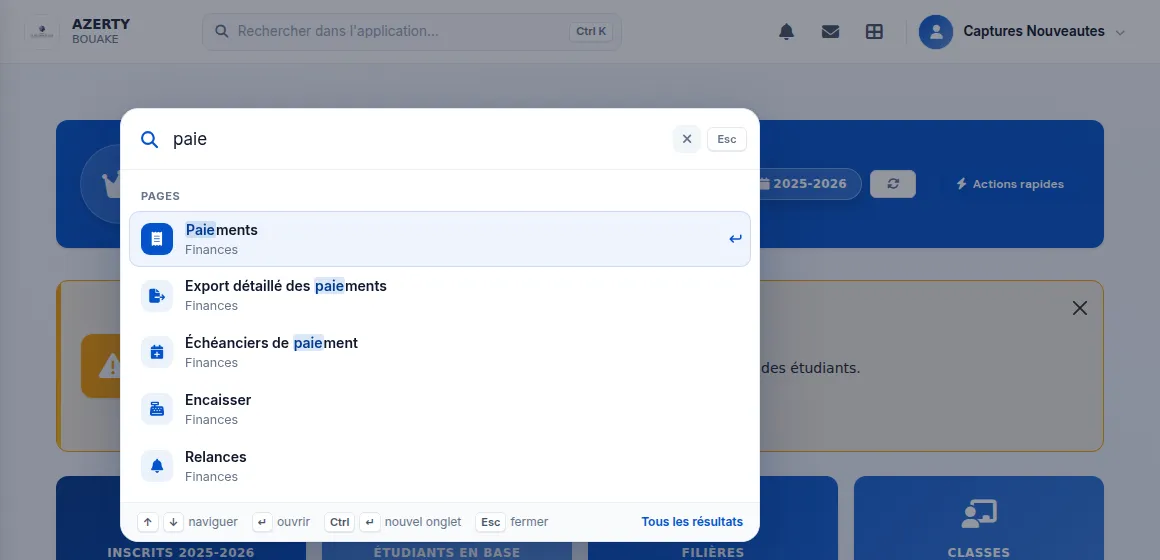
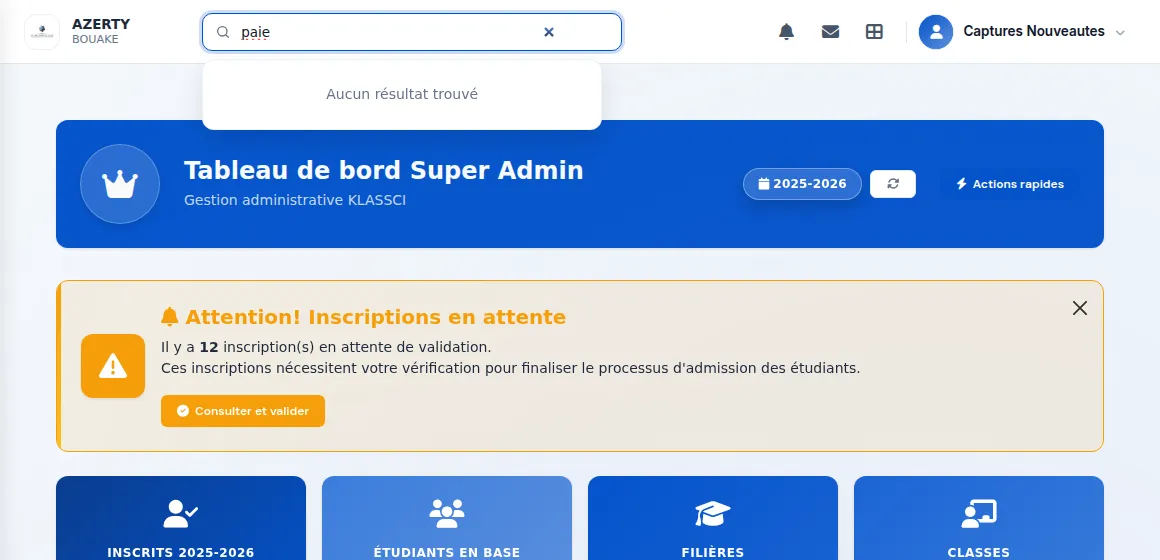
Search everything with Ctrl K — Ctrl K (⌘ K on Mac, or the search field in the menu on phones) opens a search in the middle of the screen. It finds more than a hundred pages of the application, even with everyday words ("cash in", "receipt"), and records: students, payments, classes, programmes, subjects, teachers. Arrow keys move through results, Enter opens, Escape clears then closes. Everyone only sees what their account can open, and recent searches keep pages only, never names or amounts.
 BeforeAfter
Typing “paie” used to find nothing; the search now suggests the matching pages. -
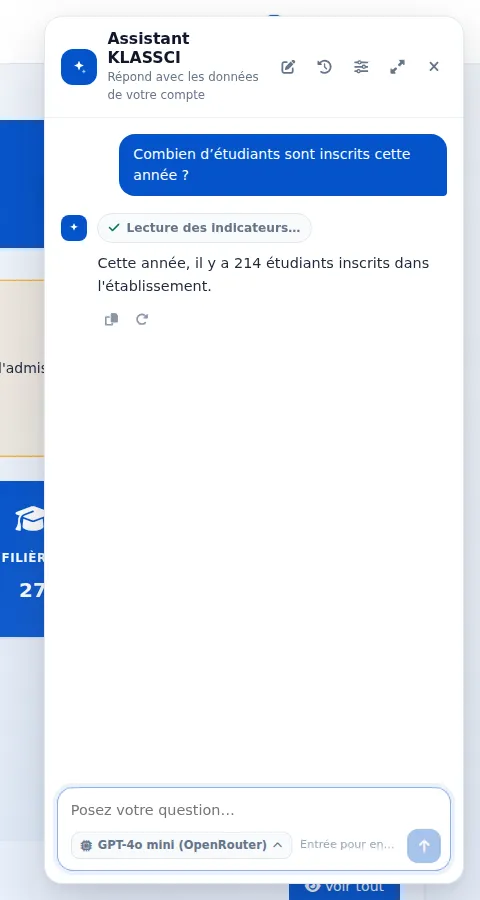
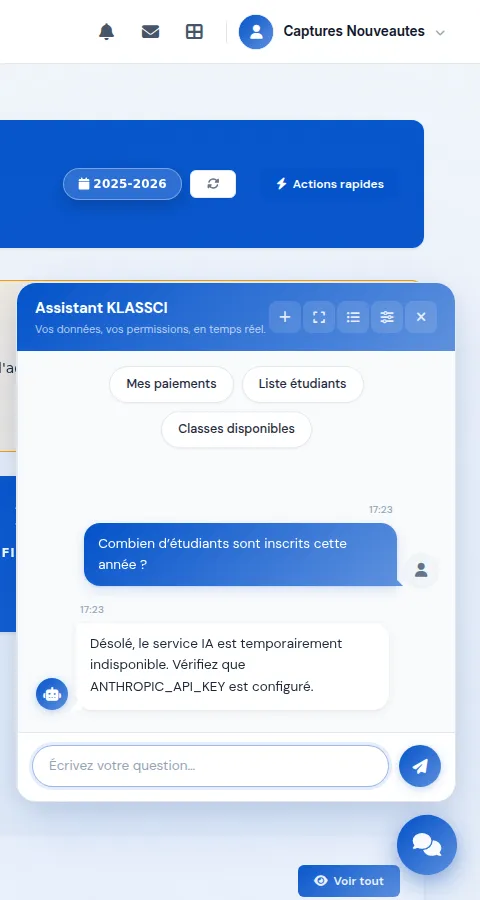
An assistant that answers with the school's own figures — ask a question in plain language (“how many students are enrolled this year?”, “who still owes fees?”): the assistant looks the answer up in the school's data, reading only what your account is allowed to see, and shows what it is checking while it works. The answer is written as it comes. The school picks the AI model in its settings and pastes its own key, stored encrypted and never shown again; if a model does not respond, another takes over without interrupting the conversation. A test button checks in a few seconds that everything works.
 BeforeAfter
The same question went unanswered; the assistant now reads the indicators and gives this year's enrolment count. -
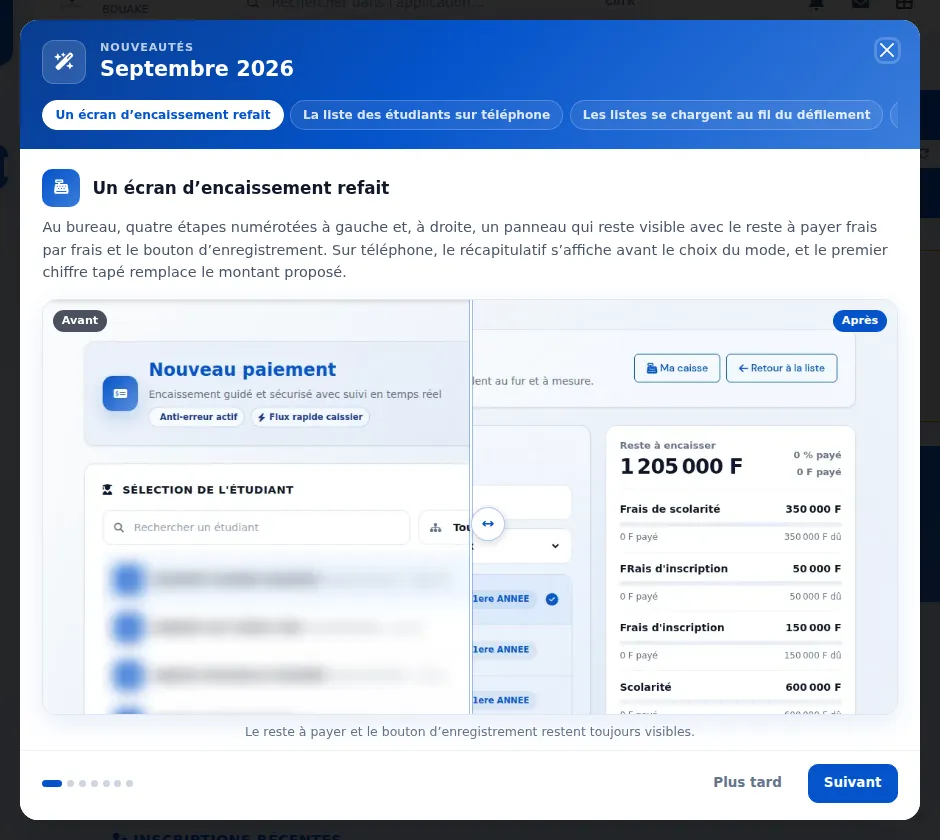
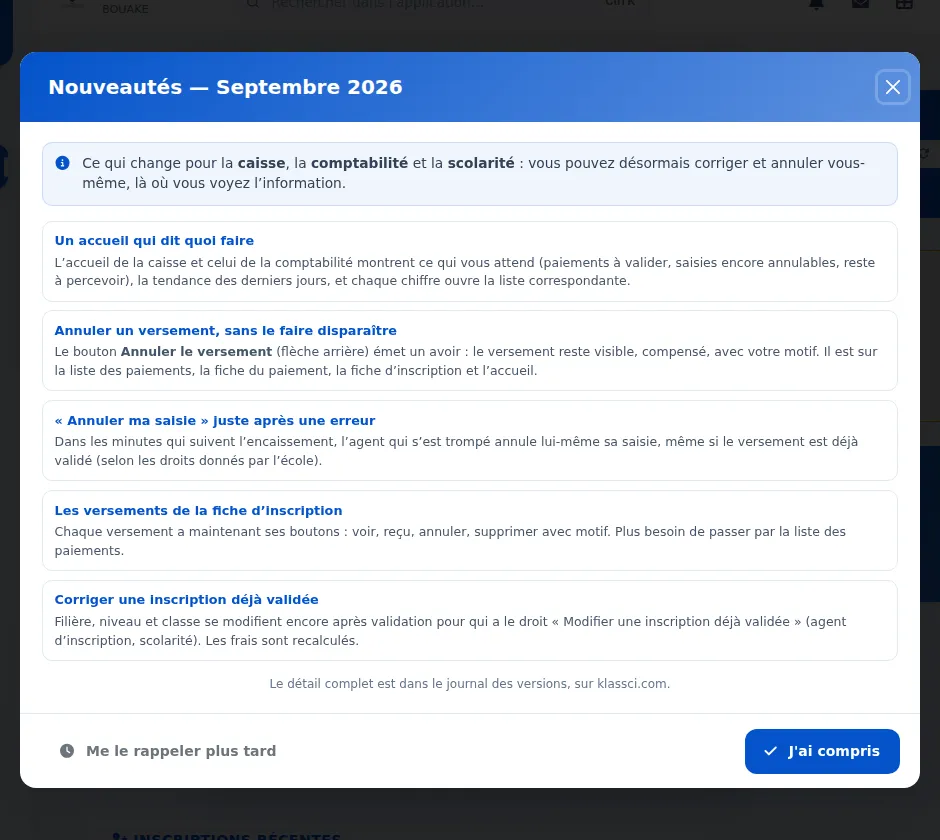
The "What's new" window shows changes in pictures — one change at a time, with a screenshot of the screen before and after, compared by dragging the slider. Move between them with the chips in the header, the arrow keys or the buttons. Each account only sees the changes that concern it.
 BeforeAfter
A list of texts becomes one change at a time, with its before and after screenshots. -
Payment screen redesigned, on desktop and phone — on desktop, four numbered steps (student, enrolment, payment, payment method) and, on the right, a panel that stays in view with the balance fee by fee and the save button. On phones, the step-by-step flow takes the whole screen, the summary comes before the payment method, methods are shown as tiles, and the student's name is no longer cut off. In "My cash desk", notes and coins are counted row by row. The fixed amount suggestions (25,000 and 50,000 FCFA), the same for every school, are replaced by "Everything left" and "Half".
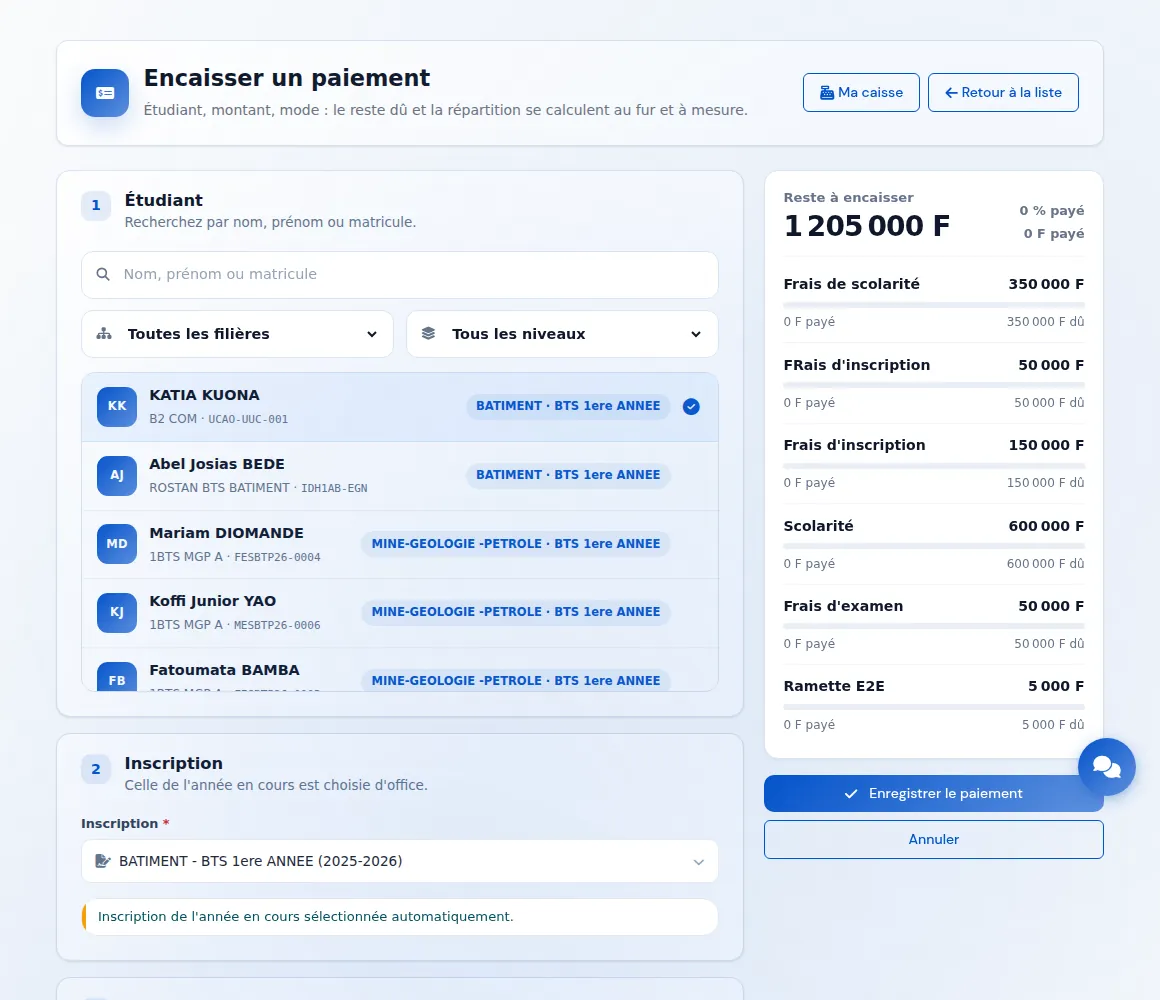
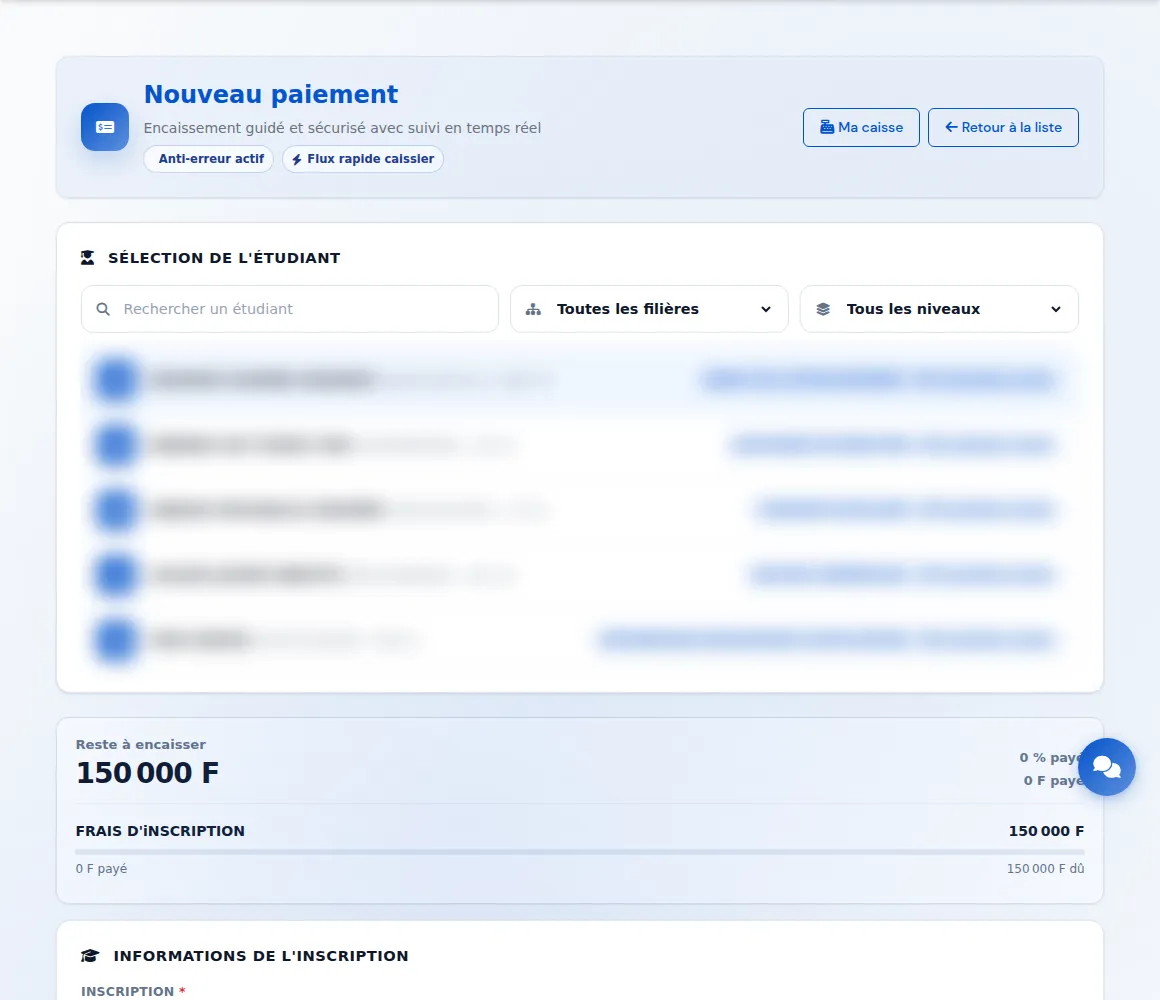 BeforeAfter
The four steps on the left; the balance due and the save button always visible on the right. -
Today's reception desk: each family's file in one click — the "File" link now appears on every row, not only on missed appointments.
-
A fee restricted to one group of students is no longer charged when the group is unknown — a fee reserved for newcomers applied whenever a record did not carry the "returning student" mark, including when the box had simply been left blank. Both directions now require an explicit answer. The trade-off is deliberate: better to miss a fee than to collect one wrongly, since a missed fee can still be claimed, whereas money already received cannot be removed without leaving it unallocated.
-
The company pages are reachable from every page — About, Security, Privacy and Legal notice only appeared in the footer, and two of them nowhere at all. They are now grouped under a "Company" entry in the navigation bar, on the home page as well as on University, Secondary, Virtual classroom, the blog and the documentation. Those pages were also missing a navigation bar entirely: you arrived from a link or a search, and the only way back was a breadcrumb. On phones the four links are laid out flat in the menu rather than folded into a submenu that would have cost one more tap.
-
One navigation bar everywhere — home, University, Secondary and Virtual Classroom each had their own, at different heights, and the virtual classroom offered no way back to the other editions, no language switch and no menu on a phone. A single bar now serves them all, each page keeping its own links. On a phone the contact button finally appears in the menu, which was the only place it could be reached.
-
The product demo holds still, and explains itself — the three angled screens on the home page span endlessly: a screenshot or a link preview always caught them mid-turn. They now sit still, respond to the mouse, and each carries a label naming what it shows — LMD tracking, cash desk and payments, and the families' mobile app.
-
"Apply online" is in the footer — the families' entry point lived only in the navigation bar, which is to say nowhere once you had read to the bottom of a page.
-
Grade coverage tracking finally shows for the people who enter the grades — the banner announcing what is missing had been sitting on the grade-entry screen and the assessment list from the start, but two obstacles kept it invisible: its display condition only recognised the global academic-oversight permission, and neither screen passed it the academic year. The one person the figure is useful to was the only one not getting it. The scope is not widened for all that: a class a teacher does not teach, does not mark and did not enter remains off limits.
-
The figure refreshes after grades are saved — the calculation is cached for ten minutes to stay fast. The banner would ask again without saying so, get the same stale answer back, and keep reporting as missing the very grades just entered. Saving now forces a recalculation; simply switching class still uses the cache.
-
An assessment scheduled for later no longer counts as missing grades — a class fully up to date with its marking would read "25 missing grades" for a test planned the following month, which entry refuses to record before its date anyway. Only assessments already held, or with no date, now count.
-
Quick entry now says what it skipped — a row left blank, with no grade and no "absent" tick, was silently ignored while the screen answered "Grades saved successfully" as if everything had gone through. The message now counts what was recorded and names the students still to be entered while there are five or fewer. Entry being progressive by nature, the tone is that of work remaining, not of a reprimand.
-
A grade reported as missing now says when it is a duplicate student — the banner reported "1 missing grade" on a subject the school had in fact fully entered. Both were right: the class carried two active records for the same person, whose names differed by a single first name, and the grade was on the other one. The two records are now named side by side with their student numbers — and this matching is shown for the whole class, including when no grade is missing at all: that is the costly case, since two fully marked records move no counter and still produce two report cards.
-
"Teacher to confirm" no longer shows when the teacher is entered right next door — the banner looked for the teacher to chase in the general timetable, and nowhere else. A school that does not fill in the timetable saw this message on every subject although it had entered its teachers on the report-card screen. Failing a timetable, those names now show; the source appears on hover. And when neither answers, the message says where to go and enter the information instead of suggesting doubtful data.
-
A class's Subjects tab, the subject configuration and the teacher configuration now show the same list as the report card — those three screens gave three different ones. Two crossed a subject's list of programmes with its list of levels, a product that invents pairs the curriculum does not carry; the third ignored the parent core curriculum, so a specialty class showed fewer subjects than its report card carries and the teacher of an inherited subject could be entered nowhere.
-
The pre-generation check for a class's report cards is markedly faster — it recalculated the entire grade-coverage picture on every call, which nothing displayed at that point.
-
Confirming a duplicate at enrolment now leaves a trace — when the check flags an existing student, confirming used to bypass the check entirely, with nothing anywhere recording what had been waved through. Months later, faced with two active records for the same person, nobody could say whether someone had knowingly confirmed. Confirmation remains sovereign — it is simply no longer silent.
-
The “Core / Specialisation assignment” screen is now called “Report card blueprint” — its name only described one of its four jobs. It also carries which subjects make up the report card, which term each one belongs to and the confirmation of those terms, and their order on the document. A title that is wrong by omission sends people looking elsewhere for what is right there. The page address is unchanged: any links you saved still work.
-
The blueprint synchronisation command now simulates before writing — reserved for the technical team, it rebuilt the blueprint from the cross-product of two independent lists and wrote it without asking. Two lists can only describe a full grid: as soon as a subject is taught in one programme in first year and in another in second year, the cross-product also invents the two combinations nobody asked for. It could moreover only add, never remove, so it could recreate what a removal had just taken out. It now shows what it would do, and writes only when explicitly told to.
Security
-
Each role now reaches only what concerns it on assessments and announcements — a cash desk or accounting account could open the assessment form and create, edit or delete assessments, and an account that could only read announcements could publish or delete them. The matching right (view, create, edit) is now required. Roles that work on these screens keep exactly the access they had. The top bar's quick actions now only offer pages the signed-in person can open; the cash desk finds "Take a payment" and "My cash desk" there.
-
Removal of troubleshooting tools that were still reachable without signing in — a folder left over from the project's early days exposed technical details about the server, along with maintenance scripts a visitor could trigger. It has been removed from every instance. Alongside it, signing in from the mobile app now enforces the same limit on password attempts as the web form, and the class list is no longer readable without an account.
-
The platform's third-party components have been brought up to date, and the check meant to watch them can finally ring — KLASSCI relies, like any modern platform, on software components written by others. Thirteen flaws rated high or critical were sitting in them. One allowed executable code to be slipped into a page through formatted text; another could bring the server down by handing it a document built to keep it busy indefinitely; a third could bypass the rules deciding which outside services the platform agrees to call. They are closed. The more troubling part, though, wasn't the flaws themselves but the fact that nobody could see them: the automated check meant to report them was written in a way that made failure impossible, so it announced "all clear" no matter what it found. It now genuinely decides, and it decides on what ships to production rather than on development tooling. It also stops on an alert the reference database hasn't rated yet — an unrated alert is not a harmless one, and that is precisely what had let through a validation flaw in the keys used to sign notifications. When a risk has to be accepted because no fix has been published, it stays visible with its stated reason rather than hidden: accepting a risk and concealing it are two different things. Finally, the test suite only ran during code review, never on a direct release: it now runs in both cases, on the development branch as well as on each school's own.
-
Submitted documents are no longer served directly by the web server — birth certificates and identity papers were written to a public folder. They now live out of the server's reach and open only through the application, which checks who is asking.
-
Changing a class roster now requires a permission — changing a class's subjects, adding students to it or removing them required no particular permission.
Fixed
-
Juries: no automatic decision without quorum, and none on an incomplete record — a record with no average is flagged incomplete instead of being referred. The date and notes entered when creating a jury are now saved.
-
Resits and report cards — a resit session requires its original session and cannot be published without an exam; a report card with no grade can no longer be published.
-
Payroll — a payslip with a negative net can no longer be saved or validated, and the payslip clearly prints the net pay.
-
Adding a class session — a teacher just linked to a subject appears and is selected without reloading the page; hours display as "7h46" rather than with decimals.
-
Taking a payment on a phone: the suggested amount no longer adds up with what you type — the balance was suggested up front, and typed digits were appended to it: 120,000 FCFA suggested, then 25,000 typed, gave 12,000,025,000 FCFA. The first digit typed now replaces the suggested amount, and the confirmation for an unusual amount appears above the keypad.
-
Phone: the two bottom buttons no longer touch the screen edges (payments, reminders).
-
Rejecting a request frees its appointment slot — a rejected application or re-enrolment request kept its booking, so the slot stayed taken. It is now available again for another family.
-
Counters that tell the truth — several screens only counted the rows of the first page: active coordinators, published LMD report cards and their average, recorded attendance. They now cover everything, and the jury and resit-session counters follow the class, programme and semester filters. In the student inbox, marking a message as read no longer lowers the total number of messages.
-
The student list finally loads in full on phones — the card grid stopped at the first thirty students.
-
The student list becomes a real phone screen — search at the top, four tabs (All, Enrolled, In progress, Not enrolled) and compact rows: photo or initials, name, class and student number, enrolment state. A student not enrolled this year keeps their last class, with its year. An enrolment in progress can be validated in one tap from its row, the list loads as you scroll, and secondary actions (re-enrolments, export, recycle bin) move into a sheet that slides up from the bottom, each shown only if the account has the right. The desktop screen is unchanged.
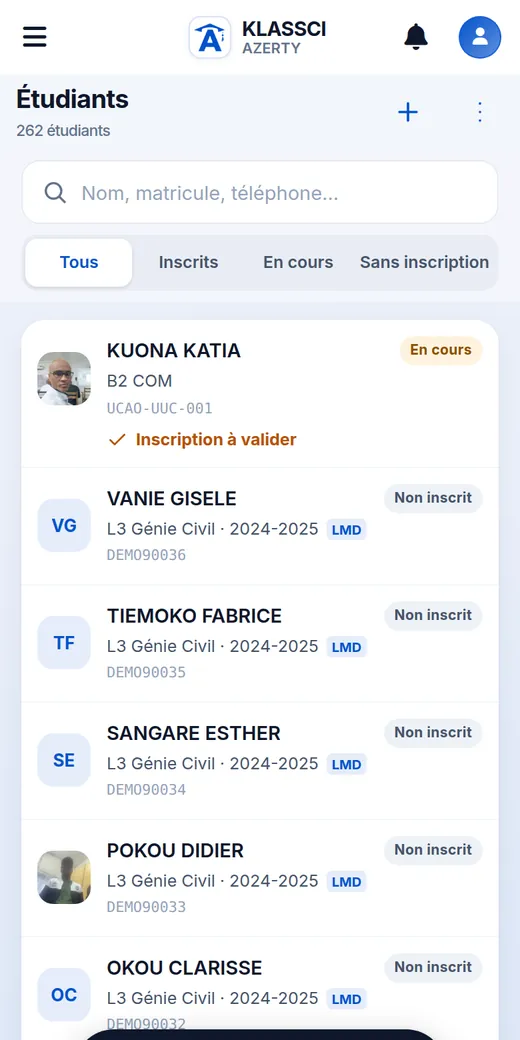
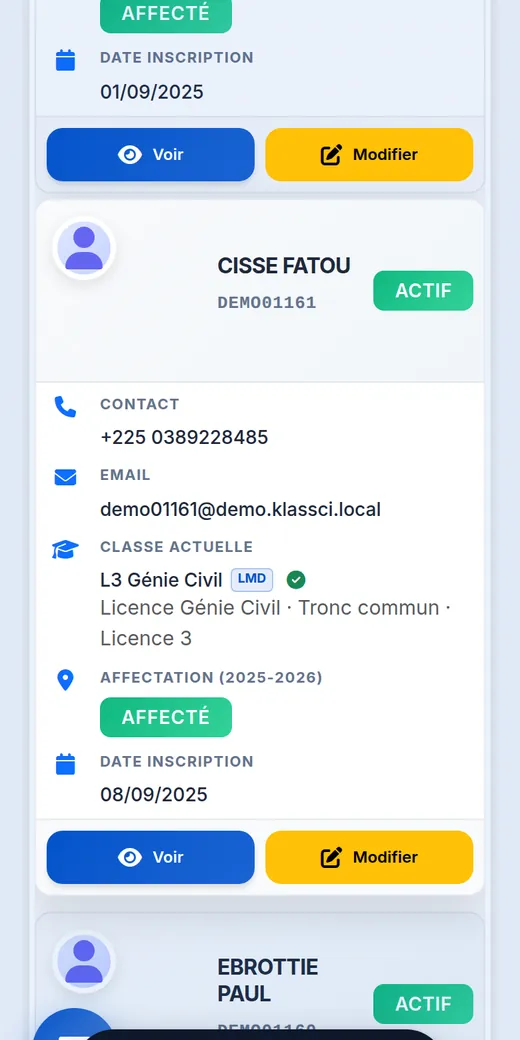 BeforeAfter
Cards in a grid become compact rows, with search and tabs at the top. -
LMD curricula: one course unit shared by two tracks is finally handled cleanly — a course element reserved to one track no longer shows up in the other. Editing an element to reserve it to another track now moves it instead of copying it; a checkbox keeps it in both when that is intended. Removing the shared version of an element no longer brings it back. A "Shared + reserved" label flags duplicated elements, with the step to fix them.
-
LMD curricula: teaching hours are entered track by track — lecture, tutorial and practical hours typed for a course unit shared by two tracks stay in the displayed track instead of landing in the other one. An element that is not part of the displayed curriculum is refused with a clear message.
-
LMD curricula: entering hours no longer resets credits to zero — a timetable line created by typing hours now takes the element's credits as set for the displayed track, instead of 0, which skewed the track's credit total. Removing the last line of an element, which would take it out of the LMD, now asks for a second confirmation and suggests using the pencil to move it to another track instead.
-
LMD curricula: a course unit's page shows each track separately — a unit shared by two tracks now has one tab per track, with its own course elements, credits and teaching hours. It used to merge both curricula into a single table and compared credits with the unit's own record rather than the track's.
-
LMD curricula: a deleted planning line no longer blocks its re-creation — typing hours again for an element whose line had been deleted used to fail. The line is now restored from scratch, without bringing back the previous hours, teacher or notes.
-
LMD curricula: an element's coefficient is 1 from the start — the field showed a greyed-out 1 that was never saved. It is now prefilled, and takes the chosen subject's coefficient when an existing subject is attached.
-
The LMD planning states which year it covers — the current academic year is shown at the top, and only its lines are listed. The Track filter on the course units page becomes a searchable list showing each track's code and name.
-
The group portal updates as soon as a payment is validated or cancelled — when a school validates or cancels a payment, it notifies the group portal so the founder's view reflects the new receipt straight away, instead of waiting a few minutes for the next refresh. On production instances this notice was in fact never sent. It goes out again, and if the school isn't linked to the portal, the problem is now logged instead of going unnoticed.
-
Changing the grading scale or the weight of an already-graded assessment now recalculates averages — the grades themselves did not change, so nothing triggered a recalculation, and the stored average, computed with the old scale or weight, took precedence on screen and on the report card. Moving an assignment from weight 1 to 3, with 10/20 on it and 20/20 on the other, left 15 instead of 12.5. Both the assessment page and the quick edit from the grade grid now recalculate. The grading scale can no longer go below a grade already entered: entry already rejected a grade above the scale, but lowering the scale afterwards bypassed the rule — an 18 brought down to a scale of 10 would have given 36 out of 20. A recalculation that fails is reported, without suggesting the change was not saved. Report cards already generated keep their official average until they are regenerated.
-
"Cancel" always cancels in confirmation dialogs — on screens that ask for confirmation (enrollments, payments, student record, subjects, grades, timetable), a quick click on the confirm button while the dialog was still opening was lost: clicking "Cancel", the close button or Escape afterwards still ran the action. The confirm button now responds only once the dialog is fully open, and "Cancel" always cancels. The dialog also announces its title and the label of its close button to screen readers.
-
Bulk enrollment validation now states what it actually does (
/esbtp/inscriptions→ Validate selection) — the confirmation dialog promised to automatically validate payments that were still pending. KLASSCI does the opposite, by design: an enrollment whose payment is not yet validated is skipped, never validated in place of the cashier. The message now says so: only enrollments with a validated payment are validated, their students are notified, and the others are left aside. -
Moving an assessment no longer leaves a stale average behind — changing an assessment's subject, class or term did move the marks, but nothing recomputed the stored averages, on either side: the one being left kept a value no mark justified any more, the one being joined ignored the marks that had arrived. This was not a display glitch: the stored average wins over the marks, on screen and on the report card. Measured after a move: a student whose five marks give 15.6 was shown 15. All four move paths now recompute both sides. For batch moves, the recomputation is capped so the response arrives in time; beyond the cap, the response returns the exact parameters to re-run. An average with nothing left to average is never reset to zero — no marks left, or only absences: it is left as is and flagged, its fate remaining a school decision, and no zero average is ever created from absences alone. On the assessment page, the message says what actually moved (the class, the subject or the term) and leads straight to the report-card generation check for the class concerned, which offers to remove it — or, when only absences are left, a case that check does not see, names each student and subject with a link to their averages. Each link only appears for someone who can open the screen it points to; otherwise the message says who to ask. A recomputation that fails is reported on the page instead of a silent “updated successfully”.
-
Recomputing an average could write 0 out of 20 when the assessment's term was stored as "1" — an assessment's term is written two ways in the database ("1" or "semestre1"), a historical legacy. The recomputation that follows saving a mark only looked for marks under one of the two spellings: it found none, computed an average over nothing, and wrote 0 out of 20 over the real average — 14.00 became 0.00, measured. Marks are now read under both spellings.
-
The term of a mark moved from one semester to another was stored in a format the maintenance tools did not recognise — the remote repair tools wrote the label ("semestre1") where the rest of the application stores the number. As a result, the orphan-average cleanup tool no longer found the mark, considered the average unsupported, and deleted it. The format is now the one used by the rest of the application.
-
Orphan-average cleanup now respects the scope it was given — the mark synchronisation tool can limit its cleanup to one class and one term. That limit applied to only one of its two categories: the first, covering averages whose subject no longer exists, swept the whole school whatever it was asked. Yet that is the one that deletes most widely, since its criterion depends on no option.
-
A student's civil-status fields are no longer greyed out for those allowed to edit them — surname, first names, gender, date and place of birth, nationality and student number were locked on screen except for accounts with administration access. A registrar granted "edit students" could open the record without being able to correct a single line. Those fields now follow that permission.
-
The mobile app's timetable and upcoming sessions work again — both screens asked the database for a field that does not exist under that name for subjects. The database refused the whole request, and the two screens stayed empty without explaining why. They show sessions and the subject name again.
-
Words now agree with the student's gender — a girl used to read her name followed by a masculine participle on her own file and on the receipt her family takes home. Agreement applies where the word describes a named person; pricing column headers and counters stay masculine, which is also the form used for a mixed group.
-
State-assignment status shows again for bulk re-enrolments — a student re-enrolled in bulk as not assigned had no badge in the list or on their file: they appeared as if the status was blank, when it is what decides the amount due.
-
The second-semester tab showed the first semester's weighting — on the « Edit averages » screen, a subject's weighting was looked up without stating which period or which student: the calculation fell back to the first semester every time, and never reached the weighting inherited from the common core, which landed on a default value instead. This was not display-only — the screen carries that value into its form, and saving writes it to the database; both are now fixed. A third gap closes along the way: saving a mark created a result row whose weighting defaulted to 1, never the one declared in the blueprint, and that 1 was what the screen then showed. The recalculation now reads the blueprint for new rows. Rows already recorded do not move, right or wrong: a weighting of 1 already in the database may be your school's own choice or the old default, and nothing tells them apart — they are corrected when the report card is regenerated, or by hand.
-
An LMD subject no longer prints on a BTS report card — on instances that have imported LMD curricula, a constituent element picking up a line in a BTS curriculum came out on the class's report card, even though the two screens for managing subjects both exclude it. The subject therefore appeared on the report card without being visible anywhere it could have been removed — that is what made the defect expensive, far more than the extra subject. The audit showed this was no isolated accident: eight screens could display, or allow attaching, an LMD element in a BTS context, including a class's "available subjects" panel, which listed them all. Attendance screens are deliberately left as they are: they can legitimately concern LMD subjects. If a grade had been entered on such a subject, it stops appearing on the report card — the grade is not deleted, but the report card must be regenerated for the document to reflect the correction.
-
A subject's comment finally shows on the report card — the two screens concerned were reading a property that has never existed under that name. A missing property raises no error: it returns an empty value. The comment entered at generation was therefore always replaced by a dash, silently, on every instance.
-
"Duplicate entry" when generating a report card: a subject removed then put back no longer blocks everything — generation ends by setting aside the subjects it did not retain. That removal is soft: the row stays in the database, invisible, but still occupies its unique slot. If the subject came back onto the programme, the next generation could not see it, tried to recreate it, and the database refused — permanently. That student's report card became impossible to produce.
-
Repeat or pass is now decided on the annual average, not the second semester alone — the second-semester report card printed "Repeats the year" under an annual average above the threshold. A student at 11.20 for the year but 9.40 in the second semester read a decision their own report card contradicted two lines above. The setting still exists for anyone who wants to decide on the second semester alone, but that is no longer what ships. Note: schools already open must switch the setting on screen — where the settings screen has been opened once, the old value is recorded and still applies.
-
Generating a report card no longer erases the board decision entered by hand — on a second-semester report card, the decision typed in by the school was replaced by nothing as soon as the automatic calculation did not answer. And it does not answer in manual mode, which is the mode that ships by default: regenerating a report card was enough to lose the decision.
-
Removing a student from a class now archives all their grades — archiving relied on only one of the two ways a grade is attached to a class. Changing an assessment's class does not update the first one: the grades concerned stayed live after the student was removed and kept weighing on their averages elsewhere. Both attachments are now taken together, on archiving as on restoring.
-
The annual view of a core-curriculum class is no longer empty — on "whole year", tracking asked for the second semester's membership only. A core-curriculum class, whose students all move into a specialty in the second semester, appeared there without a single student although its entire first semester had been entered. The annual view now unites both semesters, and each assessment only expects the students who were there in its own semester.
-
A second-semester cohort written "S2" is no longer read as the first — the calculation that says who belongs to a class over a period recognised only three spellings; every other one fell back to the first semester without a word. On a core-curriculum class, whose membership changes between the two, that designated the wrong students — for a headcount, a rank, or a bulk report-card generation.
-
A subject withdrawn from a student no longer counts as a grade received — the same marker serves two purposes: the school withdrawing a student from a subject, and the system recording that a student was not yet in the class. The latter were counted as done, and a class where half the students arrived mid-year could display "all grades received" without a single one being entered.
-
Ticking a programme on a subject's record really does attach it — the form announced "updated successfully" and the subject appeared nowhere, because it was writing to tables the report-card screens no longer read. Two further defects in the same form are fixed along the way: it emptied all of a subject's programmes and levels on every save, and it reset the report-card position, semester and core status of the combinations it kept.
-
One semester's curriculum no longer overwrites the other's — loading the second semester's curriculum after the first shifted every subject common to both from one semester to the other: it vanished from the first semester's report card, without a word. When a load contradicts a semester already written, the whole batch is now refused with the list of subjects concerned, rather than writing a choice nobody made.
-
Grade tracking no longer sends a whole class's grades to screens that display none — the response carried, for every assessment and every student, the numeric grade, the name of whoever entered it, whoever corrected it, and the timestamps, including to screens that show none of it. Grades and their authors are now served only to holders of the global viewing permission; duplicate students remain visible to everyone who sees the banner — that is precisely what explains to a teacher why a grade is "missing".
-
A subject from the other academic system no longer skews averages — an LMD subject that someone had created an assessment for, and entered marks on, was counted in a BTS class report card. Measured on a second-year Building class: one such subject carried thirty-four marks, and a 14/20 alongside a 4/20 produced an overall average of 10.67 instead of 14.00 — saved as-is on the report card. Twelve of the product's average calculations now apply the same rule: report card generation, the "Official / Current" comparison, the Results page table, the class statistics printed on the sheet, the academic path average on the student record, the student's mobile home screen, and the re-enrolment decision — which displays nothing but decides between moving up and repeating the year. The marks are not deleted: someone entered them, and what becomes of them is the school's call. Report cards already printed keep their value until they are regenerated.
-
The Results page's "Overall average" was showing a single subject's mark — the indicator strip at the top read saved averages, which are stored one row per subject, and kept the last one read as the student's overall average: no weighting, no ordering. A student with 14 in a core subject and 4 in a secondary one displayed 4.00. The pass rate was computed from those same values. The strip now averages all of the student's subjects. Rank is no longer taken from a subject row either: that was a rank within the subject, not within the class.
-
The "Edit averages" screen is no longer locked behind a toll — until now, any subject whose coefficient was not configured for the programme + level pair made the screen refuse to open. Worse, the outcome depended on history: the same student, on the same subject, got the screen if an average had already been saved, and a redirect otherwise. The screen now opens in both cases, with a coefficient of 1 and a notice saying so. The "Configure coefficients" link stays within reach. Saving is now all-or-nothing: on refusal nothing is kept, and the message says which subject caused it.
-
A subject from the other system stays visible and removable on that screen — flagged "outside system", with no input field, and with its removal cross. Hiding it would take its removal button with it and make it impossible to take out — which is exactly the defect that curriculum removal fixes elsewhere.
-
Curriculum screen confirmations no longer go through the browser's own dialogs — removing a subject that carries assessments chains two confirmations, and that is the common case. Browsers offer, after repeated native dialogs, a "prevent this page from creating additional dialogues" checkbox; once ticked, the next confirmation answers "no" with nothing to indicate it — on the one screen the offending subject can be removed from. All three confirmations now use the application's own dialog, which the browser cannot silence.
-
A batch of curriculum removals no longer leaves a partial state — a failure on the third removal left the first two deleted, the rest intact, and an error that did not say which. The batch is now all-or-nothing, and can therefore be replayed as-is after correction.
-
The Curriculum screen fits on a phone — its rows overflowed by a hundred and two pixels below 640 px wide: the subject name, the term buttons and the report-card position overlapped, and the removal cross ran off the screen. Rows now wrap instead of squeezing.
-
Loading a blueprint by naming its programme no longer hits the wrong one — programme and study-level names are not unique; only their codes are. Two programmes sharing a name meant the blueprint was loaded against one of them, at the mercy of insertion order, silently. The code is now tried first, and a name matching several entries is refused with all of them listed, so that the school decides. The same rule covers mixed institutions, where programmes created automatically for an LMD track carry that track's name: a BTS blueprint can no longer land on one.
-
A re-enrolled student saw last year's averages as 0.00 — the “Edit averages” screen can pick up grades from the previous year, which is the case for every re-enrolled student. But it displayed the row before computing the average, so the value shown was zero. The defect was visible only there: everywhere else, saving a grade immediately creates an average row, which took over.
August 2026
Added
-
Transfer from another higher education institution — the online application form no longer assumes every applicant is coming straight from secondary school. A question at the top of the "Your background" section lets applicants choose between "I am coming from secondary school" and "I am transferring from another higher education institution". The second option reveals five fields: the institution being left (required), the programme followed, the last level completed, the year of last enrolment and the reason for the transfer. Baccalaureate details are still requested in both cases — it remains the first document the school checks. Schools see a "Transfer" marker directly in their applications list, along with the previous institution, and the full detail in the application record; accepting a transfer application opens the enrolment form with the Transfer box already ticked and the previous institution carried over.
-
Online applications from new students — school leavers can now submit an application from klassci.com: identity, address, chosen programme, secondary-school details, state placement status and a guardian's contact details. Each file arrives in a dedicated inbox where the school accepts or rejects it with a reason, and accepting opens the enrolment form already filled in with what the applicant entered. The channel is closed by default: each school opens it when it chooses, over the same period as re-enrolment.
-
On-site enrolment start date — a new setting announces the day the desk opens. Applicants read it on their submission confirmation instead of calling the school to ask when to come.
-
Bulk bulletin export to a single PDF (
/esbtp/bulletins) — an "Export grouped PDF" button gathers every bulletin matching the applied filters (year, class, term, status, search) into one PDF document, in the order you choose: by class, name, student ID, average or rank, ascending or descending. The export still works even when some bulletins haven't been generated yet: those are simply left out of the document, you're warned before downloading (how many are included / left out), and a summary page at the front of the PDF lists the bulletins that weren't included. Perfect for printing a whole class at once, ready to hand out.
Improved
-
The portal now says exactly why a submission was refused — an enrolment already exists, an application is recorded under a different name, the school has already accepted the file: each situation has its own wording and its own way forward. Two of them address the applicant and a relative sharing the same phone number equally, and are written to stay true for both.
-
A rush on applications no longer closes re-enrolment — the two portals now have their own limits, and browsing the list of programmes no longer uses up the quota reserved for submissions.
-
Guardian details carried over — in the enrolment form, one button copies the guardian the applicant declared online and names what is left to fill in.
-
Per-term breakdown on the annual results view (
/esbtp/resultats) — for a student who moved from the common core to a specialisation, the Annual tab now shows one table per term: term 1 with its common-core class, term 2 with its specialisation class, each with its own subjects, coefficient total and average. Every table now matches exactly the rows it displays, whereas the screen previously mixed the annual average at the top with a single term's average right below it. "Passed" or "Failed" stays reserved for the annual decision, a term table simply showing whether that term's average sits above or below 10.
Fixed
-
More robust bulletin printing — a bulletin whose subject had no coefficient set could remain impossible to print. This case is now handled automatically, for both individual downloads and the bulk export, and the bulletin prints normally.
-
Correct results after a change of specialisation class — a student reassigned to another specialisation mid-year saw their average shown as 0.00 with a "Failed" label and no grades for term 2. Their results now follow their current specialisation class, and the annual average correctly combines term 1 from the common core with term 2 from the specialisation.
-
Unfinalised bulletins flagged as such — a bulletin whose average hasn't been generated yet no longer hides the grades already entered, and no longer defaults to 0.00 or "Failed". The student portal now clearly states that the bulletin is awaiting generation.
-
Year-end finalisation for common-core classes — once every student in a common-core class has moved on to a specialisation, bulletin generation now shows an explicit message pointing you to the specialisation classes, where term 1 from the common core is carried over automatically, instead of the confusing "No active student" message.
-
Excel export of a class list — the First names column is filled in again, and the parent or guardian details (surname, first names, phone, email, occupation) along with the student's email now appear instead of "N/A".
-
PDF previews for the accounting analysis and the bulletin — both pages could refuse to open. They now display normally again.
July 2026
Added
- KLASSCI multi-universe architecture (
/,/universite,/college,/lms): the homepage becomes a hub that routes visitors to KLASSCI University, KLASSCI College and the future LMS. The University landing remains available on its own route, College gets a product presentation with desktop and mobile interfaces, and the Fumadocs architecture is prepared for each universe.
Improved
- Stronger social SEO: dedicated metadata per universe with OpenGraph, Twitter Cards, canonical links and FR/EN alternates for WhatsApp, Slack, LinkedIn and X previews.
June 2026
Added
-
Premium redesign of the grade detail page (
/esbtp/notes/{id}) — the single-grade detail page adopts the KLASSCI premium design: gradient hero with the student's identity and the assessment, at-a-glance KPIs (raw score, score out of 20, honors mention, assessment type) and a "Result" panel with a level-colored score, comment and traceability (who entered it, last edit). -
More readable audit log (
/esbtp/audit) — entity types shown in the audit log, per-user activity and PDF / Excel exports no longer display a technical prefix: you now read "Note", "Student", "Payment" instead of technical labels. -
OHADA Cash Reconciliation module (
/esbtp/comptabilite/reconciliation) — full bookkeeping workflow that reconciles physical cash on hand vs. recorded payments in 6 steps (draft → review → approval with separation of duties → close with payment lock → official signable PV PDF, archived 10 years). Per-mode cash count entry (cash, mobile money, wire transfer, cheque, Wave, Orange Money, MTN MoMo, Moov Money) with automatic discrepancy detection and a premium resolution wizard offering four actions: create a corrective payment, adjust an existing payment, cancel a payment, or accept the discrepancy with a justified reason. A "View transactions" button on each mode card lets the accountant tick off line by line against the merchant portal, with a direct link if the portal URL (Orange Money, MTN MoMo, Moov Money, Wave) is configured in Settings. Health dashboard embedded in the Accounting page with a red alert banner whenever a session has been open for too long, KPIs (overdue sessions, drafts + in review, days since last close, % of sessions with no discrepancy over 90 days). Email notifications sent automatically every morning at 8 AM to users who can open a reconciliation. Fully configurable per school (daily / weekly / monthly frequency, discrepancy tolerance threshold in FCFA, merchant portal URLs, overdue delay). -
SAARI / Sage Ligne 100 accounting export (
/esbtp/paiements) — new Excel export format compatible with the Sage Ligne 100 BNI BKE layout, configurable per school (journal code, default account, fee-category → SAARI account JSON mapping, tenant colors for headers). The export faithfully reproduces the structure Sage expects, with a visible thead row and column labels that match. -
Premium redesign of the Payments page (
/esbtp/paiements) — KLASSCI gradient hero, clickable KPIs that instantly filter the list (total collected, validated payments, pending, rejected), infinite scroll instead of classic pagination, subtle animation on new rows, premium pickers everywhere (zero native select). -
Premium redesign of the Bulletins page (
/esbtp/bulletins) — gradient hero, modern click-row table to open a bulletin, bulk actions (publish, export, email the whole class), AJAX without page reload. -
Premium redesign of the Students page (
/esbtp/etudiants) — modern click-row table, infinite scroll, premium edit modal to quickly tweak a student without leaving the page, bulk corrective actions (class reassignment, matricule update, archive). -
"Universal dropdowns" saga — cross-cutting technical rule that guarantees every dropdown menu always renders above all other content (cards, modals, hovered KPIs, gradient hero), everywhere in the platform. No more menus clipped at the viewport bottom or hidden behind a neighbour.
Improved
-
Yakro bulletin PDF — enlarged font for better legibility, optimized A4 layout (reduced margins and padding, mojibake "Matière" → "Matière" fixed, info rows in a 2-column label/value table), everything now fits on a single A4 page with mentions in a 2-column grid, compacted results and statistics tables, signature and stamp zone with breathing room. The ministry name becomes a configurable multi-line field (no more "Recherche Scientifique" repetition).
-
S1 / S2 coefficients tracked separately — distinct per-semester coefficient management (each subject can have a different coefficient in S1 vs. S2) with copy across periods (override/merge preview with confirmation) and an enriched coefficient modal (inline S1/S2 switch, completion gauge showing how many subjects are configured, preview of changes before applying).
-
Subject configuration redesigned premium (
/esbtp/config-matieres) — full redesign, S1 / S2 / Annual switch as AJAX without reload, copy modal across periods, immediate propagation to the active class. -
5-tier attendance scale — the attendance grade becomes more nuanced (instead of a binary bonus/penalty, 5 configurable tiers) with a full premium redesign of the absences edit page (
/esbtp/absences/edit). -
Formal accounting audit — full audit of the Accounting module (dashboard KPIs vs CLI vs UI, safeguards, rendering perf) which revealed and fixed 5 production bugs before any school had to report them.
Fixed
-
Coordinator attendance dashboard made reliable (
/coordinateur/attendance-dashboard) — some indicators (closed sessions, sign-in rate, alerts for unclosed sessions) could stay at zero or empty following an internal change. They now show the correct values again. -
Absence justification processing page accessible again (
/esbtp/attendances/justifications) — the screen listing justifications to process returned a not-found page; it now opens normally. -
Student-side notifications — fixed an error message that could appear when opening the notifications bell for a student.
-
Grades visible before the report card is generated (
/esbtp/etudiants/{id}) — on a student's profile, the Academic tab showed "No grade recorded for this year" until the report card was generated, even though grades already existed. Provisional results computed from the entered grades now show (clearly flagged as provisional) and are automatically replaced by the official report card once it is generated. -
Free decimals in fast grade entry (BTS and LMD fast entry, single grade edit, Notes page, teacher dashboard, external grading) — the grid was blocking any decimal other than 0.25 / 0.50 / 0.75 (impossible to enter 11.44 or 12.23). Every entry view now accepts free decimals in French format (the backend and the DB already supported that precision).
-
Grade draft banner (
/esbtp/notes) — the "Unsaved draft detected" banner now correctly disappears after saving and no longer reappears when reopening the modal for the same class / subject / period. -
Personnel page (
/esbtp/personnel/unified) — the "New staff member" dropdown in the hero was clipped by the section below and a KPI was rendering on top. Hero refactored to free the menu from the surrounding stacking contexts. -
Universal dropdowns — menus are now teleported to the page root on open to escape stacking contexts created by some parents (cards, modals, gradient hero).
-
BTS common trunk — hierarchical fallback — if no orientation target is configured, the class climbs to its parent track to surface the right specializations.
-
Bulletin — canonical training type resolution — the training type (BTS, LMD, etc.) is now resolved consistently across the subject configuration, the bulletin and the global subject.
-
Results page — query refactor (union instead of an indirect join that was buggy) and arithmetic-average fallback when coefficients are not yet configured.
-
Absences edit — fixed the 500 crash on open (missing internal method) and a Blade rendering bug that prevented saving.
-
Special bulletin routes (
/esbtp-special/bulletins/*) — now open to the "Configure bulletins" permission (customizable-roles rule: no hardcoded role), instead of being reserved to a fixed role. -
Subject configuration — the S1 / S2 switch was missing a selector on
<button>elements (only<a>was wired), fixed. The coefficient modal now shows a "Saving…" state on the Save button. -
Subject create page (
/esbtp/matieres/create) — the JavaScript was never loaded on the page (wrong Blade directive), fixed.
Security
-
Post-reconciliation lock — validated payments included in a closed reconciliation session can no longer be modified, cancelled or deleted, except through an explicit superAdmin override (always journalled). Permission
comptabilite.reconciliation.bypass_lockrequired and traced in the audit log. -
OHADA separation of duties on reconciliation — the user who opens a reconciliation session can no longer approve it themselves (configurable per school via setting
comptabilite.reconciliation.require_separation_of_duties, enabled by default to align with the OHADA standard). -
"Manage enrollment specialization" permission introduced instead of a hardcoded role on the BTS common-trunk workflow — every school now picks which role gets the post-common-trunk specialization (customizable-roles rule: no extra hardcoded role).
May 2026
Added
-
LMD-aware class create / edit form with automatic BTS/LMD switch (
/esbtp/classes) — when you pick a Licence, Master or Doctorate level, the form automatically switches into LMD mode with a distinct panel: premium Mention picker grouped by Domain (Legal Sciences, Humanities, Life Sciences…) with live search and a secondary domain chip, read-only Domain display inherited automatically from the selected Mention, premium cascading Parcours picker filtered by the chosen mention (code chip, live search, always-visible "No track = common-trunk mention" sentinel). For BTS levels, the form shows the classic Filière selector. If you change the level while editing (BTS to LMD or the other way), the incompatible fields are automatically cleared. Strict server-side validation: impossible to create a Licence/Master/Doctorate class without selecting at least one mention. If no LMD mention has been configured for your instance yet, a clear message invites you to ask the administration to configure them. The form works both on the dedicated page and inside the « New class » and « Edit class » modals on the classes list. -
Premium redesign of the teacher « Grade management » page (
/dashboard/teacher/grades) — KLASSCI gradient hero with 4 embedded indicators (Total assessments, Published, Drafts, Recently entered grades), premium grid of assessments with monochrome blue type badges (Lecture, Tutorial, Lab, Project, Supervised work, Exam, Other) that differ only by icon (semantic red preserved for Exam), timeline list of the latest entered grades with gradient avatar + semantic score chip (green ≥10/20, red <10/20, gray « Absent »), elegant empty states with call-to-action, full mobile/tablet responsive. -
LMD academic blueprint fully editable inline — on the LMD Planning page, every cell of the table (lectures, tutorials, lab work, project, supervised work, ECTS credits) becomes editable on a single click. Changes save instantly without page reload, and the total hours recalculate automatically. Assigning a teacher to an ECUE happens through an elegant picker (grouped by role, with profile photos). Every change is traced in the audit log for compliance.
-
Bulk edit of pedagogical volumes — select multiple ECUEs at once (per-row checkbox or "select all"), an action bar appears at the bottom of the screen. Click "Bulk edit" to open a compact editor where you choose which fields to apply (for example: "Supervised work = 30h for the 12 selected ECUEs, without touching the rest"). Ideal for applying a uniform pedagogical policy across a full cohort in seconds.
-
Ready-to-use UEMOA Licence blueprints — 5 specialized Licence 3 tracks added on Ephrata (Private Law, Public Law, Economics, Management, Agroeconomics), alongside the Licence 1 and 2 common cores already imported. In total, 9 full tracks (Law, Economic & Management Sciences, Life & Earth Sciences, Modern Letters) covering 232 teaching units and 447 ECUEs, compliant with the UEMOA standard (30 credits per semester). No more manual entry of the pedagogical blueprint — everything is pre-filled, editable, audited.
-
Disability supervision for students (
/esbtp/accessibility) — a new dedicated page to oversee the cohort of students with pedagogical accommodations. Per student: official recognition, categories (motor, visual, hearing, cognitive, psychiatric, learning disorders, chronic illness), concrete accommodations (extended time as a configurable percentage, adapted room, large-print materials, sign language interpreter, note-taking aid, laptop allowed, exam breaks), assistant required, validity period. The student profile gains a new "Accessibility & accommodations" section with a premium editor panel (colored chips, toggles, validity dates). A discrete pictogram appears next to the student's name in the students list, in attendance and full class rosters, in grade-entry sheets, and in every PDF / Excel export — so teachers spot affected students at a glance. Class attendance sheets and full class rosters now include a footer "Accommodations to respect" block listing the adaptations for each affected student. Medical detail is strictly separated from the teacher-visible summary: by default only coordinators and secretaries can access it. All edits are tracked in the audit log. Five new permissions configurable per school via the custom roles matrix. Dedicated cohort export (preview + PDF + Excel + email delivery).
Fixed
-
« New class » / « Edit class » modal not switching to LMD mode (
/esbtp/classes) — when you picked a Licence/Master/Doctorate level inside the AJAX modal, the form stayed on its initial display without showing the Mention/Domain/Parcours selectors. Silent bug (no error shown) that forced using the standalone page/esbtp/classes/create. The mode switch now works both inside modals and on the standalone page, with an animated transition and automatic reset of incompatible fields. -
« New class » modal returning HTTP 500 (
/esbtp/classes) — clicking the button failed to load the form (server error). Caused by a variable used before its definition in the form partial. The modal now opens cleanly on all instances. -
Filter and badges on the session list (
/esbtp/seances-cours) — after the session-type normalization to UPPERCASE (Lecture, Tutorial, Lab, Project, Supervised work, Exam, Other), the dropdown filter and colored badges no longer recognized the values (old lowercase format). The filter, badges and per-type statistics are now aligned with the new canonical values. Multicolored badges are replaced by monochrome KLASSCI blue (the icon distinguishes the type, semantic red preserved for Exam). -
Level → semester cascade in LMD planning — the semester filter now automatically adapts to the chosen level (Licence 1 → S1+S2, Licence 2 → S3+S4, Licence 3 → S5+S6) per the UEMOA standard, regardless of which units are already attached to the selected track. The level filter displays every active LMD level.
-
Multi-user editing robustness — when two people edit the same cell simultaneously, a clear conflict message appears ("This planification was modified by another user, please refresh the page") instead of a generic error. Expired sessions, lost permissions, and server-side validation errors all show precise contextual messages.
Security
- Audit log extended to pedagogical blueprints — every change to teaching hours, credits, coefficient, or assigned teacher is now traced in the audit log accessible from the "Security & Audit" menu (permission
security.audit.view). You know exactly who changed what, when, and with which before/after values.
Improved
-
Resilient grade entry, even on flaky wifi (
/esbtp/notes, entry modal) — every keystroke is now saved locally in the browser. If the connection drops while the teacher is entering 600 grades in class, nothing is lost: the next time the modal opens for the same class / subject / period, a yellow banner « Unsaved draft detected — 4 min ago · 38 grades pending sync » offers to restore everything in one click. A network badge in the modal header constantly shows the sync state: green « Synced », orange « Saving… », red « Offline — local draft ». If the teacher tries to close the modal while saves are still in flight, a premium confirmation prevents accidental data loss. -
Excel-like keyboard navigation (
/esbtp/notes, entry modal) —TabandShift+Tabmove across columns,EnterandShift+Entermove across rows,Ctrl+Ssaves all pending grades,Escblurs the cell,Ctrl+Fopens the search bar. On the very first focus of the first cell, a discreet tooltip surfaces the shortcuts once (auto-dismiss after 6 seconds or on the firstTab). -
Premium redesign of the grade entry modal (
/esbtp/notes) — the table header (Students, Semester 1/2, Assessments, Summary) stays sticky at the top while scrolling vertically. An integrated toolbar shows a live student search (filter by name, first name or matricule) and live counters (« 87 students · 6 assessments · 12 visible »). Beyond 80 students per class, the grid renders only the first 50 and a « Load 30 more students » button appears at the bottom to avoid jank. When the table overflows to the right, a subtle gradient and a floating arrow invite horizontal scrolling. -
More visible save: premium toast instead of row flash (
/esbtp/notes) — every saved grade now triggers an elegant toast in the top-right (« Grade saved — Marie Konaté · average 14.25/20 ») which intelligently batches if multiple grades save in less than half a second (« 8 grades saved — Marie, Aïcha, Jean, +5 »). The row flash is also kept for direct visual confirmation. -
Visually clear absent toggle (
/esbtp/notes) — the tiny checkbox is replaced by a red form switch with the « Abs » label. When a student is marked absent, their row is gently tinted red, their name turns italic and an « Absent » badge (or « Absent 3/6 » if only some assessments) appears next to their name. -
Readable assessment headers + quick edit (
/esbtp/notes) — the tiny score-scale and coefficient inputs are replaced by a clean three-line display: assessment title, « / 20 · Coef 1 », type badge. A subtle pencil button appears on hover and opens a mini form to quickly edit the title, score scale (1 to 100) and coefficient (0.1 to 10) without leaving the page. -
« Save and continue » in assessment creation (
/esbtp/notes) — a new button next to « Create assessment » saves the new assessment and keeps the form open with the class, subject, date, time, score scale and coefficient preserved, so teachers can string two or three assessments together in the same session without reopening the modal each time.
Added
-
Offline grade entry: Excel export + re-import with Before/After preview (
/esbtp/notes) — every grade entry modal now offers an "Export to Excel" button (one row per student, one column per assessment with the score scale and coefficient in the header, freeze pane on the student and name columns, autoFilter, matricule kept as text to preserve leading zeros) for offline entry, e.g. in the classroom or at home. On the way back, an "Import Excel" button with drag-and-drop opens a premium preview modal showing, with four colored KPIs (to create, to update, unchanged, errors) and a row-by-row table, exactly what will change before confirmation. Validation is per-cell (score within scale, matricule must exist, French decimal format12,5accepted,ABSmarker recognized for absence) and the apply step is atomic. 5 MB file limit, 10 exports per minute, 5 previews and 3 imports per minute to prevent abuse. -
Real-time impact preview on the bulletin (
/esbtp/notes) — every time a teacher types a grade in the entry grid, a discreet panel appears under the student row and shows in less than a second the new subject average, the new general average, and the CAMES mention change (Outstanding / Very Good / Good / Pass / Insufficient) if the grade tips the student into a different mention bracket. Guard against typos and instant visual confirmation of the academic impact. -
Premium redesign of the teacher create / edit pages — single-page form with KLASSCI gradient hero, three required fields to get started (full name, phone, specialization), a "Contract regime" section with radio cards (Contractor / Permanent / Consultant) and conditional fields per regime, a collapsible "Detailed profile" panel for diplomas and grade, optional start-of-activity date prefilled to today.
-
Premium redesign of the bulk-availability editor (
/esbtp/enseignants/bulk-availability) — every teacher item is repainted: gradient avatar with initials, premium stats (Preferred / Available / Unavailable) with semantic colors, 7×11 calendar grid with per-status gradients, edit mode with active blue outline, legend in a grey card. -
Unified PDF / Excel export pattern with preview, email delivery, and per-tenant premium export settings. The same flow now powers payments, class rosters, bulletins, and accounting reports.
-
Per-tenant PDF customization — tenant settings for accent color, logo position, footer signature, margins, and rendering preview in a new tab without intermediate download.
-
Interactive chat with event-driven notifications — messaging reacts in real time to business events (payment validated, enrollment validated, payment created) and surfaces matching notifications in the recipient's sidebar.
-
Premium "New message" modal in chat — gradient header, circular recipient avatars, real-time search, full keyboard accessibility.
-
Chat UI 2026 polish — consecutive messages from the same sender are grouped, optimistic UI on send (the message shows up instantly), "New" banner on unread conversations.
-
Actionable collections page (
/esbtp/comptabilite/relances) — every overdue line offers a pre-filled WhatsApp deeplink with the personalized reminder message, plus an accuracy widget showing the success rate of reminders by communication channel. -
Full workflow gating — every role (cashier, accountant, secretary, coordinator, teacher) sees only the sidebar sections, routes, and action buttons that match their scope. A CLI command lets you supervise permissions granted per tenant.
Improved
- Merged
esbtp_enseignant_profilesintoesbtp_teachers— one editing screen, one schema. The "contract type" and "employment status" fields are unified in a single "Regime" field (Contractor / Permanent / Consultant). "Hire date" becomes "Start-of-activity date". Theesbtp_enseignant_profiles,esbtp_enseignant_disponibilites,esbtp_enseignant_affectationstables (never actually populated by the modern UI) are dropped. - Cleanup of out-of-context fields on the teacher profile — Laboratory, Motivation, Teaching Methods, Pedagogical Tools, CV upload and photo (coming via progressive upload) are removed. The "Department" filter and column on the list are also removed (KLASSCI targets higher education without department layering).
- "Secondary view" banner on the teacher list reminding that the primary staff management surface is
/esbtp/personnel/unified. - Centralized teacher access via the new Eloquent relation — every screen (teacher dashboard, attendances, grades, planning) now uses the same relation to access the profile of the connected teacher. Pages no longer crash after schema migrations.
Security
- Throttling on teacher routes — 60 requests per minute on the teacher group, and 5 per minute on password reset (which creates a random password).
Improved
- The "Print" button now prints the actual document, not the web page (preview screens for attendance sheet, full class roster, student financial situation, attendance certificate, school certificate, timetable, report card, payment receipt, attendance report) — previously the button printed the whole page (KLASSCI sidebar, topbar, and KPI cards all visible in the print preview). Now clicking "Print" opens the real PDF of the document in a new tab; just click the printer icon in the PDF viewer (or hit Ctrl+P) for a clean printout, identical to the PDF that gets downloaded. Bonus: if the user accidentally hits Ctrl+P on any other page of the app, the sidebar and topbar are now auto-hidden so only the meaningful content prints.
Removed
- Purged "ESBTP" references that leaked through as fallback values in emails, SMS, PDFs, and the install screens — KLASSCI being a multi-tenant product, seeing "ESBTP" as a default whenever a school hadn't yet filled in its own name was incoherent. Parent notification emails now use "votre enfant" / "your child" as the fallback (instead of "ESBTP"), reminder SMSes use the configured school acronym from Settings (instead of a hardcoded "ESBTP:" prefix), and every PDF (receipts, certificates, timetable, grades report, attestations) now reads its header (school name, address, phone, email, city) live from the school's Settings — no more "Ecole Spéciale du Bâtiment et des Travaux Publics", "BP 2541 Yamoussoukro", or "esbtp@aviso.ci" hardcoded in if config was incomplete. Form placeholders and subtitles cleaned up too. Legitimate references — "ESBTP Yakro" and "ESBTP Abidjan" on the bulletin style picker (which are the real names of the two bundled style templates) — are preserved.
Fixed
- School logo not appearing (blank rectangle) on attendance sheets, full class rosters, student/class exports, and several accounting PDFs — on the blue header banners of these documents, the logo collapsed to a white rectangle due to a legacy CSS filtering effect, and the file lookup only tried a single storage location (so it went missing for any tenant whose logo had landed in a different subfolder over time). The logo now renders in its real colors, framed in a white card so it stays readable on the colored banner, and the file resolution now tries every plausible location (with two bundled KLASSCI logos as last-resort fallbacks so the header is never logo-less).
Security
- "Record payment" button now actually works for roles that hold the "create payment" permission (student profile
/esbtp/etudiants/{id}and enrollment profile/esbtp/inscriptions/{id}) — previously, the "Record a payment", "Make a payment" and "Pay" buttons were rendered (the create-payment permission was granted) but clicking them and submitting the form silently failed with a 403, because the endpoint also required the "validate enrollment" permission which isn't actually used in this flow. The cashier and any custom role with the create-payment permission can now record a payment from those two screens, as expected. - "Validate payment immediately" checkbox restricted to the self-override permission (payment modals on student profile and enrollment profile) — the checkbox used to show up for everyone, and was even pre-checked on the student profile. Ticking it let a user validate their own payment in one step, bypassing the anti-fraud separation of duties. The checkbox is now visible only for users who explicitly hold the "Self-validate own payments" permission (reserved for very small schools with a single accounting account). For everyone else, the payment is created pending validation and a separate accountant must validate it.
Fixed
- Pre-enrollment of a new student by the cashier (
/esbtp/inscriptions/pre-inscription) — the "Save pre-enrollment" button failed with a database integrity error whenever a brand-new student (never previously enrolled) was submitted. Only re-enrollment of an existing student worked. The bug had been there since the very first cashier release. Fixed: pre-enrollment of a new student now goes through and parks the enrollment as a "prospect" with its subscribed fees and any partial down-payment recorded. RelationNotFoundException [enseignantProfile]on the Planning Général page and several endpoints related to attendances, grades, and the teacher dashboard — fixed. A newUser → teacherProfilerelation (withteacherandenseignantaliases) is exposed and used by every affected screen.- "Create teacher" modals on
/esbtp/planning-generaland on the session creation form — were still displaying the old fields (Department, Contract Type, Employment Status, Hire Date) after the DB merge. Now aligned with the new schema: Regime + Start-of-activity date. - Phone field required on teacher edit — the form was blocking legacy teachers whose phone was not on file. The field is now optional on the edit form (server validation accepts empty).
April 2026
Added
-
Premium redesign of the subjects list (
/esbtp/matieres) — gradient hero with 4 live KPIs, hybrid filters (3 always-visible selects + collapsible advanced button), sticky bulk actions bar, per-row kebab menu (View / Configure / Edit / Delete), modal confirmations, AJAX bulk delete, premium empty state. -
Premium redesign of re-enrollment (
/esbtp/reinscription) — tabs and indicators fed from the same source (yearly per-class KPIs), clear status badges (Re-enrolled / To re-enroll / Pending), real-time sort and search, aligned with the visual pattern of other modules. -
Premium redesign of announcements (five views: index, create, edit, detail, manage) — KLASSCI gradient header, semantic badges per audience (students / teachers / all),
iiConfirmconfirmations everywhere, removed the legacy green background in favor of the KLASSCI monochrome blue palette. -
Conditional enrollment for upcoming year — a student can enroll before the term starts with a grace period on missing documents or fees. Dedicated dashboard at
/esbtp/inscriptions/sous-reservewith automatic detection of missing documents, smart alerts by reserve condition, click-to-detail navigation, sidebar link. The Overview, Academic, and Attendance tabs of the student profile now show an explicit fallback when the current year is still under conditional enrollment. -
Premium redesign of the enrollment detail page — two-column info-grid for parents / student, summarized finance bar (expected / paid / balance), list of other enrollments for the same student, premium empty states, modernized payment table. Edit page also refactored (removed redundant address field, parents info-grid, section headers).
-
Bulletin configuration redesigned — per-school configuration page rebuilt (template, mentions, calculation formulas, signatures, /20 or /100 grading), fixed broken sidebar links.
-
Password expiry alert at 6 months — contextual warning message in the header ("your password expires in X days"), redirect to the change form, visual distinction between first login and expiration. A CLI command unblocks an expired account without UI access.
-
Show / hide password toggle on the admin creation page during initial install, and on the premium password change modals (4 profiles: superadmin, secretary, accountant, coordinator).
-
Per-tenant module activation and deactivation — every tenant can enable or disable the Teachers / Grades & Evaluations / Timetable / Attendance / LMD / Accounting / Cashier / Communication / Tech Support modules. The sidebar and dashboard KPIs hide deactivated sections. Corresponding permissions (
module.*.access) are managed from the role configuration screen. -
Remote tenant management CLI — REST endpoints + Artisan commands to create a user, list accounts, soft-delete, create or set the current academic year, unblock an expired password. Sanctum token auth. Lets you operate a tenant without UI access (useful for support and onboarding).
-
Bulk attendance entry without a course — the new interface lets you log class hours without assigning a specific course, useful for shared lectures and conferences.
UNIQUE+NULLpattern, cross-compatible MariaDB/MySQL via a generated column. -
Group portal for founders — cross-tenant aggregation of financial, academic, and operational metrics, with per-school health scoring, automated alerts (plan mismatch, inactive tenant, SSL expiry, enrollment drop), and a transverse subscription banner.
-
Group member onboarding — new DGA role, email-based invite flow with auto-generated password and a 24-hour signed URL, forced password change on first login,
usernamefallback (auto-generatedfirstname.lastnamewith collision-handling). -
Cross-tenant notifications — invoice system, faculty notifications, founder notifications, dedicated table with per-user preferences.
-
Block enrollments on full classes in the enrollment form: live display of available seats with colored thresholds (green above 30%, orange 10-30%, dark orange below 10%, red full), automatic disabling of the submit button, only validated enrollments for the current year are counted.
-
Conversational context for the Claude chatbot — the bot now remembers the last tool result (students or classes) so it can answer follow-up questions like "and the next class over?" without you having to re-specify the class.
-
Richer chatbot filters — student lookup by workflow step and status, class lookup by system (BTS / LMD) and seat availability.
-
Signature 2026 pricing scheme — three tiers (Essentiel, PRO, ELITE) aligned with higher education, Partner formula at 15,000 XOF per year, 3-month trial, grandfathering of existing subscriptions for 24/18/12 months.
Improved
- Full overhaul of the accounting module — six premium pages redesigned: bursar dashboard, payments, category tracking, fee configuration, dashboard, reminders. Two-row
planning-headerpattern with KPIs embedded in the hero. - Redesigned Attendance tab on the student profile — single unified dark hero gathering the synthesis, white sub-cards for granular detail, gating of past years to prevent visual regressions.
- Redesigned class schedule page — day/week/month views with colored session pills, per-session kebab menu, legend, dynamic per-school PDF settings, one-click week duplication.
- Premium overhaul of enrollments — live-updating KPIs, bulk actions (cancellation, export), modal
iiConfirmconfirmations, uniform toasts, shared styles viacommon.jsandii-*CSS namespace. - Redesigned classes page — restructured layout, semantic badges, modernized table, AJAX filters.
- Redesigned admin modals — unified on the KLASSCI monochrome blue palette, removed non-semantic decorative colors.
- Hardened money-related actions —
throttle:60,1and10,1on payment routes, every nativewindow.confirm()replaced with customiiConfirmdialogs.
Fixed
- N+1 fix in the chatbot's class lookup — went from 300 queries per call down to 2, using a filtered
withCountand a single current-year lookup. - Double
selectClasse()definition in the class picker: the second hoisted definition silently overwrote the first without callingtoggleSubmitButton(), so the button was never disabled by the "class full" modal. The two functions are merged. - "Notes" button on the assessments page now redirects to quick entry; bulk delete fixed.
- Removed a
composer installat deploy time that froze some tenants on shared environments.
Security
- IDOR audit phase 1 — three Policies created,
authorize()calls added to sensitive routes,viewFinancialsmasked for unauthorized roles. - Cleanup of stack traces exposed in production on ten identified routes.
- Migration of 230+
hasRole()calls to the Spatie permission system (@can,@cannot), removed hardcoded role checks in controllers.
March 2026
Added
- Full LMD system alongside BTS — UE, ECUE, and credits per semester, many-to-many ECUE↔UE pivot with contextual coefficients, student parcours with progressive credit validation, LMD report cards with weighted averages, configurable calculation formulas (AQ, NAQ, APC).
- Tronc commun module — common-core enrollment flow then specialisation, original-class report card, shared courses, strict scheduling, three configuration parameters (report card, courses, schedule).
- Conduct grade — automatic calculation on a 16/20 scale (one point off per 4 hours of absence), Reprimand and Warning mentions, eight tiers of appreciation, per-school configuration, factors in absences per course.
- Cashier role — dedicated workspace with cash dashboard, multi-step pre-enrollment flow with category-by-category fee entry, partial payment, automatic credentials via
UserService, administrative completion banner with safeguards. - Multi-tenant LMS API — public school discovery endpoints (no permanent token required), dedicated authentication with
lms-discoveryrate limiting, internal documentation accessible viaGET /api/lms/documentation. - Student documents module — upload, list, download, extension badge, role-based read permissions.
- BTS/LMD differentiation on the student profile — semester tabs, residual fees by category, lifetime CECT, unified
photo_urlaccessor. - Interactive fee configuration — artisan command to manage fee subscriptions interactively, no-duplicate generation, archive of inactive entries.
- ECUE module — two-tab modal with credit validation, premium Select2 tabs, fully-AJAX UE page (zero reload), UE↔Parcours linking across multiple semesters.
Improved
- Coordinator dashboard overhaul — premium design with KPIs and AJAX navigation between tabs, no reloads.
- Class schedule page overhaul — premium design, KPIs, ECharts scrollable charts, HH:MM time format everywhere.
- Results pages overhaul (index, classes, class) — annual / S1 / S2 views, attendance integration, fix for inconsistent grade filtering.
- Notes page overhaul — availability calendar with inline editing, real-time search in selection modals, standalone modal replacing the legacy AJAX embed.
- Pre-enrollment page overhaul — premium analytics cards, centered steps with continuous lines between circles, student lookup for the re-enrollment flow.
- Annual planning page overhaul — Events tab merged in, balanced calendar (900 px, 48 px cells), KPIs corrected on every tab, save modal without reload.
- Coordinator and Class workload sections overhaul — premium design, sign-in modal aligned with the attendance-codes page.
- Financial standing overhaul — preview as a dark hero in the student-profile style, PDF in formal-document style, action buttons on the Finances tab, SVG fallback for missing avatars.
- Staff page overhaul — premium design, role masking based on permissions, cashier tab added to the unified view.
- Performance tweaks — extracted fee-configuration constants, removed hardcoded email, fixed N+1 in LMD via proper eager loading.
Fixed
- LMD report card averages stuck at zero — period-format inconsistency in the query, added
getPeriodeVariants(). - Enrollment workflow fix — a validated payment is now required before the enrollment itself can be validated, alert on the student page when the enrollment is pending, automatic redirect after validation.
- superAdmin dashboard fix — white background, softer warning text, AJAX refresh fixed for class/faculty loads.
- Parent modal rendering fix — eliminated hover flash, removed transitions, custom modal replacing the Bootstrap one for parent search.
- Select2 in modals fix — z-index 1075, dropdown forced downward, dropdownParent on body to escape
overflow-y:auto. - "Edit availability" button fix in the faculty grid.
February 2026
Added
- Enriched report-card system — semester weighting for the annual average, persistence of results on generation, report-card style picker, "Abidjan style" toggle.
- Per-student report card — coefficient modal self-contained on the student profile, no round-trip to a separate page.
- Filières & Levels overhaul — selectable pills, per-filière handling of levels in the linkages.
- Faculty sign-in module — "Coming up" badges, bulk editing, report modal, tracking of completed hours, availability polling.
- Administrative PDF documents — full overhaul of the previews, configurable color settings, generation via Browserless for reliability, stronger watermarks, themed header applied to certificates.
- Blank grade-sheet PDF generation for manual entry.
- Quick faculty creation from the course-session modal.
- Real-time search in selection modals for students, classes, and courses.
Improved
- Availability calendar overhaul — inline editing right inside
add-seance. - Fullscreen notes modal overhaul + fix for the 500 error on faculty
quick-create. - Faculty attendance stats overhaul + faculty report page overhaul.
- "Hours per course" tracking section overhaul on the class page.
- Class filters in the planner + standardized HH:MM time format.
- Student management modals on the class page (add, remove, transfer).
Fixed
- bulk-update-status fix for faculty attendance — uses
url()instead ofroute()to avoid crashes when the route isn't cached on the server. - Matricule regeneration fix — changes are now applied during student edits.
- Auto-generated matricule fix — pulls info from the most recent enrollment.
January 2026
Added
- Premium overhaul of the landing page — editorial design inspired by zed.dev, IBM Plex Serif/Sans/Mono, KLASSCI blue on a beige background, dot grid + grain texture, premium animations (gradient text shimmer, morphing blobs, clip-path text reveal, button pulse, pillar stagger), 9 real screenshots in the hero marquee, feature modals, full dark mode, mobile-responsive.
- Per-role permission manager — dedicated UI, permissions grouped by module, automatic group expansion, role grouping in the UI.
- Full Notes module overhaul — modal-based workflow, dedicated API endpoints.
- Faculty attendance module — per-faculty drilldown, individual stats, PDF button in the bulk banner, accordion for bulk editing, time pickers in the embed, conflict confirmations during quick generation.
- Bulk schedule editing for sessions, with conflict handling for faculty.
- Auto-generated matricules for new students.
- Coefficients per filière and level — strict application instead of a global fallback.
- Schedule helper tip — step-by-step guide modal.
- plan-and-confirm workflow — validation step before code for significant changes.
Improved
- Average-coefficient unblock — improved UX for tronc commun cases.
- ESBTP-ABIDJAN cleanup — MASTER/L3 matricules adjusted, full-class handling.
- Bulk faculty availability management — dedicated UI, mass apply.
Last updated: April 25, 2026